
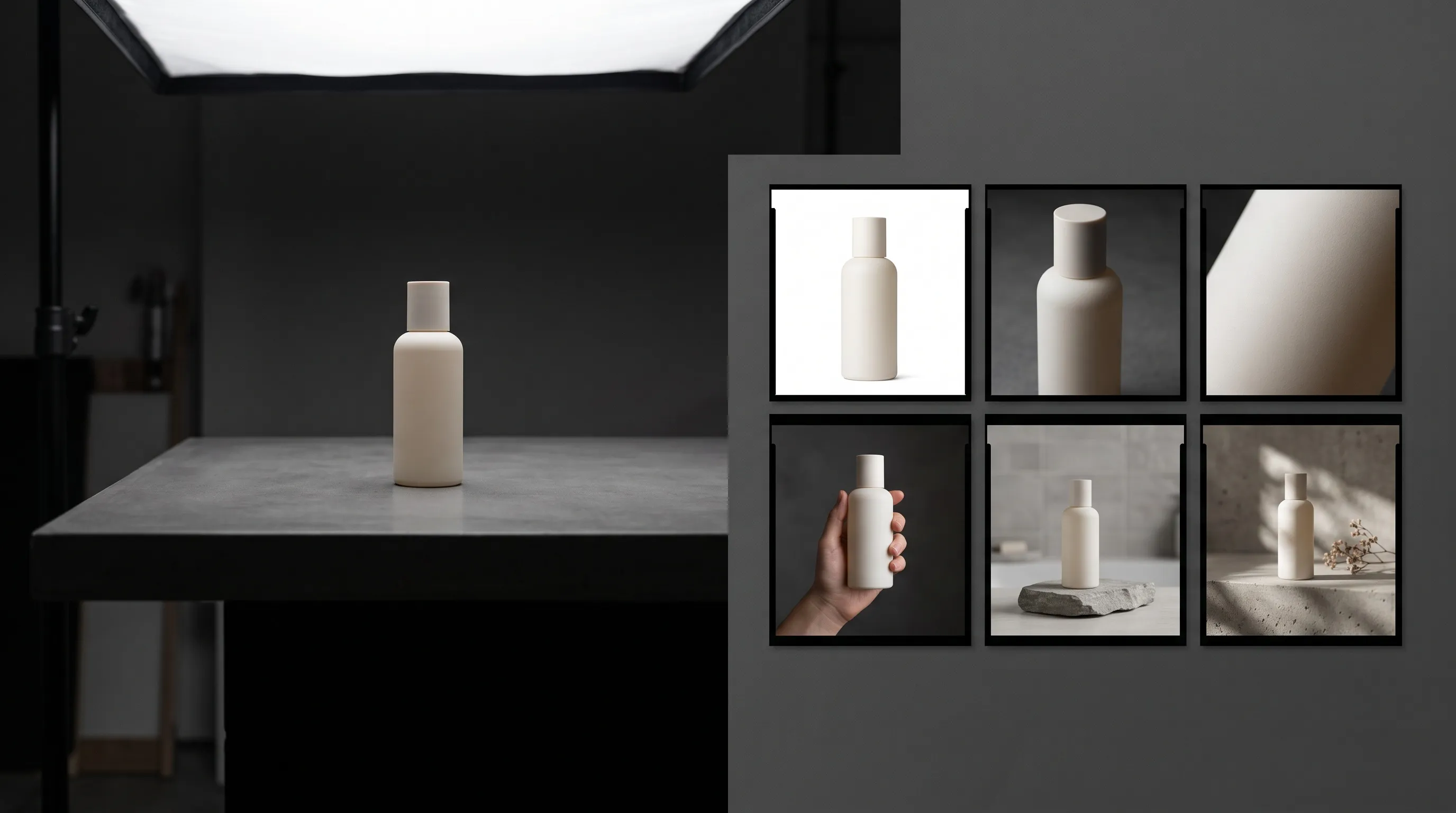
One strong product photo can start an ecommerce image set: a clear hero, useful gallery views, and a composition made for an ad or email placement. Plan those images around what shoppers need to learn, then choose the production method for each job.
Choose Nightjar when you need a connected product gallery plus precise control over the hero and campaign images. Its Photoshoot creates four varied images from one shared photographic direction, while separate Single shots let you choose framing and output settings for specific placements. Save the direction in Recipes to reuse the selected style, background, and settings on the next product. This gives you a way to build a cohesive set now and continue its visual language later without rebuilding the brief.
Start with the sharpest original photo of the correct variant, factual product notes, and the intended destinations. One view cannot verify an unseen surface: if a required image exposes an important back panel, label, or mechanism, add a real reference or use a real photograph for that slot.
| Output job | Shopper or channel question | Suggested production method |
|---|---|---|
| Recognition | Is this the product I intend to buy? | Controlled hero Single or approved original |
| Shape | What form and depth does it have? | Connected gallery image or verified alternate view |
| Detail | What are the material, finish, and construction like? | Crop from visible evidence or referenced detail photo |
| Scale or use | How large is it, and how is it used? | Connected in-scale or in-use gallery image |
| Context | How does it look in a believable setting? | Connected lifestyle gallery image |
| Campaign attention | Will the composition work in this placement? | Ratio-specific Single |
This is a compact working set, not a quota for every product or channel. Baymard found that 56% of test participants began a new product-page visit by exploring the images, so each slot should add useful evidence rather than another decorative variation. Use the per-SKU product-image planning guide when you need a channel-by-channel count.
Step 1: How do you know whether one product photo is good enough for an AI product photoshoot?
A usable source photo must show the exact product variant clearly enough to verify its defining silhouette, color, materials, edges, and visible artwork. Resolution cannot recover evidence the camera never recorded.
Qualify the source before generating anything. Start with the original file, not a marketplace thumbnail, screenshot, or compressed download. Prefer sharp focus, even light, neutral color, little obstruction, visible edges, and a product large enough in the frame to inspect.
An AI product photoshoot uses the source as product evidence. A distracting background can be replaced, but a blurred closure, clipped edge, hidden back panel, or unreadable label leaves the system to infer what is there.
Inspect the photo at full size and mark each criterion as pass or fail.
| Source check | Pass when | Fail when |
|---|---|---|
| Correct variant | The pictured colorway, finish, packaging, and included parts match the listing | The photo belongs to another variant or bundle |
| Silhouette and edges | The full visible outline is sharp and unobstructed | The product is clipped, covered, or motion-blurred |
| Color and material | White balance and light reveal the real finish | A cast, glare, or heavy filter disguises the surface |
| Artwork and text | Important visible marks can be inspected | Required copy is too small or soft to verify |
| Hidden information | Important unseen surfaces are identified for an extra reference | You are assuming the photo proves the back, underside, depth, or contents |
Nightjar gives this evidence a reusable home called a Product: one item in the team's shared collection of product context and imagery, which Nightjar calls the Library. A Product groups the images and facts defining one visually distinct sellable item. Set the strongest source as its Main photo, then add a factual description and physical dimensions when they help establish material, scale, or proportion. An image used to define that Product is a Product Photo. The hero, gallery, and campaign image can then use the same saved product context instead of requiring a fresh upload and explanation each time.
What should you do if the only source product photo is small, soft, or poorly isolated?
A weak source should be replaced or recaptured when important edges, text, material, or color cannot be inspected. Nightjar's resolution workflow, called Upscale, can bring an existing image to a 2K or 4K long-edge target, but it cannot prove missing product facts.
Use this rescue order: retrieve the original file, crop only if enough product detail remains, correct basic exposure or color cast, then recapture on a simple clean setup if defining information is still unclear. The source-resolution guide explains what input detail the system can use. If you need to recapture, follow the green-screen versus white-background source guidance.
Step 2: What images should a complete ecommerce product gallery include?
A complete ecommerce image set covers recognition, shape, detail, scale or use, context, and placement needs. It is not simply a batch of attractive alternatives.
Give each proposed image one information job. A useful compact plan is a clean hero or packshot, a three-quarter or approved alternate view, a detail or material close-up, an in-use or in-scale image, a lifestyle scene, and a channel-specific campaign composition.
Shoppers use images as a substitute for handling the product. Amazon's official photography guide describes individual, group, lifestyle, scale, detailed, packaging, and 360-degree shot types and advises sellers to capture multiple angles. That is a menu of possible information jobs, not a rule that each product needs every type. Amazon's product-photography guide supports choosing the set around the product.
Write one shopper question beside each planned image. Remove duplicate concepts, then change the set for the product's actual risks: furniture needs credible scale, packaging may need exact label evidence, and an asymmetric device may need real photographs of controls hidden from the source.
| Image job | What the shopper learns | Safe source requirement | Typical destination |
|---|---|---|---|
| Clean hero | Product identity and visible condition | Approved visible product view | PDP lead image or listing main image |
| Shape view | Form, depth, and construction | Real view when hidden geometry matters | PDP gallery |
| Detail | Texture, finish, fastening, or label | Detail must be visible or separately photographed | PDP gallery and zoom |
| Scale or use | Size relative to a person, room, or familiar object | Dimensions plus credible reference context | PDP gallery |
| Lifestyle | Setting, use, and brand context | Clear product reference and plausible scene | PDP secondary image, email, or social |
| Campaign composition | Product plus placement-specific layout | Clear product reference and known safe area | Ad, email, or social placement |
How should you choose between white-background, detail, lifestyle, and in-scale product images?
Choose each product-image type for the information it contributes: a clean hero establishes recognition, detail supports inspection, scale reduces size ambiguity, and lifestyle shows use and context.
Baymard found that 42% of users tried to judge product size from images. Its benchmark also found that 28% of 60 major ecommerce sites lacked an in-scale image even for best-selling products. Add a scale image when dimensions are hard to picture, but do not force one into a small, familiar object where it adds no new information.
The order also matters. Listing proof should establish what the buyer receives before campaign imagery builds atmosphere around it. The lifestyle versus white-background product-photo guide covers that choice in depth, while the per-SKU image-count guide handles larger channel plans.
Step 3: Can AI safely create new product-photo angles from one source image?
AI can create a plausible new camera angle from one product photo, but it cannot verify newly revealed geometry, labels, ports, seams, closures, or depth that the source did not show.
Rate a requested transformation by how much new product information it claims. A dramatic new background can still preserve the visible product view; a quiet rotation may expose a completely unknown back panel.
Use the risk ladder below. If a newly visible fact could change what a buyer believes they will receive, add a complementary real Product Photo, keep the approved source angle, use a real image for that slot, or make a manual composite.
| Risk | Transformation | What the source proves | Safe action |
|---|---|---|---|
| Lower | Replace or remove the background while preserving the visible view | Visible silhouette, surface, artwork, and angle | Generate, then compare the visible product closely |
| Medium | Relight, reframe, place in use, or create a tighter view from visible evidence | Original visible facts, but not regenerated material response, contact, or scale | Inspect texture, edges, shadows, contact, scale, and any rebuilt detail |
| Highest | Reveal an unseen side, back, top, underside, mechanism, or included part | Nothing about the newly visible surface | Add a real reference or keep that claim out of the generated image |
Use the AI camera-angle control guide for the full method and the camera-angle help article for a shorter operating checklist.
Müller and co-authors explain in their CVPR 2024 MultiDiff paper that a single reference leaves several plausible explanations for unobserved areas. For a product listing, that means a convincing back panel still needs a real reference before it can serve as evidence of the item being sold.
Step 4: How do you create a controlled ecommerce hero image from one product photo?
Use a controlled Single when the hero needs a new presentation. Nightjar lets you set its background, framing, shadow, aspect ratio, resolution, and format independently of the varied gallery. That keeps the listing’s lead image on a narrow brief while the Photoshoot explores supporting views.
Nightjar's image-creation path for product-only and on-model shots is the Product Photography Workflow. Select the Product, choose a flat background, and set the product-only camera angle, staging, and crop through Framing. Set Shadow separately for the contact shadow beneath a listing-intent product shot. Then choose the required aspect ratio, resolution, and JPEG, PNG, or WebP output. When a person appears, the body arrangement uses a reusable Pose and the crop uses Camera Distance instead of product-only Framing.
| Hero setup field | Decision to record |
|---|---|
| Subject evidence | Approved source view and any supporting Product Photos |
| Background | Destination-approved flat color or other permitted setting |
| Framing | Camera angle, staging, and crop for this product-only shot |
| Shadow | None, soft, hard, long, or reflection, subject to destination rules |
| Ratio | Required output shape |
| Resolution | Required delivery target |
| Format | JPEG, PNG, or WebP as accepted by the destination |
| Approval owner | Named person responsible for product and policy review |
Exact label artwork, legal copy, and regulated packaging should remain on real approved pixels or be restored through a manual composite when generated text cannot be trusted.
When should you keep the original product photograph instead of generating a new hero?
Keep the original photograph for the hero when a marketplace requires an actual-product photo or when exact packaging, text, color, included parts, or safety-critical detail must remain documentary evidence.
Use Nightjar for the supporting context and campaign views while the real source remains the authoritative lead image.
Step 5: How do you generate a cohesive product gallery without making four unrelated images?
A cohesive AI product gallery should vary camera angle, crop, pose, expression, or detail while keeping the same product evidence, setting, photographic language, and creative direction connected.
Use a Photoshoot to explore connected gallery views, then select the images that answer your planned shopper questions. In Nightjar, Photoshoot is a four-image output choice inside the Product Photography Workflow; it can start from a selected Product or a loose source image.
Four separate requests can drift in lighting, setting, crop, person, and mood. Photoshoot varies camera decisions across its outputs while keeping the subjects, background choice, photographic look, and choice of a reusable AI person, called a Fashion Model, connected. In Nightjar, that photographic look is a reusable Photography Style, which controls lighting, camera feel, color, texture, mood, and atmosphere. Written exceptions are added as Custom Directions on top of the structured controls.
Choose the Product or source image, select the background and Photography Style, add a Fashion Model only when the product needs one, and write any product-specific Custom Directions. Select Photoshoot, then choose one aspect ratio, JPEG, PNG, or WebP output, and 1K or 2K resolution. Review the resulting four images by job and reject redundant frames.
Photoshoot plans four varied frames around the product and creative direction; it does not assign fixed shape, detail, scale, and context slots. Compare the results with your shot list. Keep the useful views, remove duplicates, and fill a missing job with a controlled Single, an evidence-backed crop, or a real photograph. Four attractive outputs are only a complete gallery when they cover the information this product needs.
For example, an illustrative ceramic-mug set might keep the original hero, use Photoshoot for related tabletop and in-use views, and crop the source for a visible glaze detail. If no frame shows the handle clearly, create that view separately from a reference that does. A banner can use the same Photography Style and Background with a wider composition. The set stays connected while each image earns its place.
For a recurring lifestyle scene, use an image-backed Background: a Backdrop specifies the exact surface, while a Location supplies a reference environment. The lifestyle-background guide explains the source-to-scene workflow.
A crop-based detail is safer when the original already contains the detail. A synthetic macro can invent texture, text, or construction, so use the AI product close-up guide before creating a view that claims more than the source proves.
What is the difference between within-set cohesion and catalog-wide consistency?
Photoshoot connects the images inside one set, while reusable Product context and production controls help later Products continue the same visual direction.
In Nightjar, save a Recipe for each repeatable setup, such as the clean hero or the campaign composition. A Recipe stores the selected ingredients, framing or pose controls, Custom Directions, and output settings while leaving the Product and Additional Photos out. Applying it to another Product brings back the production decisions, so you can continue the same lighting language and setting with new subject evidence. Products remember what you are photographing; Recipes remember how you photograph it.
Step 6: When should you generate a separate image for an ecommerce channel or ad placement?
Generate a separate ratio-specific Single when cropping the gallery image would remove product information, weaken the composition, or leave no usable space for the intended placement.
Choose the destination before creating the campaign image, then compose for its shape and safe area. The job might call for a square, portrait, vertical, or wide file.
A PDP image centered for square display may lose the product, its use context, or necessary copy space when forced into a vertical story or wide banner. Stretching changes the product's proportions and is never an acceptable adaptation.
Test the existing image against one decision: can it be cropped without losing product information or layout intent?
| Decision | Next action |
|---|---|
| Yes | Crop it, inspect the product again, and approve the actual export |
| No | Generate a separately composed Single for that placement |
Nightjar exposes aspect ratio, resolution, and output format as Generation settings, so the destination can be specified before the image is made. Use the DTC product-photo format guide for the full placement matrix and the ecommerce output-settings guide for color profile, compression, and delivery choices.
Step 7: How do you review AI-generated product images for accuracy before publishing?
Every AI-generated product image needs human comparison with the real product before publication, especially where the output shows text, brand marks, fine construction, scale, included parts, or a surface absent from the source.
Review the final candidate at normal display size and at zoom. A persuasive thumbnail can hide a wrong seam, soft label, altered finish, or missing component.
Higher resolution makes an image easier to inspect; it does not make its product facts true. Baymard found that 25% of benchmarked ecommerce sites lacked sufficiently high-resolution product images or adequate zoom for some popular products. Resolution and fidelity therefore need separate checks.
Complete the checklist below for every output and record the evidence used. Do not approve a failed field because the overall image looks good.
| Fidelity check | Pass or fail | Source evidence used |
|---|---|---|
| Silhouette and proportions match | ||
| Dimensions and scale cues are credible | ||
| Color and material response match | ||
| Texture, edges, and reflections match | ||
| Readable text and brand marks match | ||
| Included parts are present and correct | ||
| Shadows and physical contact are credible | ||
| Every newly visible surface is verified | ||
| Final display size and zoom are acceptable | ||
| Approval owner and date |
Nightjar's Product can carry several Product Photos, a factual description, and physical dimensions, which gives the Generation more product evidence than one loose image. Its built-in visual review can catch and retry obvious eligible substitution, omission, broken readable product text or brand marks, and catastrophic failures at no extra Credit cost, so an eligible retry gives the output another chance to pass before it reaches your checklist. Review the returned result against the product, including the finer details that automated review may leave unchanged.
If shape is drifting, follow the product-shape preservation guide. If text or a logo changes, use the product-text and logo guide. The broader causes and remedies are covered in why AI product photos do not match the real product.
What should happen when an AI product image fails the fidelity checklist?
A failed product image should be corrected by improving the evidence or narrowing the transformation, not approved because it looks plausible.
Add the missing real view first. Then correct the Product's factual description or dimensions, reduce the angle or scene change, retain the approved source image, or use a manual composite or conventional capture. Retrying can correct a visible generation failure; it cannot recover a fact the source never supplied.
Step 8: How do you prepare the set for Shopify or Amazon?
Export for the destination, then inspect the actual files in their intended placement. In Nightjar, select aspect ratio, resolution, and JPEG, PNG, or WebP output before generating. Photoshoot supports 1K or 2K; Singles also support 4K. Use a separate composition when the required crop would cut off the product or its useful context.
Shopify allows product and collection images up to 5000 by 5000 pixels or 25 megapixels and under 20 MB. It says 2048 by 2048 usually displays best for square images and recommends consistent aspect ratios for images displayed side by side. Check the final gallery in your theme, including its crop and zoom behavior.
For Amazon, check both technical requirements and what the image is allowed to depict. Amazon's staff checklist calls for an actual-product photograph for the MAIN image, a pure white background, at least 85% frame fill, and no added overlays. Preserve an approved real hero where that rule applies; evaluate generated secondary images against the current category requirements before upload.
Amazon's public summaries differ on the minimum long-edge resolution: its Product Image Requirements summary lists 500 pixels, while the staff checklist lists 1,000. Verify the authenticated requirements and category guide at upload. The Amazon AI-generated product-image policy guide covers the distinction between preparing a file and meeting image-content rules.
What does a practical six-output Nightjar image set use?
An illustrative first pass in Nightjar uses one hero Single, one four-image Photoshoot, and one placement-specific Single: six generated candidates for four Credits. Select the final set by coverage and accuracy; missing views or rejected candidates may require additional work.
| Production job | Output | Current usage |
|---|---|---|
| Controlled hero Single at 1K or 2K | 1 image | 1 Credit |
| Cohesive Photoshoot at 1K or 2K | 4 images | 2 Credits total |
| Placement-specific Single at 1K or 2K | 1 image | 1 Credit |
| Total | 6 images | 4 Credits |
The arithmetic is 1 + 2 + 1 = 4 Credits, based on Nightjar's Generation usage. This is generation usage for the example, not a fixed price for six approved deliverables. If the original photograph already works as the hero, keep it and skip that Single.
What's next after the first ecommerce image set is approved?
Once the first Product's set is approved, the next step is to preserve its production direction for later Products rather than rebuilding the brief from scratch.
Save the approved photographic language as a Photography Style, recurring Backdrops or Locations as Backgrounds, body arrangements as Poses, recurring people as Fashion Models, and the reusable Create-form setup as a Recipe when those choices genuinely belong to the brand direction. Photoshoot creates cohesion inside one set; reusable Product context and production controls help later Products continue the same direction.
Continue with the full AI product-photography workflow from one shot to a catalog when you are ready to move beyond one item. Start with one product photo.
References
- Nightjar - AI product photography system used for the worked workflow
- Amazon product-photography guide - Product-image types and multi-angle guidance
- Amazon Seller Central product-image requirements summary - Gallery count, pixel range, and zoom guidance
- Amazon image-rejection checklist - MAIN-image and pixel guidance
- Shopify product-media requirements - File limits, square-image guidance, and aspect-ratio guidance
- Baymard research on in-scale product images - Image-first browsing and scale findings
- Baymard research on image resolution and zoom - Resolution and zoom benchmark
- Müller et al., MultiDiff, CVPR 2024 - Technical limit of single-image novel-view synthesis