
Quick Answer
AI camera angle control can create plausible front, three-quarter, side, overhead, and detail views from one product photo, but it cannot recover surfaces the camera never captured. Use extra source views for any side, label, port, seam, or mechanism that must be accurate, then compare every generated image with the physical product before publishing it.
Which camera angles belong in an ecommerce product gallery?
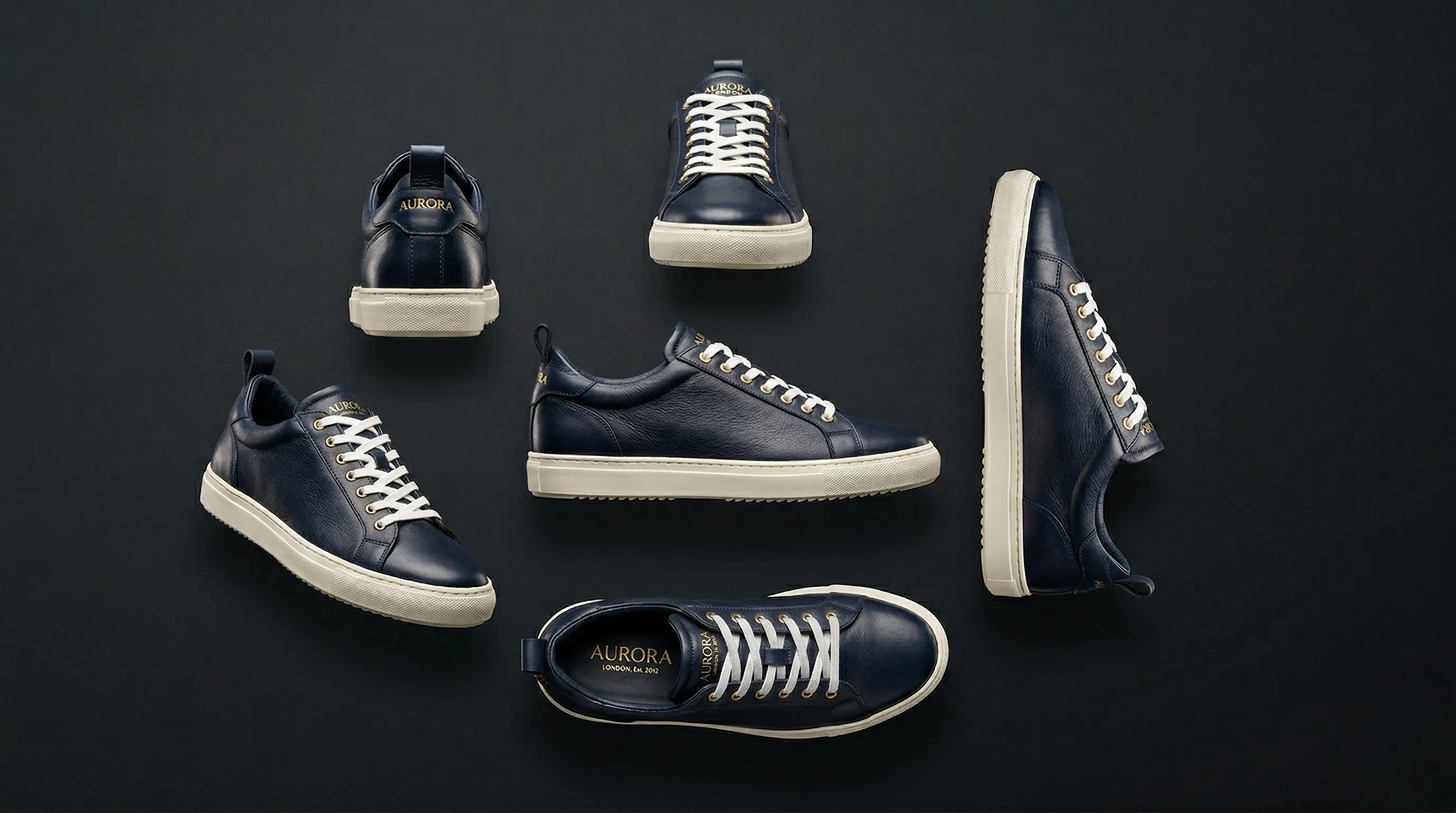
An ecommerce product gallery should use each camera angle to answer a buying question. A front view establishes identity, a three-quarter view explains volume, side and rear views reveal construction, and overhead or close-up views expose details that a main image cannot show.
| Product view | What it helps a shopper inspect | Good source evidence |
|---|---|---|
| Front or eye-level | Overall silhouette, main branding, and proportions | A straight, uncropped front photograph |
| Three-quarter | Depth, two adjacent faces, handles, and closures | Front and side views when side details matter |
| Side or profile | Thickness, ergonomics, ports, and sole or edge construction | A real photograph of that side |
| Rear | Labels, fasteners, care information, and back construction | A legible rear view rather than a prompt description |
| Overhead | Kits, flat lays, openings, and top surfaces | A top view for any detail hidden from the original angle |
| Close-up or macro | Texture, stitching, hardware, text, and small features | A sharp detail photo with enough real pixels |
The most useful set depends on the product. A bottle may need front, rear-label, cap, and texture views; a shoe may need side, three-quarter, heel, sole, and material details. The goal is not to fill a fixed number of slots. It is to remove the important visual unknowns before a shopper has to guess.
A generated camera move is a new photograph, not a rotation
AI camera angle control generates new pixels for a requested viewpoint; it does not rotate the pixels already present in the source. The model uses visible shape, shading, perspective, and learned object patterns to propose what another view could look like. Hidden geometry and artwork are inferred, so a convincing result is not proof that the unseen side is correct.
Research systems call this task novel-view synthesis. The SV3D research paper, for example, adapts a video diffusion model to generate multiple orbital views from one image. That research demonstrates the technical possibility, but a product-photo workflow has a stricter standard than a visual demo: a rear label, port layout, buckle, or seam must match the item a buyer will receive.
Perspective correction is a different operation. It can straighten or reshape surfaces already visible in a photograph, but it cannot reveal a hidden panel. Cropping and changing aspect ratio also leave the viewpoint unchanged. A generated camera move should therefore be treated as a new synthetic photograph, not a lossless transformation of the original.
Every unseen surface becomes an inference
AI-generated camera angles are more dependable when the source set already shows the surfaces and details that will appear in the output. One clean photograph can support modest changes around the same visible faces, while a large move from front to rear asks the system to invent much more.
Use this risk rule before generating:
| Requested camera change | Source set to provide | Risk to product fidelity |
|---|---|---|
| Slightly higher, lower, or off-center | One sharp view showing the same surfaces | Lower, but still review proportions and details |
| Front to three-quarter | Front plus the relevant side | Moderate if the side has unique construction |
| Front to full side or rear | Direct photographs of each new surface | High from one photo |
| Overhead or underside | A real top or bottom view | High when openings, labels, or components are hidden |
| Continuous 360-degree spin | Turntable capture or an approved 3D model | Unsuitable as an inferred one-photo sequence |
Start with a sharp, evenly lit image that shows the whole silhouette without heavy occlusion. Add direct views of readable text, logos, repeating patterns, joints, ports, closures, and transparent or reflective parts. Written dimensions can guide scale, but they cannot establish a feature that no photograph shows.
How do Framing, Pose, and Camera Distance control different kinds of product shots in Nightjar?
Nightjar separates camera control by subject: product-only shots use Framing, while shots with a Fashion Model use a reusable Pose plus Camera Distance. This split keeps the product's staging, the model's body arrangement, and the crop from being collapsed into one vague instruction.
| Shot type | Nightjar control | What it changes |
|---|---|---|
| Product only | Framing | Camera angle, staging, and crop through options such as Eye-level, Three-quarter, High angle, Low angle, Overhead, Floating, Pedestal, Propped, and Macro |
| Fashion Model included | Pose | The model's reusable body arrangement and orientation |
| Fashion Model included | Camera Distance | Close-up, medium, or full-body crop within the distances supported by the selected Pose |
A close Camera Distance is relative to where the product is worn. A ring close-up can frame the hand, while a shoe close-up can frame the feet and leave the Fashion Model's face outside the image. Framing does not apply when a Fashion Model appears.
Other controls solve different decisions. A Photography Style stores reusable direction for lighting, camera feel, mood, color, and texture. A Background supplies the scene as a Backdrop or Location. Neither replaces Framing, Pose, or Camera Distance.
How do you generate controlled product views in Nightjar?
Nightjar generates controlled product views by keeping product evidence separate from production direction. A Product stores the photos and factual details that define the item, while Framing or Pose plus Camera Distance sets the requested view in the Product Photography Workflow.
Choose Nightjar when you need a repeatable gallery of reviewed stills for several products. For example, a bag collection might need an Eye-level image for the front design, a Three-quarter image for depth, and a Macro image for hardware. Save a Recipe for each view with the same Photography Style, background, and delivery settings, then apply that set to the next Product. The view changes deliberately while the rest of the brief stays available, so a new bag does not require rebuilding three photographic setups. Real side and hardware photos supply the evidence for those views; the saved direction supplies their shared presentation.
- Build the Product from useful evidence. Add the clearest identity image as the Main photo, then add Product Photos showing any side or detail that may appear in the output. The web Create form fits selected references under a five-image cap, with Main photos first; explicitly select an important detail as an Additional Photo when it must take priority over the remaining Product Photos. A factual Product Description and physical dimensions supply context, while the photographs provide the visual evidence.
- Choose whether the shot includes a Fashion Model. For a product-only image, select the relevant Framing. For an on-model image, choose a Pose and one of its supported Camera Distances.
- Choose controlled repetition or connected variety. Use Single shots when a particular Framing, Pose, or Camera Distance must stay fixed. Choose Photoshoot when one Product needs four connected images that may vary angle, pose, crop, and detail emphasis. Photoshoot is an output choice inside Product Photography, not an exact rotation control.
- Keep the rest of the direction stable. Reuse the same Photography Style, Background, Fashion Model, output settings, and request-specific Custom Directions where appropriate. Nightjar can save those choices as a Recipe, a reusable Create-form setup that excludes the Product itself.
- Review against the real item. Inspect silhouette, proportions, color, materials, text, logos, patterns, seams, hardware, reflections, and every newly visible surface. Nightjar's built-in visual review can retry obvious failures at no extra Credit cost.
For a focused walkthrough, see how to change a product photo's camera angle with AI. The broader guide to consistent AI product photography explains how Products, reusable visual direction, and Recipes keep a catalog from drifting between shoots.
Use AI for plausible views; use capture or 3D for proof
Use AI for reviewed still images when a plausible new viewpoint is useful and the source material covers the details that matter. Use a reshoot or verified 3D model when geometry, labeling, fit, safety information, or frame-to-frame continuity must be exact.
| Requirement | Best starting point | Reason |
|---|---|---|
| Secondary gallery or campaign still | AI generation from several approved views | Fast iteration with human review |
| Small camera move around already visible surfaces | AI generation or a narrow generative edit | Less hidden geometry must be inferred |
| Exact rear panel, underside, port layout, or regulated label | Real photograph | The camera records the actual detail |
| Precise product pixels in a new setting | Manual cutout and compositing | Product geometry and artwork remain unchanged |
| Smooth interactive 360-degree spin | Turntable photography | Consecutive frames preserve real rotational continuity |
| Repeatable measured viewpoints or AR | Approved 3D or CGI asset | Camera position and geometry are controlled |
AI-generated stills should not be stitched into a supposedly exact spinner. The GS1 Product Image Specification defines 360-degree product imagery as a single-axis sequence captured at fixed intervals, with at least 24 images. A handful of inferred stills is a gallery, not that kind of product record.
How should alternate product views meet Amazon and Shopify image rules?
Alternate product views should be planned separately from each platform's main-image and file rules. A useful side or detail view can belong in a gallery without being suitable as the featured image, and platform requirements can differ by category, region, and theme.
Amazon's current product image requirements require the main image to accurately represent the product, use a pure white background, and show the entire item without added graphics; Amazon also applies category-specific rules. Its product-photography guidance recommends at least six images, which can include additional views and details. Check the relevant Seller Central category guidance before publishing.
Shopify does not prescribe one universal camera-angle set. Its product media guidance says square product images at 2048 by 2048 pixels usually display best and advises a consistent aspect ratio for images shown together. Shopify themes and product layouts vary, so review the gallery on desktop and mobile instead of assuming one crop works everywhere.
Frequently Asked Questions
Can AI change the camera angle of one product photo? Yes, but every newly visible surface is inferred. The camera-angle workflow guide explains which source views reduce that risk and when to reshoot.
Can AI turn an angled product photo into a flat lay? AI can generate a plausible overhead view, but hidden top surfaces and geometry may change. See when to generate, correct perspective, composite, or reshoot a flat lay.
Can AI create a true 360-degree product view from one photo? Not as a verified product spin. The AI product 360 guide explains the difference between inferred stills, turntable capture, and 3D models.
How can I change a Fashion Model's pose without changing the product? Use strong product references, a reusable Pose, an appropriate Camera Distance, and careful output review. The guide to changing a Fashion Model's pose covers the full process.
How can I stop AI from changing a product's shape? Several sharp source views and smaller viewpoint changes reduce shape drift. Follow the product-shape preservation checklist.
How can I generate a product close-up? Use Macro Framing for product-only images or a close Camera Distance with a Fashion Model, backed by a sharp detail source. The AI product close-up guide explains when to generate, crop, or Upscale.
References
- Nightjar - AI product photography with reusable product evidence and visual controls
- SV3D research paper - Primary research on single-image novel-view synthesis
- GS1 Product Image Specification - Primary standard for 360-degree product image sequences
- Amazon Seller Central product image requirements - Current marketplace image rules
- Shopify Help Center product media types - Current product-image size, format, and display guidance