
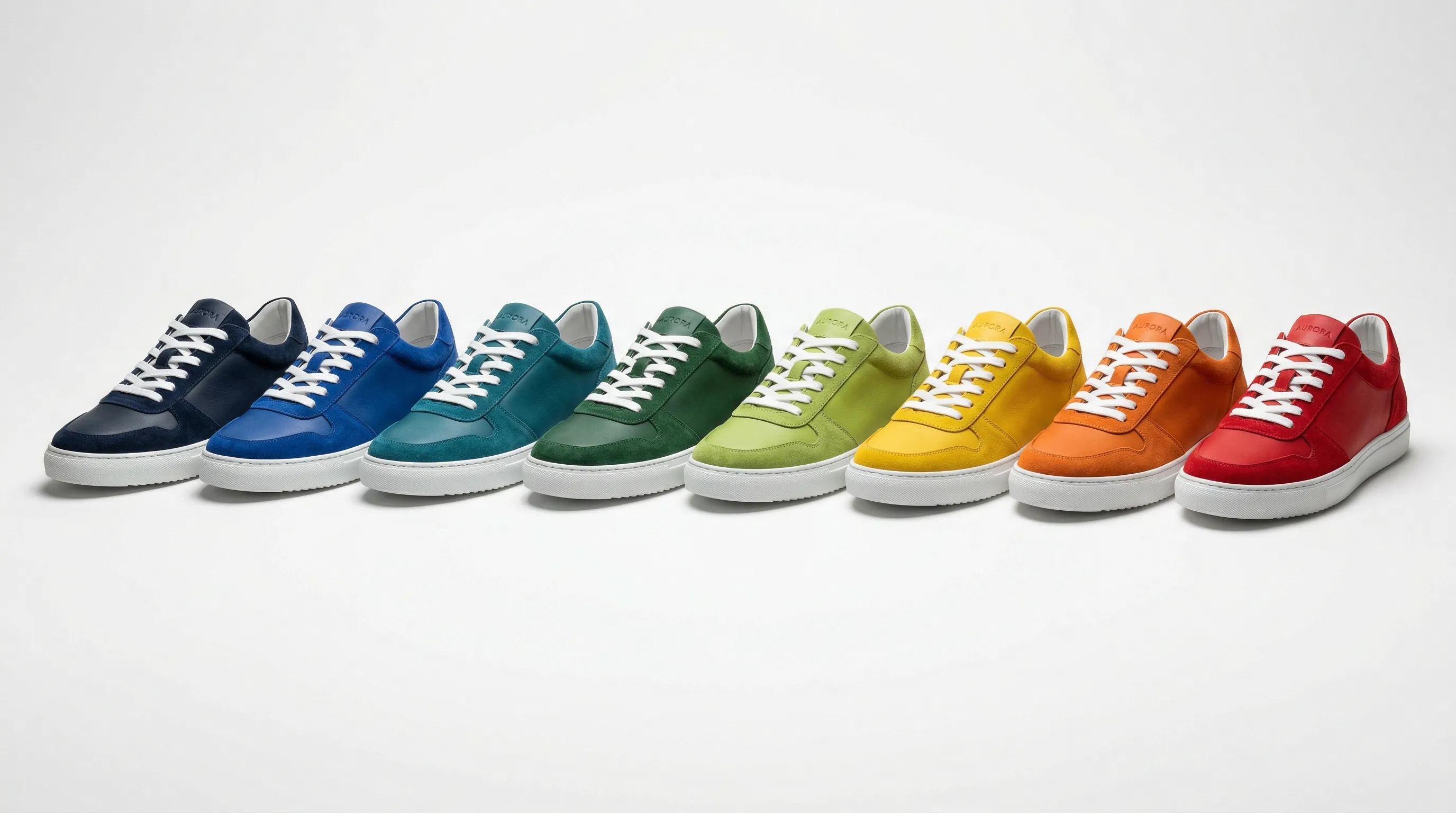
Quick answer: AI recoloring can avoid photographing every colorway when the product's shape and material are unchanged and you have an accurate source photo. In Nightjar, add the image to Edit, choose Recolor, specify a hex color and describe which surface should change. Review the result against the actual variant. Ordinary completed edits cost one Credit at 1K/2K or two at 4K.
The $7,800 Problem With Photographing Every Colorway
Picture this: you're launching a hoodie in 12 colors. Not unusual for an apparel brand. What follows is a cost chain that few people talk about honestly.
Separate sample costs from per-image costs before comparing methods. The following is an illustrative budget, not a market average: assume $150 to produce each color sample, $30 to ship each, $75 per photographed angle, $3 per image for retouching and $1.50 for color correction. Your supplier and photographer may quote differently or bundle some of those services.
For 12 colorways at six angles each, those assumptions produce:
- 12 samples produced: $1,800
- Shipping: $360
- 72 images photographed: $5,400
- Retouching: $216
- Color correction: $108
- Total: $7,884
And that's one product. Most catalogs have dozens.
In this example, photography is the largest expense; samples and shipping add another $2,160. Do not count sample production or shipping once per angle, and do not assume recoloring removes samples needed for product development or quality checks. The potential saving is the avoidable photography work. For the underlying capture process, see how to take professional product photos.
There's a second problem that's harder to quantify: visual inconsistency. Shooting the same hoodie in navy on Monday and in forest green on Thursday means different ambient light, maybe a different photographer, slightly shifted shadow angles. Customers comparing colors side-by-side on a listing page notice these differences, even if they can't articulate what feels off.
Plan around your supplier's and studio's actual dates. Recoloring can remove a new photography booking from an otherwise-ready color launch.
What an Additional Colorway Actually Costs
For one more colorway, compare the costs that change with that decision. The base photography is already paid for in an incremental comparison.
| Cost component | Count it by | Recoloring changes it when… |
|---|---|---|
| Sample production | Physical colorway | The sample was needed only for imagery, not product approval |
| Shipping | Shipment or sample, according to the quote | No new physical item needs to reach the photographer |
| Photography | Agreed session, product or final image | Adequate source views already exist |
| Retouching and color matching | Final images or labor | The generated output needs less work than the alternative |
| AI generation and review | Completed outputs, revisions and operator time | The source and color request produce acceptable variants |
For ten colorways at six angles, six base photographs leave 54 additional color-angle images to create. In Nightjar, 54 completed ordinary edits use 54 Credits at 1K/2K, or 108 at 4K. Compare the relevant plan cost with a quote for the same 54 deliverables.
Scaled: 50 Products, 8 Colors Each
At catalog scale the numbers become difficult to ignore.
- 50 products × seven additional colors × six angles = 2,100 additional images.
- One completed ordinary edit for each would use 2,100 Credits at 1K/2K, or 4,200 Credits at 4K.
- This is one catalog exercise, not an annual cost unless you repeat it annually.
For broader cost context, see our Amazon product photography cost breakdown. Nightjar's current plans determine the dollar cost of the Credits you need.
How AI Product Color Recoloring Actually Works
The important distinction is whether you are adjusting existing pixels or asking a model to generate an edited image.
Pixel-based color adjustment changes a selected area of the existing photograph. Photoshop's Hue/Saturation controls support adjustment layers, masks and targeted color ranges; they do not inherently flatten shadows or erase texture. This is useful when a retoucher needs direct control over the boundary and the original detail.
Generative editing uses your photo and an instruction to create a changed image. It can interpret requests such as "make the fabric navy but keep the zipper silver," without requiring you to build the mask manually.
Nightjar's Recolor is a generative Edit workflow. The source Asset guides the product, and the color pill makes the target explicit. It is designed to help preserve shadows, highlights, fabric weave and folds.
Choose Nightjar when you want to request the color and surface in plain language, review the result and keep working with the same source Assets in the Library.
From One Photo to Every Color: The Workflow
Nightjar handles recoloring through its Edit tab: add product images to a board and describe the change. The Recolor Edit Shortcut starts the request for you. Using Nightjar's recoloring workflow:
- Add an accurate product image to the Edit board.
- Choose the Recolor shortcut.
- Set the target hex code in the color pill; with several images, use an
@imagereference to identify the product. - Specify the surface and exclusions, such as "change only the fabric; keep the zipper silver and the logo white."
- Generate and compare the result with the source and a reliable reference for the real colorway.
- Return to the approved source for each new color.
You can supply flat lays, on-model or mannequin photographs.
For fashion-specific workflows, there's a dedicated guide for creating color variants on apparel.
A catalog of 100 products, eight colors and six angles requires 4,200 additional color-angle images after the base color. Break production into reviewable groups and track which source, color and angle each approved output represents.
Color Accuracy Is a Revenue Problem
Color accuracy in product photography is usually framed as a quality concern. It's a financial one.
Color errors create a simple expectation gap: the customer orders the navy shown on screen and receives a different-looking item. Pixelz's discussion of color matching describes why matching across angles matters. Its cited consumer-attitude percentages should not be multiplied by all US retail-return dollars to estimate losses from color errors; those are different populations and measures.
Track your own color-related return reasons and support complaints. That is more useful for choosing which colorways need new photography than treating every return as a photo problem.
A hex input such as #1B2A4A removes ambiguity from the request compared with "navy." Material, lighting, display settings and the physical dye or finish still affect the match.
Before listing a recolor, compare it with an approved physical sample or trustworthy color reference under appropriate lighting. A hex field is not an exemption from truthful advertising: pictures can communicate misleading claims too. See our misleading-content guide and catalog consistency guide.
AI Color Variants vs. Traditional Reshoots vs. Photoshop: A Direct Comparison
The methods solve different parts of the job.
| Factor | Nightjar Edit | Traditional reshoot | Photoshop color adjustment |
|---|---|---|---|
| Budget basis | Credits per completed edit | Supplier/studio quote and logistics | Software and retouching labor |
| Color input | Explicit hex request plus surface instruction | Actual physical colorway | Picker, targeted adjustment and mask |
| Existing detail | Source-guided; designed to help preserve shadows, highlights, weave and folds | Photographs the physical product | Existing pixels can be retained outside the adjustment |
| Lighting across variants | Guided by the same source | Requires repeatable setup | Can retain the same base photograph |
| Physical sample | Needed to establish or verify the real color, not necessarily for every new shoot | Needed for capture | Needed reference still matters |
| Repeated work | Reuse the source Asset and edit instructions | Repeat the agreed shot list | Reuse masks/settings where appropriate |
| Final approval | Check color, structure and export | Check capture, retouching and export | Check mask edges, color and export |
Each method has its place. Nightjar makes the most sense when adequate source views already exist and requesting a change is less work than arranging another shoot or building each selection by hand.
Which Products Recolor Best
Good candidates: Solid-color apparel, accessories, phone cases, drinkware and packaging with clearly defined surface boundaries. Check whether the requested color change also changes how the material should reflect light.
Works with some care: Gradient materials like ombre fabrics or sunset-toned products. Multi-material products where only one material changes color (the fabric changes but the zipper stays silver). Patterned fabrics where the base color needs to shift but the pattern itself should remain intact.
Needs the most direction: Highly complex all-over prints where the color is inseparable from the pattern. Metallic or iridescent finishes where color and reflectance properties are intertwined. Products where the color change could reach branding elements.
For these, Nightjar's Edit tab lets you refine in plain English after the initial recolor: "make the logo white again," "keep the zipper silver," "restore the metallic finish on the buckle."
Pre-production concepts are a separate use case. You can visualize and pitch potential colors before making every sample, then manufacture the promising candidates. Label concepts clearly; do not present a generated color as a verified finished product. Taking pre-orders also requires accurate information about what will be supplied.
Combining colors with multiple camera angles expands the workload quickly: eight colors × six angles is 48 images. Each angle still needs product evidence.
Meeting Amazon and Shopify Image Requirements With AI-Generated Color Variants
A practical concern when switching to AI-generated color variants: will they actually pass marketplace image requirements?
Amazon: check current main-image rules, including a pure white background, the entire product and appropriate frame fill, plus accurate representation. Its seller guidance gives 1,000 pixels on the long edge for zoom and 1,600+ as optimal. Check the category and variation requirements before assigning the correct image to each color. See our Amazon guide.
Shopify: 2,048 × 2,048 is recommended for square product images, with files smaller than 20 MB. Inspect the exported file and crop or resize as needed. See our Shopify guide.
Each completed edit is an Asset you can review and download. Name it clearly, check the final format and dimensions, and assign it to the correct product variant.
AI Product Color Changers Compared: Nightjar, Photoroom, SellerPic, Pixelcut
Several tools now offer AI color recoloring for product images. They differ in meaningful ways.
| Tool | Documented color workflow | Useful distinction to evaluate |
|---|---|---|
| Nightjar | Recolor shortcut, hex color pill, explicit image references and plain-language surface instructions | Fits a source-to-edit-to-Library workflow |
| Photoroom | Conversational recolor within a broader photo-editing suite | Convenient if you already use its background, brand and editing tools |
| SellerPic | Brush-based multi-area selection and text or hex input | Direct region selection; check the input restrictions for the particular tool |
| Pixelcut | Automatic object masks with hue, saturation and brightness adjustments | Object-based color editing rather than a text-only interface |
Photoroom describes a conversational recolor workflow and aims to retain texture and shadows. Its page does not establish that hex input or manual targeting is impossible across its product, so those are not reasons to dismiss it.
SellerPic documents hex input and multiple brush-selected regions. Its upload guidance excludes model/mannequin and side/back images, while other copy on the page mentions fashion models. Confirm the exact workflow's restrictions for your source type instead of treating that inconsistency as a platform-wide prohibition.
Pixelcut's current recolor page describes selecting detected objects and adjusting their colors. It is not text-only. The page offers a free online workflow, but does not establish comparative accuracy or degradation rates after sequential edits.
Nightjar earns consideration when the source image is already in your Library and the next task needs both a specific color request and contextual instructions: recolor the bag body, leave the metal clasp alone, then retain the reviewed output for later use. The deciding convenience is the integrated Asset-and-Edit handoff. For the separate Product Photography workflow, see consistent AI product photos.
For a broader comparison across all AI product photography tools, see our full roundup of the 10 best tools for 2026.
Frequently Asked Questions
Can AI change the color of a product photo realistically?
Yes, when the source is clear and the surface is well defined. Generative editing can retain convincing texture and lighting while changing color. Compare the result with the real colorway before listing it.
How much does it cost to reshoot product photos in different colors?
Get a quote for the additional colorways and views, separating sample/shipping costs from per-image work. The article's 12-color, six-angle example totals $7,884 under stated assumptions. In Nightjar, ordinary completed edits use one Credit at 1K/2K or two at 4K, plus any further completed revisions.
Do AI color variants look realistic enough for Amazon listings?
Yes, when they accurately show the real variant and meet the finished-file and main-image rules. Check color, product detail, background, frame fill and dimensions.
How do you maintain texture and shadows when recoloring product images?
Start from a clear source and specify the surface plus details to leave unchanged. Compare shadows, texture and hardware afterward.
What is the best AI tool for creating product color variations?
Choose Nightjar for explicit color and image references within its existing Library/Edit workflow; SellerPic for its documented brush-selected regions and hex input; Photoroom if its broader photo-editing workflow suits you; or Pixelcut for object-mask color adjustments.
Can I create product color variants before manufacturing samples?
Yes, for clearly identified concepts and buyer discussions. A concept is not evidence that the factory can reproduce that exact color and finish. Verify production samples before presenting the image as the actual colorway.
How long does it take to generate AI color variants?
Generation avoids a new capture session when the source is adequate, but total time includes source preparation, revisions and review.
References
- Adobe: Hue/Saturation adjustment: Adjustment layers, masks and targeted colors.
- Pixelz: Color matching and returns: Color consistency context, not a US returns-dollar estimate.
- FTC: Advertising FAQs: Truthfulness applies to pictures and implied claims.
- Shopify: Product media types: Image specifications.
- Amazon: Photography standards: Seller guidance.
- Nightjar: Recolor in Edit.
- Photoroom: Conversational recolor.
- SellerPic: Region selection and hex input.
- Pixelcut: Object-mask color adjustments.