
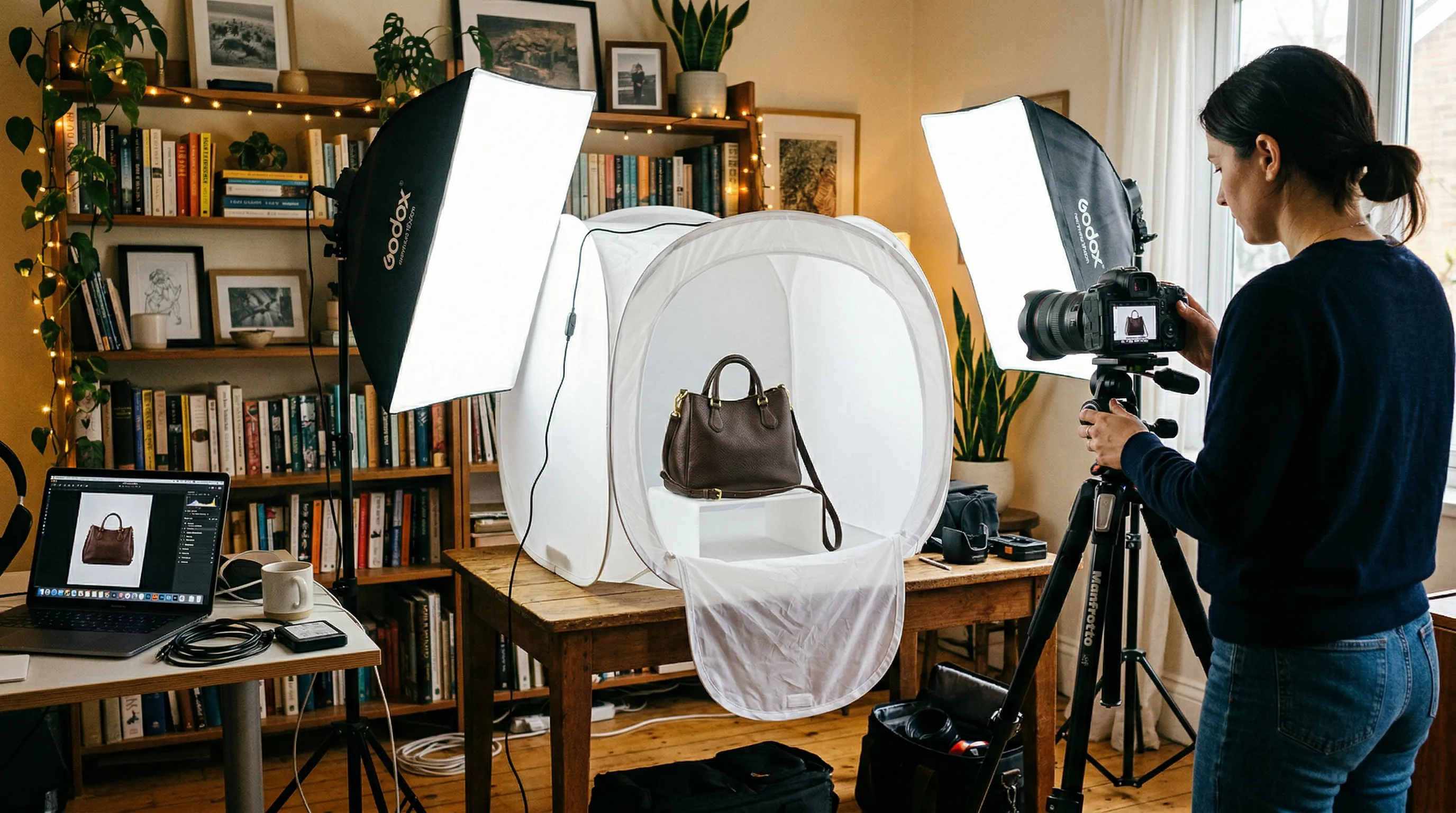
Why Product Photos Make or Break E-commerce Sales
Professional product photos require consistent lighting, a suitable background, and careful focus and exposure. You can start with a smartphone, diffused window light or an affordable lighting kit, and white card. For a small catalog, this DIY approach can work well. But as inventory grows, consistency becomes harder. Your Monday shots may look different from your Thursday shots. Natural light shifts. Equipment gets bumped. Suddenly your catalog looks like a patchwork of different photoshoots.
This is where the three paths diverge: DIY for small sellers learning the craft, professional studios for premium brands with budget to match, and AI tools like Nightjar for scaling brands that need volume without sacrificing consistency.
The stakes are real, but no universal conversion percentage can tell you what better photos will do for your store. In Baymard's usability testing, 56% of users' first actions on a product page were to explore its images. Low resolution and inadequate zoom prevented shoppers from checking details. That gives you a concrete standard: show the actual item clearly enough for someone to inspect it.
Essential Equipment for Product Photography
Camera and Phone Options
Start with the camera you own. A modern smartphone can produce useful product photographs when the lighting, focus, and framing are controlled. There is no single color-accuracy score that establishes a phone's suitability for every product.
What matters more than the camera body is everything around it. A $1,200 phone with poor lighting produces worse results than a $300 phone with proper diffused illumination. The phone versus DSLR question becomes relevant only after you have controlled everything else.
That said, mirrorless cameras and DSLRs still offer advantages: RAW file capture, manual control over every setting, and better performance in tricky lighting. If you already own one, use it. If you are buying new, consider whether that money goes further toward lighting and backgrounds instead.
Lighting Setup
Lighting is one of the biggest variables you can control. Two diffused lights positioned around 45 degrees from your product are a useful starting point for even illumination, not a rule for every material. Softboxes or diffused LED panels spread the light and reduce hotspots.
Natural light costs nothing. Photographers romanticize window light for good reason: it can look beautiful. But it changes during a session. The sun moves. Clouds pass. By afternoon, the light's direction and color may have shifted.
For repeat sessions, controlled artificial lighting makes the setup easier to reproduce. Window light can still work: record the time, camera position, diffuser, and white balance, and expect to adjust when conditions change.
Background and Surface
Amazon generally requires pure white backgrounds (RGB 255, 255, 255) for main product images; check your category's rules. Elsewhere, white is a useful clean-catalog starting point, though pale or transparent products may need more contrast.
Create a seamless infinity curve using a white foam board or paper roll. The curve hides the horizon line where the surface meets the backdrop. Without it, you get a visible crease that screams amateur.
For lifestyle and contextual shots, textured surfaces add interest. Marble for cosmetics and jewelry. Warm wood for artisanal goods. Linen fabric for soft goods. Match the surface to your brand aesthetic, then stick with it across your catalog.
Support Equipment
A tripod is non-negotiable. Handheld shots introduce micro-variations in framing that become obvious when customers compare products on your site. Lock the camera position and leave it there.
Use a remote shutter or your camera's timer to prevent shake when pressing the button. A reflector (even a piece of white cardboard) bounces fill light into shadows. And keep clamps, tape, and small risers on hand for positioning products that refuse to stand on their own.
| Equipment | Budget Option | Professional Option |
|---|---|---|
| Camera | Existing smartphone | Existing camera or a separately quoted purchase |
| Lighting | Window plus diffuser, or budget LED kit | Adjustable lights and softboxes |
| Background | White card or paper sweep | Support stand and replaceable seamless roll |
| Tripod | Stable phone mount | Tripod suited to the camera and overhead load |
| Budgeting | List the accessories you actually need; exclude equipment already owned | Get current quotes, including stands, mounts, and storage |
Camera Settings for Sharp, Professional Results
Automatic settings exist because camera manufacturers know most users never touch manual mode. For product photography, you need to take control.
For a camera with adjustable aperture, f/8 to f/11 is a useful starting range. Depth of field also depends on the lens, distance, and product depth; inspect the nearest and farthest details rather than assuming one setting keeps everything sharp. Wider apertures like f/2.8 blur the background beautifully for portraits, but product photography demands clarity across the frame. Save the shallow depth of field for detail shots where you want to isolate a texture or feature.
Start near the camera's base ISO, often 100 or 200, to minimize avoidable noise. Raise it if the exposure or required shutter speed demands it; a sharp, slightly noisy image is more useful than a blurred one.
White balance causes more problems than photographers realize. Auto white balance adjusts constantly, making your product appear slightly different in each frame. Set a custom white balance using a gray card, or choose a preset that matches your lighting. Then leave it alone for the entire session.
Shoot in RAW format if your camera supports it. RAW files contain more data than JPEGs, giving you flexibility in post-processing. You have more latitude to adjust shadows, exposure, and white balance than with a heavily processed JPEG, although clipped highlights and missed focus cannot simply be recovered. Smartphones now offer RAW capture in their pro modes.
| Setting | Recommendation | Why |
|---|---|---|
| Aperture | Start at f/8-f/11 on an adjustable-aperture camera | Check depth of field; most phone apertures are fixed |
| ISO | Start at base ISO, often 100-200 | Minimize avoidable noise |
| White Balance | Custom/Preset | Color consistency |
| Format | RAW | Editing flexibility |
Step-by-Step Product Photography Process
1. Prepare Your Product
Products straight from inventory carry fingerprints, dust, and sometimes scratches you did not notice on the shelf. Clean everything. Microfiber cloths for glass and plastic. Compressed air for crevices. Steam or iron fabrics until they look fresh. Polish reflective surfaces knowing that you will still spend time removing smudges in post.
Have backup units ready. Discovering a flaw after an hour of shooting costs more time than swapping products.
2. Set Up Your Shooting Area
Position your background with the sweep curve facing your camera. Place your two lights at roughly 45-degree angles, both at the same height and distance from the product. Symmetry produces even illumination.
Mount your camera on the tripod at product height, not looking down unless you specifically want that perspective. Mark tape on the floor for light stands and tripod legs. When you return tomorrow to shoot more products, you want to recreate this setup as closely as possible.
3. Dial In Your Settings
Set white balance first using a gray card or your lighting preset. On an adjustable-aperture camera, start at f/8 and base ISO, then adjust shutter speed. On a phone, lock focus and exposure where supported and use the main camera without digital zoom. Take a test shot. Shopify's DIY guide covers a simple source-photo setup.
Here is where many guides fail you: do not evaluate test shots on your camera's rear screen. That 3-inch display lies. Transfer to a computer and view at full size. Check for focus, exposure, and any problems you missed. Only then commit to shooting the full set.
4. Shoot Multiple Angles
Capture the views needed to answer the buyer's questions: front, back, sides, top-down when useful, and at least one detail shot. If your product has texture, materials, or craftsmanship worth showing, photograph those. Include a real scale reference where size is hard to infer. You do not need a fixed number of views for every item; a plain candle and a watch have different information needs.
5. Post-Processing
Even strong shots need editing. Color correction helps bring your white backdrop to RGB 255,255,255 and keeps your product colors matching reality. Remove dust spots and any remaining flaws. Crop to your platform's specifications. Export at the correct resolution.
For a planning example, allow 2 hours for setup and capture plus 30 minutes of editing for each of five final images: 4.5 hours total. This is an illustrative allowance, not a measured average. Time a representative product; straightforward batch packshots can be much faster than reflective or heavily retouched work.
The Hidden Cost of DIY Product Photography
DIY photography seems free after the initial equipment purchase. You already own your time, so using it costs nothing. Except that is not how business works.
Calculate your hourly rate. At an assumed $50 per hour, the 4.5-hour example costs $225 in labor: $100 for setup and capture, plus $125 for editing. Equipment purchases and software are separate. Spread shared setup time across the batch instead of charging it again to every SKU.
A studio quote buys a different scope: capture, specialist handling, and agreed finished files. Soona's published Studio pass, for example, lists a $149 booking fee plus $39 per photo. Five photos total $344 before models, styling, shipping, premium edits, and tax. It is a specific rate-card example, not the price of every studio.
| Method | Five-image planning basis | Work still required |
|---|---|---|
| DIY photography | Illustrative 4.5 hours x $50 = $225 labor | Capture, editing, delivery, equipment |
| Studio example | $149 + 5 x $39 = $344 base | Briefing, shipping, approvals; quoted extras |
| AI photography in Nightjar | Studio plan: $25/month for 150 Credits; five completed 2K single images use 5 Credits | Real source photos, direction, output review, corrections, delivery |
Nightjar's published pricing makes the generation allowance predictable; it does not turn five completed candidates into five approved photos automatically. Choose by the total cost of the files you can actually use. DIY can be the right choice at any hourly rate when you need direct control or literal evidence of the physical item.
You can calculate your actual photography costs using Nightjar's cost per SKU guide.
The Consistency Problem at Scale
Most photography guides teach you how to get one good shot. E-commerce requires 50, 500, or 5,000 images that all look like they came from the same session.
This is where DIY approaches break down. You shoot 20 products over two days, then add 10 more products a month later. Natural light changed with the seasons. You replaced a bulb in your lighting kit. The camera shifted slightly on its tripod mount. Your new images do not quite match the old ones.
Customers notice. Maybe not consciously, but that inconsistency signals amateur operation. It creates friction. Established brands have photography that looks unified across thousands of SKUs. When your catalog looks like a collage of different photoshoots, you are competing at a disadvantage.
Professional studios solve this by maintaining controlled environments and documented processes. They shoot your products in identical conditions because that is their job. But scheduling, shipping products, and coordinating with studios adds overhead and turnaround time.
AI tools offer a different solution. Nightjar turns the variables that drift between sessions into reusable ingredients: a Photography Style holds the camera feel, lighting, and color, and Framing controls the product-only view, while Pose and Camera Distance guide model shots. Save a full setup as a Recipe, a reusable Create-form configuration, and apply it to the next product without rebuilding the brief. This is how you maintain a consistent aesthetic across a catalog without relying on extraordinary discipline.
When to Consider Each Photography Method
The right approach depends on where your business sits today and where it is heading.
| Work condition | Method to consider | Why |
|---|---|---|
| Direct capture needed, with time to learn and control the setup | DIY | Low equipment outlay using what you own; reusable capture skills |
| Exact capture, specialist materials, or a talent-led campaign | Professional | Controlled physical evidence and custom art direction |
| Trustworthy product references already exist; recurring scene/channel variants needed | AI tools such as Nightjar | Reuse direction instead of rebuilding each setup |
| Seasonal context changes around an unchanged product | AI or a hybrid workflow | Keep real source evidence while varying the campaign scene |
| Complex props or human models required | Professional | AI cannot capture physical reality it has not seen |
DIY can work when you have the time and patience to learn the required capture. The skills transfer to other areas of visual marketing.
Professional studios and AI tools solve different parts of the job. The choice depends on the physical evidence required, available source photos, budget, turnaround, and creative direction.
As volume grows, compare a documented in-house setup, a batch studio service, and a hybrid workflow. Nightjar is a strong fit when you already have trustworthy product photos and the growing work is creating coordinated lifestyle scenes and channel variants. It lets you reuse direction instead of restaging those variations, while keeping real capture for the views that need it.
How AI Product Photography Works
AI product photography starts with a source image. You upload a photo of your product, ideally well-lit and sharp, but it does not need to be studio quality. Use real additional views for details or sides that the source does not show.
You describe what you want in plain language. Something like "white background, soft shadows, 45-degree angle" or "lifestyle setting, marble surface, morning light." No Photoshop skills required. No hours learning layer masks and color curves.
Some tools generate multiple views from a source photo. Nightjar's Photoshoot output requests four coordinated, AI-directed images. You can open an existing image in Photoshoot or choose that output in Create. The system uses the product references and shared direction to guide the set; review labels, shape, and previously unseen surfaces before publishing.
Select a flat white background for listing-style work and check the exported pixels and product accuracy. Output controls help prepare dimensions and file formats; they do not certify marketplace compliance. Keep real product photographs for Amazon main images and Etsy listings where their rules require them.
What AI Photography Does Best
Reusing visual direction across a catalog, preparing scene and channel variants from existing product references, and making targeted edits without rebuilding an entire studio setup. Treat generated colorways and unseen angles as candidates to compare with the actual variant.
What AI Cannot Do
AI cannot document a physical event that never happened. You need real product references for accurate product photography, and real capture when the point is proof of a particular person, place, fit, or performance. Generated scenes and models can serve creative work; they are not evidence of an actual shoot or product test.
| Approach | Useful when | What to check |
|---|---|---|
| Nightjar | Repeated product photography using saved Products, Photography Styles, and Recipes | Product fidelity and each destination's rules |
| General-purpose image generation | One-off visual exploration or reference-based edits | Whether the actual SKU and reusable direction carry through |
| Conventional photo editing | The captured product pixels must remain intact | Mask edges, reflections, color, and retouch accuracy |
General-purpose tools are not all text-only: OpenAI documents uploaded-image transformation, and Midjourney supports Omni References. Nightjar's relevant advantage here is the connected product-photography setup, not exclusive access to image references.
For a deeper comparison, see our guide to the best AI product photography tools in 2026.
Platform Requirements: Amazon and Shopify Specs
Different platforms have different image specifications. Getting them wrong means rejected listings or images that look worse than they should.
Amazon Product Image Requirements
Amazon's main image rules are strict. The background must be pure white, specifically RGB 255,255,255. No off-whites, no creams, no light grays that seem close enough.
Amazon's Listings Lounge technical guidance lists an accepted range of 500–10,000 pixels on the longest side and separately expresses a preference for more than 1,000 on that side for zoom. Its photography guide recommends more than 1,000 pixels on each side. These are not a universal 1,000-pixel-square upload minimum. A 2,000-pixel-long-edge working target is a useful starting point for this guide; check that the shorter side still suits the intended display. Your product should fill at least 85% of the image frame.
Use an accepted format such as JPEG, and check the current category and upload requirements. Main images must show the actual product, with no added promotional text or watermarks; inherent packaging text is different from an overlay.
For complete platform guidelines, see our Amazon product photography requirements guide.
Shopify Product Image Requirements
Shopify recommendations differ from Amazon. The platform suggests 2048 x 2048 pixels in a square format. This works well because square images display consistently across collection pages, product pages, and cart views.
Shopify's product-media documentation allows product images up to 5000 x 5000 pixels or 25 megapixels, with files smaller than 20 MB. Zoom behavior depends on the theme. Inspect the actual mobile page and zoom view; a fixed file-size target should not destroy label or texture detail.
| Spec | Amazon | Shopify |
|---|---|---|
| Working size | This guide's starting target: 2000 px long edge | Shopify square recommendation: 2048 x 2048 px |
| Zoom guidance | Larger than 1,000 px on longest side | Theme-dependent; test the rendered page |
| Background | RGB 255,255,255 | Flexible |
| File-size guidance | Check current upload/category rules | Smaller than 20 MB for product images |
Frequently Asked Questions
Can I take professional product photos with my phone?
Yes. A phone can capture professional-looking product photos with suitable lighting and careful setup. The camera matters far less than lighting, background, and consistency. Use a tripod, controlled lighting, and shoot in your phone's highest quality setting or RAW mode if available.
What equipment do I need for product photography?
Start with a camera or smartphone, stable support, a suitable background, and controllable light. Price only the missing equipment. A window and reflector can replace a lighting kit for a small first shoot.
How do I set up lighting for product photography?
Position two lights at 45-degree angles on either side of your product. Use softboxes or diffusers to create even, shadow-free illumination. Avoid direct sunlight, which creates harsh shadows and shifts throughout the day.
How much does professional product photography cost?
There is no single five-image price. Soona's Studio pass example above is $344 base for five photos before extras. Get a quote for your materials, styling, usage, and retouching. Nightjar uses a subscription with Credits; include source capture and review labor when comparing its finished-image cost.
What is the best background for product photos?
Pure white (RGB 255,255,255) is the usual Amazon main-image requirement and a useful clean-catalog default. Use a paper sweep to hide the horizon line. For lifestyle shots, marble, wood, and fabric surfaces add context appropriate to your brand; preserve enough contrast to see the product's edges.
What camera settings should I use for product photography?
On an adjustable-aperture camera, start at f/8-f/11 and base ISO, then inspect depth of field and exposure. On a phone, lock focus and exposure where possible. Set custom white balance rather than auto. Shoot RAW for editing flexibility.
How long does DIY product photography take?
Time a representative item. The worked example budgets 2 hours for setup and shooting plus 5 x 30 minutes of editing, or 4.5 hours. Shared batch setup and simpler editing can reduce that; complex materials can increase it.
References
- Shopify: DIY product photography - Capture and lighting guidance
- Shopify product media - Product-specific image limits
- Amazon image guidance - Main images and zoom
- Baymard: Resolution and zoom - Observed product-image inspection behavior
- Soona pricing - Published Studio pass example
- Nightjar - Plans and product-photography workflow