
Quick Answer
Photograph each garment once, flat or on a hanger, and use an AI on-model tool to put it on a saved AI fashion model: on a plain studio color for listing images, and in a saved location for campaign images. Save the person and the place, so the next garment comes out matching the last. Nightjar, Botika, WearView, Photoroom, FASHN and On-Model all start from a garment photo. Nightjar saves the garment, the person, the place and the whole setup, puts up to three people in one shot, and retries any image that misrepresents the garment at no cost to you. In 2026 it costs about $0.17 per 2K image with the same person every time, against $0.19 to $1.74 for the others. Check every face and garment at full size before an image goes live, and tag images of AI-generated people before you list them on Amazon.
What replaces the model, the photographer and the location
An on-model photo needs four things: the garment, a person, a setting and the styling. Without a shoot, each one comes from somewhere else.
- The garment comes from one good photo. A flat lay, a hanger shot or a ghost mannequin photo works, taken straight on in even light with true color. Add a back view and close-ups of details such as buttons, snaps or a print. Our answers on flat lays, hanger photos and ghost mannequin photos cover each starting point.
- The person comes from a saved AI fashion model. Pick a ready-made one, or make your own from photos of a real person who has agreed to it in writing. Save that person once, so every image starts from the same face instead of a new description.
- The setting is a plain color or a saved place. Listing images sit on a flat studio color. Campaign images need a place, such as a street, a beach or a café, and that place should be saved too, so a collection doesn't land in a slightly different street every time.
- The styling goes in plain words. Shoes, what goes under a jacket, whether it is buttoned: write it the way you would brief a stylist.
The tools differ in how much of this they keep for you. A general AI assistant such as ChatGPT or Gemini saves no garment, person or place for its image model to start from. Each image works from the photos you attach and the brief you paste or keep in a project's instructions. A dedicated on-model app saves the person and sometimes a scene. Nightjar saves all four: the garment as a Product, the person as a Fashion Model, the place as a Background and the whole setup as a Recipe.
How to create on-model photos in Nightjar, step by step
Nightjar saves each part of an on-model photo once and reuses it. The steps below make a listing set and a campaign set from the same garment photos.
- Save each garment as a Product. Paste a product page link and review what Nightjar finds, upload your flat lay, hanger or ghost mannequin photos, or pick the product from your store in the Shopify app. Add a factual description and, if you have them, a back view and detail photos.
- Choose the Fashion Model. Open Models and pick one of 80+ ready-made Fashion Models, or make your own from 1 to 5 photos of the same person. A Fashion Model sets the face and hair; build and height go in Custom Directions. Creating and reusing a Fashion Model walks through it.
- Make the listing set. In Create, select the Product, choose With model and your Fashion Model, then a Pose and a full-body Camera Distance. Set the Setting to Color with your backdrop's hex code, or white (#FFFFFF) where a store asks for it. Put the styling in Custom Directions, such as "white T-shirt, indigo jeans, white sneakers, jacket snapped closed".
- Make the campaign set in a saved place. Set the Setting to Scene and pick a Location Background: from a photo of the place, or described in words. Creating a reusable Background shows both. To match your earlier campaigns, add a Photography Style made from three of your own campaign photos: it carries their light, color and mood into every new image. Make a few images per garment and keep the ones closest to the Fashion Model card and the garment.
- Add a second person when the shot needs one. Add Fashion Model brings in a second or third Fashion Model, and Custom Directions say who wears what.
- Save the setup as a Recipe. A Recipe keeps the Fashion Model, Pose, Camera Distance, setting, Custom Directions and output settings, so the next garment starts from the same setup. Saving and applying a Recipe shows how.
Here is what these listing settings made for us in 2026, through an AI assistant connected to Nightjar, at 2K on a #EFEEEB backdrop. Each garment started from one photo (a flat lay of the dress, a ghost mannequin shot of the jacket) and went on one of Nightjar's ready-made Fashion Models, Astrid or Andre. Custom Directions asked for tan sandals with the dress, and a white T-shirt, indigo jeans, white sneakers and the jacket snapped closed.
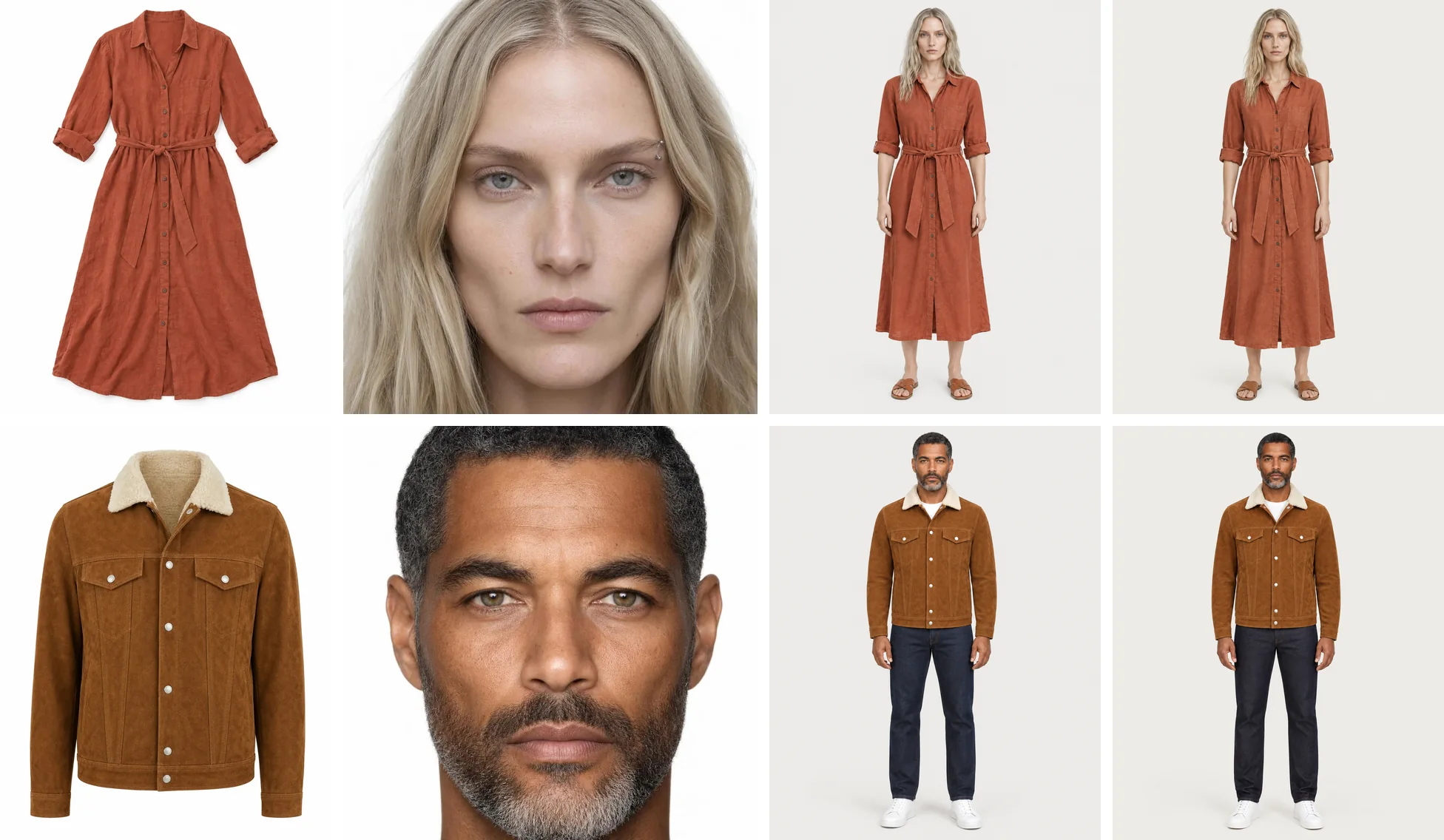
From left: the garment photo, the Fashion Model's card, then both images from one Nightjar request, as they came out.
For a whole collection, connect Nightjar to Claude, Codex or a ChatGPT Business, Enterprise or Edu workspace and ask in plain words, such as "Apply our street campaign Recipe to every dress in the new collection. Show me three samples first." The assistant plans a batch, shows the total cost, and runs the rest after you approve the samples. Running a catalog from an AI assistant covers it. Developers use the same saved Fashion Models, Backgrounds and Poses through the Nightjar API, included with every paid plan.
How to create on-model photos in ChatGPT or Gemini
You can make on-model photos in a general image tool such as ChatGPT or Gemini. The method:
- Attach the person first and the garment second, every time, and say which is which: "Image 1 is our model, image 2 is our product."
- Describe the garment in facts: color, fabric, collar, closures, pockets, length. The description gives the model the details one photo can't show.
- Write the pose, the setting and the styling as one brief, and paste it word for word for every garment, so a collection doesn't drift.
What you take on yourself: re-attaching the person, the garment and any photo of the place to every request, keeping the brief word for word, and checking every image yourself.
If your team already works in Claude or a ChatGPT Business, Enterprise or Edu workspace, connect Nightjar there and ask in the same chat. The assistant then works from your saved Product, Fashion Model and Recipe instead of the photos you would attach again.
The bigger difference is the model behind each image. ChatGPT makes every image with OpenAI's image model and Gemini with Google's, whatever the shot. Every image model is best at some shots and weaker at others. Nightjar has a sophisticated routing system that always picks the best AI image model for the task at hand, with prompts tuned for each model, so each shot goes to the model that is best at it. That gives better results than any one model used on its own. Nightjar is also built to keep your product true to the original: it automatically looks at every generated image and retries the ones that misrepresent the product, at no cost to you. Our guide to Gemini for product photos and ChatGPT alternatives for product photography go further.
Midjourney and Adobe Firefly also take reference images, but none of their pages we read claims to keep a real garment exact on a generated person.
AI on-model tools compared on features and price
The ChatGPT and Google AI answers we track for this question most often name Botika, WearView, Midjourney and Photoroom, then Adobe, Lalaland, Fotor and FASHN, and often cite On-Model's site. Here is what the on-model tools among them say about themselves in 2026, from each tool's own pages.
| Tool | Starts from | Your own model from a real person's photo | Two or three people in one shot | Saved for the next garment |
|---|---|---|---|---|
| Nightjar | Garment photos, a product page link or your Shopify store | Yes, from 1 to 5 photos, on every account | Up to 3 Fashion Models | The garment, the person, the place and the whole setup |
| Botika | Flat lay, hanger or ghost mannequin | No; its models are all AI-generated, and Enterprise gets models built for the brand | Not on the pages we read | "One model across the whole collection", from its library |
| WearView | Flat lay, hanger, ghost mannequin or worn photo | On Pro and up, built from a text prompt ("same face every time"); its try-on page also takes your own model photos | Not on the pages we read | Presets that save a look, on every plan |
| Photoroom | Flat lay or a worn photo | Yes, from an uploaded model photo; 1, 3 or unlimited by plan | Not on the pages we read | Your models in Brand Kit, and custom backgrounds |
| FASHN | Flat lay, hanger or ghost mannequin, up to three in one outfit | A face from "a single clear photo" in the FASHN Agent on every plan; your own faces in the Studio on Agency, $99 a month | Not on the pages we read | Face references |
| On-Model | Flat lay, packshot or product page images | "One frontal photo is enough", on Pro and up | Not on the pages we read | Shared identities and presets on Pro |
What each costs in 2026, on the cheapest plan that makes 2K on-model images:
| Tool | Plan | Monthly allowance | About per 2K image, same person every time | Free start |
|---|---|---|---|---|
| Nightjar | Studio, $25 a month | 150 Credits; 1 per 2K image | $0.17 | 6 free Credits, no card, no watermark |
| Botika | Pro, $55 a month | 50 credits; 1 per photo | $1.10 | 8 free credits, no card |
| WearView | Lite, $29 a month | 50 credits; 3 per 2K photo | $1.74 | Free sample shoots on WearView's own outfits |
| Photoroom | Max, $34.99 a month | Up to 185 AI Fashion Models images at 2K | $0.19 | 7-day trial on yearly Pro and Max |
| FASHN | Basic, $19 a month | 200 credits; 1 or 2 per 2K image, 2 more with a face reference | $0.29 to $0.38, with a face reference | 10 free credits |
| On-Model | Pro, €89 a month billed yearly | 800 credits; 5 per 2K image | €0.56 | Free plan with watermarked images |
Prices are billed monthly except On-Model's, and the per-image figures assume every credit goes to 2K on-model images of one saved or chosen person. Most of these tools cost less a month when billed yearly.
Fotor, a photo editor that AI answers also name, has a Flatlay to Model tool that takes your own model photo; its pages don't say whether that model is saved for the next garment.
Lalaland now redirects to Browzwear, which builds 3D virtual twins of garments and sells customizable AI models through its sales team. 3D suits brands that already design their garments in 3D, while the tools above start from a photo of the sample.
Which one fits:
- Nightjar fits a brand that wants listing and campaign sets from one saved setup. Your own Fashion Model from 1 to 5 photos works on every account, and up to three people share a shot. The same Recipe runs in Shopify and in Claude and other AI assistants, and the API uses the same saved Fashion Models and Backgrounds. At about $0.17 per 2K image the saved person is included, and Nightjar retries any image that misrepresents the garment at no cost to you.
- Photoroom fits a team that already edits in Photoroom. AI Fashion Models need a paid plan, and 2K images need Max.
- FASHN takes a face from a single clear photo in its Agent on every plan; that face reference, which "anchors every image to that identity", adds two credits per image.
- On-Model builds a digital twin of a brand ambassador from one frontal photo, on Pro.
- Botika fits a brand happy with Botika's own AI models; only Enterprise gets models built for the brand.
- WearView saves presets on every plan, and your own model starts at Pro.
Our comparison of AI tools that put clothes on a model and roundup of AI fashion model generators go through more tools.
Check every on-model image before it goes live
Whichever tool made it, look at each image at full size next to the model's reference photo and the real garment. Small changes are easy to miss at thumbnail size.
- The face: eye color, hair color and length, a beard, and marks such as freckles or a piercing. In a two-person shot, check both faces and who wears what.
- The garment: the color next to the real garment in daylight, the number and color of buttons or snaps, pockets, the collar, the hem length and how a print lines up.
- The brief: the styling you asked for, such as a jacket snapped closed, and the backdrop color on listing images.
- The set: images that sit side by side on a product page should share the backdrop, the light and the framing.
Before you pay for a plan, try your hardest garment, such as a print or one with small hardware, wherever a tool lets you use your own garment for free. Nightjar, Botika, FASHN and On-Model do; WearView's free shoots use its own outfits, and Photoroom's trial starts with a yearly plan.
Selling on Amazon: tag images with AI-generated people
In 2026 Amazon began requiring sellers to tag product images and A+ content that show a photorealistic AI-generated person. Its seller announcement asks for the keyword contains-synthetic-performer in the file's XMP dc:subject field, added with an IPTC-compatible metadata editor before upload. Images that show only real people, or no photorealistic people, don't need it.
Add it to each on-model image you list on Amazon. With the free ExifTool, one command does it:
exiftool -XMP-dc:Subject+="contains-synthetic-performer" image.jpg
Our answer on Amazon and AI images covers the rest of Amazon's image rules.
Using a real person's likeness
A custom AI fashion model made from a real person needs that person's permission to use their likeness, in writing, for the uses you plan. With a ready-made AI fashion model, the tool's terms set what you may do with it. Our answer on likeness licensing for AI fashion models and training an AI model on your brand's real model go into the details.
When a real shoot is still worth it
AI on-model photos replace many routine catalog and campaign shoots: new drops, colorways, seasonal refreshes and ad variants. A real shoot still earns its cost for complex physical sets, celebrity talent, regulated hero campaigns and work that has to be art-directed on set. For what a traditional shoot costs today, see our breakdown of product photography costs.
To try it on your own garments, start with one product photo. New accounts get 6 free Credits with no card, and free images carry no watermark.