
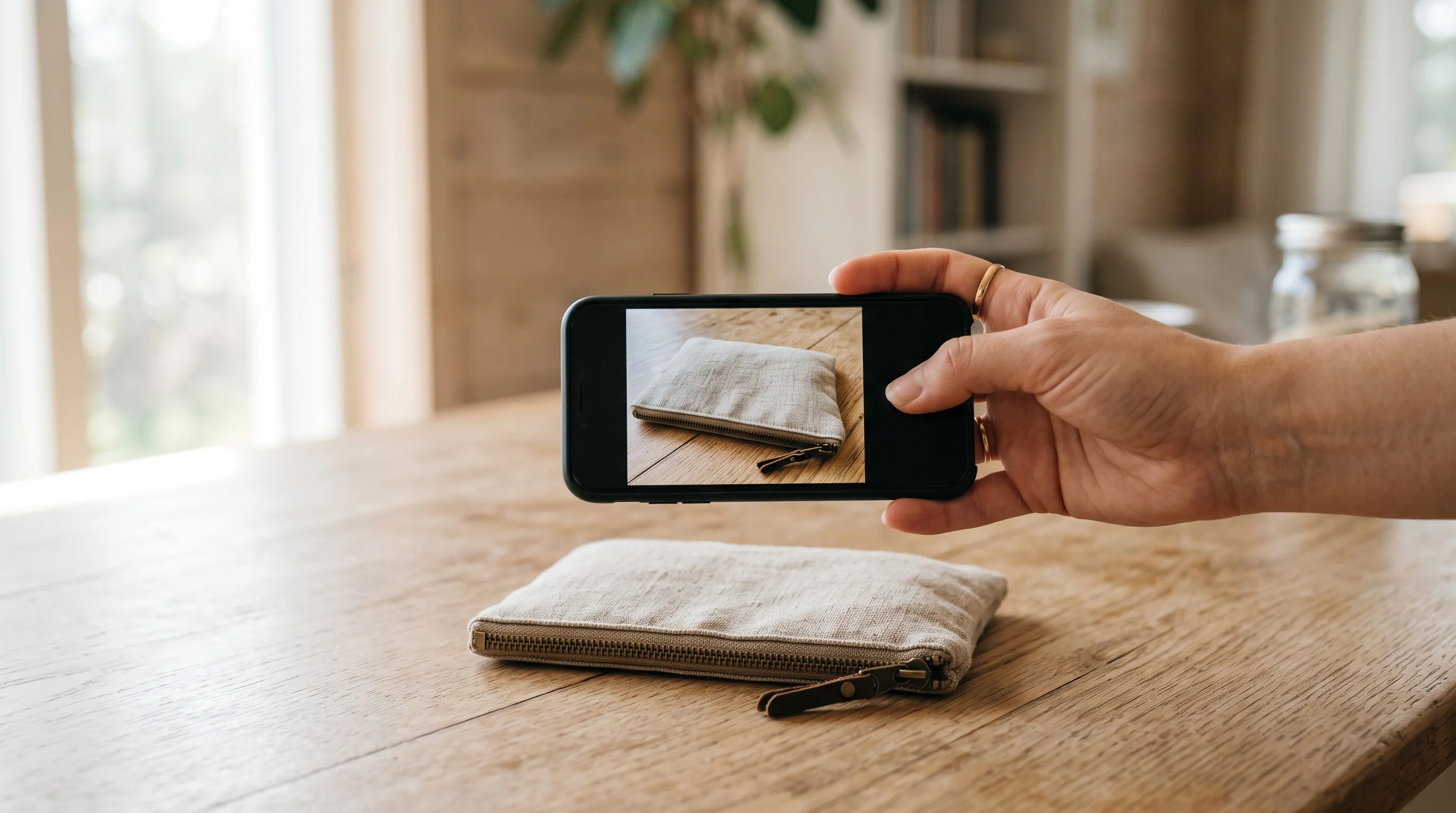
The cheapest way to get professional product photos for a new online store in 2026 is to take one clear photo of each product with your phone and let an AI product photography tool make the listing images from it. The phone photo needs no studio, light box or editing. It only has to show the product sharply, whole and in its true colors. From it, Nightjar makes the finished set at 2K: a clean image on white for the main listing photo, matching gallery shots, lifestyle scenes and photos of a person holding or wearing the product. A new Nightjar account gets 6 free Credits with no card, enough for a first product's images with no watermark, and plans start at $25 a month for 150 Credits, where one Credit makes one 2K image, about $0.17. A product photographer charges $50 to $350 an image, according to Shopify's 2026 pricing guide.
Doing everything yourself can cost nothing beyond what you already own. A phone, a window and a white foam board make a usable white-background photo, and Shopify puts a full home setup at under $50. What it costs instead is skill and time: every product has to be lit and framed the same way so the store looks like one brand, and each product gets one look, the one you shot. The sections below compare what each route costs a store launching with 10 products and show how to take a phone photo good enough to start from. They also cover what the AI tools sellers ask about most cost and do to your photo.
What does each route cost a new store in 2026?
Take a store launching with 10 products and six images each: a main image, four gallery images and one lifestyle photo, 60 images in all. Six is the number Amazon recommends as a minimum per product, and a fair target for any store.
| Route | What you pay | 60 launch images | What else it takes |
|---|---|---|---|
| Do it yourself with a phone | Under $50 once, for a tripod and foam board | Under $50 | Lighting and framing every product the same way, editing each photo, one look per product |
| Phone photo plus Nightjar | First 6 Credits free; Studio plan $25 a month for 150 Credits | $25 | One clear photo per product, and checking each image before it goes live |
| White-background studio (ProductPhoto.com) | $40 a photo on white, $35 for 11 to 50, $30 for 51 or more; lifestyle packages from $375 | $1,800, all on white | Shipping your products to Texas and a 10 to 12 business day wait |
| Studio with styled sets (Soona) | $39 a photo, plus a $149 studio fee per booking | $2,489, before $9+ pure-white edits | Shipping your products, which may come back showing signs of use |
| Freelancer on a marketplace such as Fiverr | Gigs from about $100, plus service fees | Depends on the gigs; a $100 gig often covers a few photos of one product | Mailing your products to the freelancer and getting them back |
| Product photographer (Shopify's ranges) | $50 to $350 an image, or $500 to $3,000 a day | $3,000 to $21,000 at per-image rates | Booking a shoot and getting the products to it |
The Nightjar row assumes one Single shot on white (one Credit), one Photoshoot of four gallery images (two Credits) and one lifestyle scene (one Credit) per product. That is four Credits for six images, so 10 products use 40 of the Studio plan's 150 Credits and leave the rest for more scenes or a Fashion Model shot. Prices are as listed by each company in 2026.
Studios and freelancers photograph what you send them, so a new store ships its products and waits for them to come back, which matters when you have one sample of each. With a phone and an AI tool, the products never leave your hands.
What do AI product photo tools cost in 2026?
Most AI product photo tools sellers ask about have a free start and an entry plan from about $5 to $25 a month. Not every free start lets you sell with the images, so for some tools a store's real starting price is the paid plan. This is what each one offers in 2026:
| Tool | Free start | Free images in your store? | Cheapest paid plan |
|---|---|---|---|
| Nightjar | 6 Credits once, no card: up to eight 2K images with a Photoshoot, and Edit and Upscale work on free Credits too | Yes. No watermark, and you own the images, including for commercial use | Studio, $25 a month for 150 Credits, where one Credit makes one 2K image (pricing) |
| Photoroom | 100 exports a month (export limit) and a low AI limit | No. "You cannot use a free account for commercial purposes" (Photoroom) | Pro, $12.99 a month or $89.99 a year, with 8,000 AI credits and 1,000 exports a month (pricing) |
| Canva | Up to 20 AI uses a month; Background Remover needs a paid plan (Canva) | Yes, under Canva's license terms | Pro, US$144 a year (pricing) |
| Adobe Express | Free daily generations, with no number published | Yes, except images from features Adobe marks as beta | Premium, $9.99 a month with 250 generative credits (pricing) |
| Flair | 5 generated images | No. "You must have a paid Flair plan to use Flair images commercially" (terms) | Pro, $10 a month (pricing) |
| Pebblely | None listed on its pricing page | Paid images, yes: its terms say you own them | Lite, $9 a month for 30 images (pricing) |
| ChatGPT | "Limited image creation", with no number published | Yes. OpenAI's terms say you own the output | Go, $8 a month for "more image creation" (OpenAI) |
| Gemini | Usage limits that refresh through the week (limits); downloads at 1K (images) | Google doesn't claim ownership. Images carry an invisible SynthID watermark and a visible one you can switch off in most countries | Google AI Plus, $4.99 a month, with 2K downloads (Google) |
At $25 a month, Nightjar's Studio plan is the highest entry price here. For a new store, it buys three things:
- Free images you can sell with. Photoroom's and Flair's free plans don't allow commercial use, so a store pays from its first listing image. Nightjar's free Credits make images you own, with no watermark.
- A new photograph, not a new background. Photoroom, Canva, Adobe Express and Pebblely put a new background behind the photo you took, so each phone photo has to be a good photograph already. Nightjar makes a new photograph of the product, which is why one plain phone photo is enough.
- A setup that carries to the next product. Each item is saved as a Product and the look as a Recipe, and Nightjar automatically looks at every generated image and retries the ones that misrepresent the product, at no cost to you.
Nightjar's 6 free Credits make a full set for one product. On free Credits the web app makes two images per request: two images on white for two Credits, a Photoshoot of four gallery images for two, and two lifestyle scenes for two. That is eight images of your first product to choose from, before you pay anything.
How do you take a phone photo good enough to start from?
For a tool that makes a new photograph, such as Nightjar, the phone photo is evidence of what the product looks like, not the image you publish. It has to be right, not beautiful. A photo is good enough when it passes five checks:
- Sharp at full size. Tap the screen to focus on the product and hold the phone steady. Zoomed in, stitching, labels and texture read clearly rather than as blur.
- The whole product in frame. Nothing important is cropped off or hidden. Take a second photo for a side the first one can't show, such as the back or a label.
- True color. Daylight from a window, no filter, no beauty mode and no colored light falling on the product.
- The exact variant you sell. The color, finish and parts in the photo are the ones the buyer receives.
- Clean. Lint-roll fabric, wipe off dust and take off pins, stickers and price tags. A speck or a pin in the phone photo can carry into every image made from it.
The setting doesn't have to be pretty. The pouch photo below was taken on a blue tabletop with another bag at the edge of the frame, and neither carries into the new images. A tripod, a light box or a paper sweep only matter when the phone photo itself is the image you publish. Shopify's smartphone guide covers that route, and iPhone vs AI product photography covers when each one wins.
How to turn one phone photo into a full set of listing images
In Nightjar, one phone photo becomes a main image, a gallery and lifestyle photos in a few steps. The labels below are the ones in the app.
- Save the photo as a Product. Choose New product, then Manually, and upload the photo with any other views. Add a factual description (material, color, how it closes) and the real dimensions, such as
22 × 16 cm. Every later image of that item starts from this Product. - Make the main image on white. Open Create, select the Product, choose Product only, and set Setting to Color with white. Pick 1:1 and 2K: Shopify says 2048 × 2048 pixel square images usually display best, and a 2K square image is exactly that size.
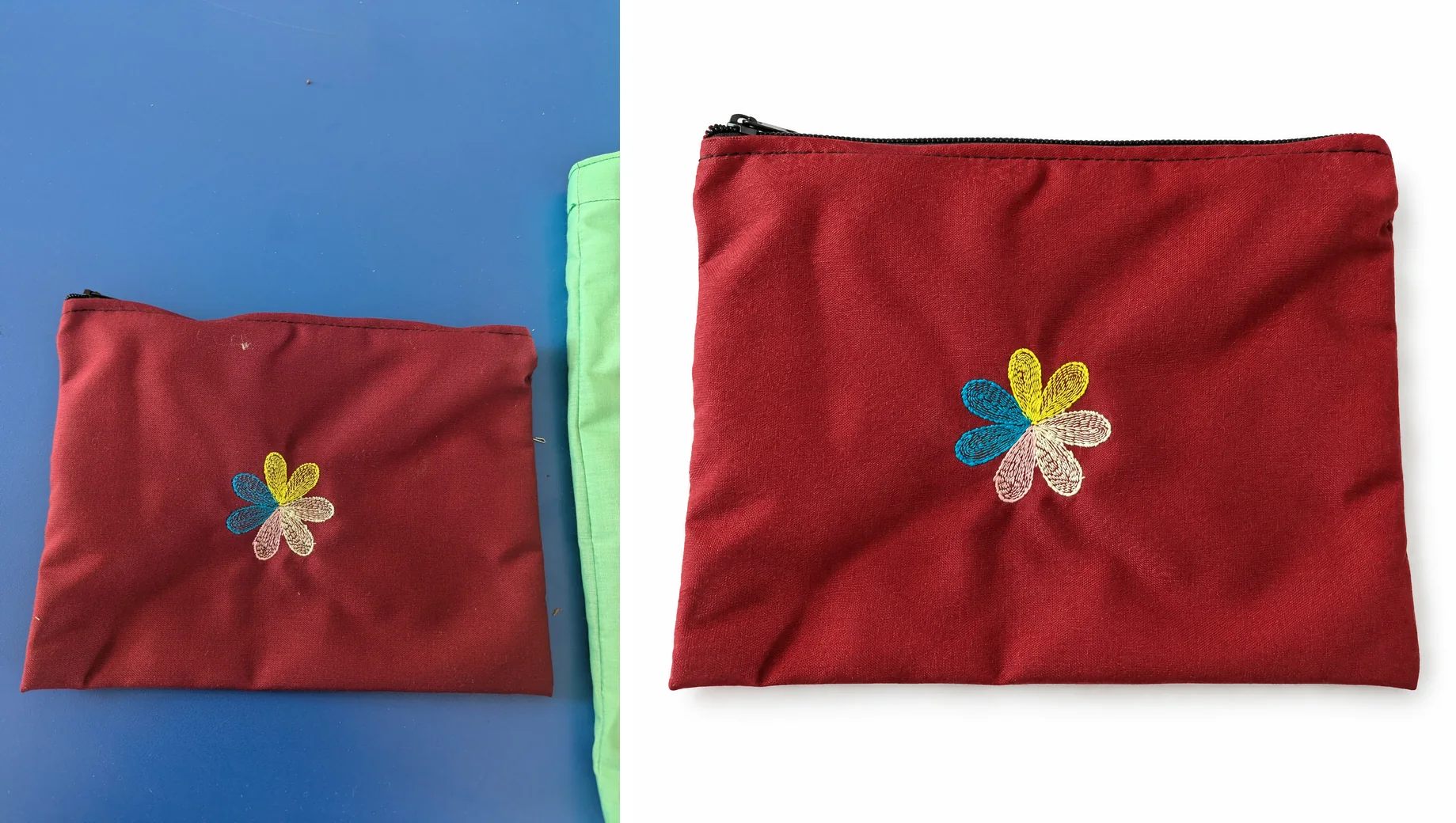
Left: the phone photo. Right: the first of two white-background images Nightjar made from it at 2K, as it came out. Pouch photo by Dorcus Nalubega, CC0.
- Make the gallery. Under Output, choose Photoshoot for four connected images that change angle, framing and distance while the product and setting stay the same.
- Add lifestyle and on-model photos. Set Setting to Scene and pick a Background, either a Location such as a home office or a Backdrop for the surface the product sits on. For a person holding or wearing the product, choose With model and one of the 80+ ready-made Fashion Models.
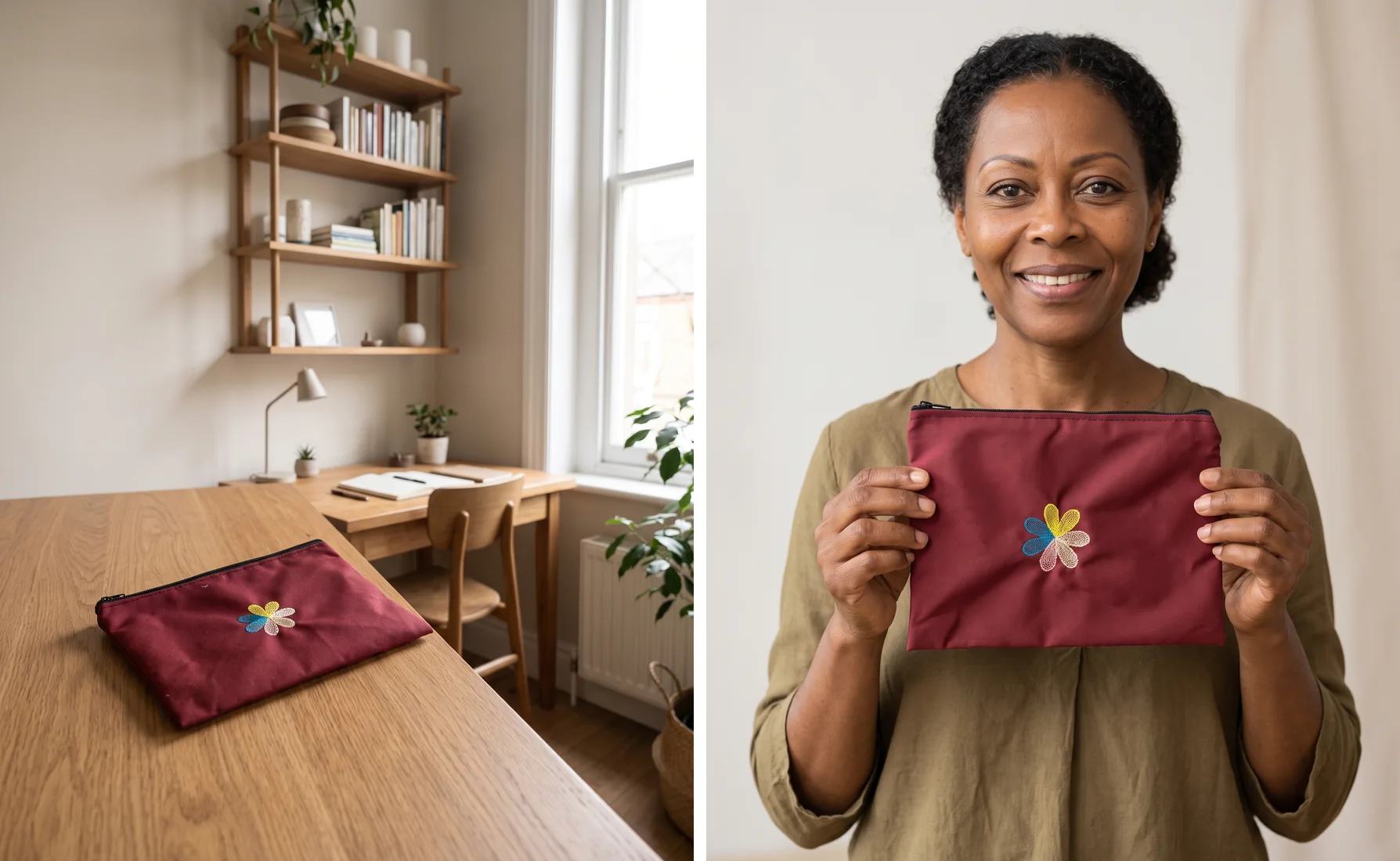
From the same phone photo: a home-office scene and a Fashion Model holding the pouch, each the first of two images from one request at 2K, as they came out. The three requests made six images for six Credits, the number a new account gets free.
- Save each setup as a Recipe. Select Save as recipe for the white image, the scene and the model shot, one Recipe each. The next product starts from the same setting, look and output settings. The Recipe guide shows how to apply one.
- Compare each image with the product in your hand before it goes live. Nightjar is built to keep your product true to the original: it automatically looks at every generated image and retries the ones that misrepresent the product, at no cost to you.
The one photo to a complete image set guide goes further into which images a full listing needs, and the help answer on turning supplier or phone photos into premium product images covers supplier photos too.
What do AI product photo tools do to your phone photo?
The deciding difference between AI product photo tools is not the background they add. It is whether they keep your photo or make a new one from it.
- Cutout tools cut the product out of your photo and put a new background behind it. Photoroom's AI Backgrounds, Canva's Background Remover, Adobe Express's background changer and Pebblely work this way. The product keeps the angle it was photographed at, so the phone photo has to be a good photograph already, shot the same way for every product.
- Tools that make a new photograph start from your photos and create a new image of the product. Nightjar, Flair and general image generators such as ChatGPT and Gemini work this way. The phone photo only has to show the product correctly; the angle, light and setting come from the request.
For a new store, a new photograph asks far less of the phone photo, and that is where Nightjar fits. The pouch above went from a blue tabletop to a white listing image, a home office and a Fashion Model's hands without a reshoot.
Nightjar also keeps the store consistent from the first product. Each item is saved once as a Product, and the look of the shoot (the setting, Framing, Photography Style, Shadow, Fashion Model, aspect ratio and resolution) is saved as a Recipe. Cutout tools can match backgrounds too: Photoroom applies the same look across a catalog with Batch. The deciding difference is the angle. With a cutout, each product keeps the angle of its own phone photo. A Recipe sets the angle, setting and look for every product, so 10 products photographed in 10 different places still look like one shoot.
ChatGPT and Gemini make product photos from an uploaded photo too, and both have free tiers. Nightjar has a sophisticated routing system that always picks the best AI image model for the task at hand. Every model is best at some shots and weaker at others, so a system that sends each shot to the model that is best at it gives better results than any one model used on its own. A chat works request by request. In Nightjar, the product, the look, the person and the setting are saved and carry over to the next product. If you already plan your store in Claude, connect Nightjar to Claude and ask for the images in the same conversation, with the same Products, Recipes and Credits as the web app.
When is a product photographer still worth paying for?
A product photographer is still worth paying for when the shoot itself is the hard part: complex physical sets, celebrity talent, regulated hero campaigns and work that has to be art-directed on set. Those are rarely a new store's launch photos. For the main image, gallery and lifestyle photos of 10 products, an AI product photography tool replaces the routine shoot, and the money a shoot would cost can go into stock and marketing instead. When the store grows into a campaign that needs a set built or a known face, hire for that shoot and keep making the everyday images from your Products and Recipes. The full breakdown of product photography costs covers budgeting a professional shoot.
Start with one product photo on the 6 free Credits, and see your first product's images before you pay anything.