
Write alt text for a product image as one short sentence that tells a shopper who can't see the photo what they would otherwise miss. Say what the product is and the details that set it apart, such as color, material, pattern and shape. Then say what this particular photo shows: the back, the clasp up close, the bag on a shoulder or the ring next to a fingertip. "Sage linen midi dress with a tie waist, back view" does that. "Dress", "IMG_4021.jpg" and a list of keywords don't. Every product photo needs its own alt text. Only purely decorative images, such as a background texture, take an empty alt (alt="").
Write it for the person using a screen reader first. Google reads the same text: its image guidance calls alt text "the most important attribute" for describing an image and uses it alongside computer vision and the page around the image. An accurate description does the search work too, and stuffing in keywords is the one thing Google warns against.
Two mistakes are the most common. The first is no alt text at all: WebAIM's 2026 scan of the top million home pages found it missing on 16.2% of images, and found questionable or repetitive alt text on 10.8% of the rest. On Shopify, a 2026 Nightjar study of 1,000 stores found that at the average store, 6 in 10 product images had no alt text set, and that in 43% of stores none of the sampled product images had any. The second is alt text that says nothing about the photo, which is easy to miss because platforms fill blanks for you. Shopify's Dawn theme hides gallery photos that have no alt text from screen readers, then labels every photo in its zoom view with the product title. WooCommerce labels them "Linen Midi Dress", "Linen Midi Dress - Image 2" and so on. Either way, a blind shopper learns nothing about the five photos. Etsy now writes AI descriptions for empty fields, which are worth checking.
The sections below give a formula and 30 before-and-after examples by product type. They also cover galleries, color swatches, size charts and other text in images, alt text in bulk, and the lawsuit letters that send many store owners looking for this in the first place.
What makes good alt text for a product image
Good product alt text answers one question: what would a shopper lose if this image didn't load? The W3C's images tutorial says an image's text alternative describes "the information or function represented by" it, and that the right words depend on "the usage, context, and content of an image". For a product photo, the information is the product's appearance and whatever this particular shot adds.
A formula that works for most product images:
What the product is, with the details a shopper would ask about + what this photo shows
"Black pebbled leather tote with a zip top" plus "worn on the shoulder" gives "Black pebbled leather tote with a zip top, worn on the shoulder".
Eight rules cover the rest:
- Describe what the photo shows, in your catalog's words. Color, material, pattern, shape, scale and the view, with facts from your product data such as "14k gold" or "30 ml". Leave out marketing claims such as "best-selling" or "premium".
- Put the most important words first. The W3C's tips say so, and a screen reader user can move on once they've heard enough.
- Skip "image of" and "photo of". Screen readers already announce an image, so WebAIM calls the phrase redundant. Name the kind of image only when it matters, such as a drawing of a product that hasn't been photographed.
- Give every photo different alt text. Each photo in a gallery is there for a reason, and the alt text names it. Etsy's guide says it is "especially beneficial to describe different views, details, or variations of your listing."
- Use plain color and material words, plus your variant name when it isn't obvious. "Ocean" tells a listener nothing; "Ocean (deep teal)" does.
- Don't list keywords. Google says keyword stuffing "results in a negative user experience and may cause your site to be seen as spam". Etsy says adding your shop name, listing title, tags or SKUs to alt text "won't be an additional benefit to your listing's SEO".
- Don't repeat the page word for word. The product name is already in the page heading. Name the product type in the main image anyway, because that image travels to collection pages, image search and shared links. In the other photos, lead with what's different.
- Keep it to a phrase or one sentence. When an image holds more than that, such as a size chart, put the information in text on the page.
Product image alt text examples: 30 before and after
The examples below are for made-up products. Each row pairs a weak version that stores commonly publish with a better one that follows the formula. Swap in the details of your own photos: alt text has to describe the image it's attached to.
Clothing
| Photo | Weak alt text | Better alt text |
|---|---|---|
| 1. Main image on white | Linen Midi Dress | Sage green linen midi dress with short sleeves and a tie waist, front view |
| 2. Back view | Linen Midi Dress | Back of the sage dress: a low V with three covered buttons |
| 3. Worn by a model | linen dress summer dress womens midi dress | The sage linen dress on a woman walking on a beach, the hem just below her knee |
| 4. Fabric close-up | detail | Close-up of the sage dress's slubby linen weave and a coconut shell button |
Shoes
| Photo | Weak alt text | Better alt text |
|---|---|---|
| 5. Side profile | sneaker1.jpg | White leather low-top sneaker with a gum rubber sole, side view |
| 6. Sole | Sneaker | Underside of the sneaker: a gum sole with a herringbone tread |
| 7. On feet | lifestyle | The white sneakers worn with cropped jeans on a city sidewalk |
Jewelry and watches
| Photo | Weak alt text | Better alt text |
|---|---|---|
| 8. Ring on white | Emerald Ring | Thin 14k gold ring with a small oval emerald in a four-prong setting |
| 9. Ring on a hand | ring on hand | The emerald ring on a ring finger, the stone narrower than the fingernail |
| 10. Necklace on a model | gold necklace jewelry gift for her | 18-inch gold chain on a model, the round pendant resting just below the collarbone |
| 11. Watch close-up | Watch | Close-up of the watch's cream dial with gold hour markers and a date window at 3 o'clock |
Bags and accessories
| Photo | Weak alt text | Better alt text |
|---|---|---|
| 12. Main image | Tote Bag | Black pebbled leather tote with two shoulder straps and a zip top |
| 13. Inside | inside | Inside the tote: a padded laptop sleeve and two slip pockets |
| 14. Sunglasses worn | Sunglasses | Round tortoiseshell sunglasses with green lenses, worn by a man in a white shirt |
Beauty and skincare
| Photo | Weak alt text | Better alt text |
|---|---|---|
| 15. Bottle on white | Vitamin C Serum | 30 ml amber glass dropper bottle of vitamin C serum |
| 16. Texture | texture | A drop of the serum on glass: clear, faintly yellow and as thin as water |
| 17. Shade swatches | lipstick shades | Lipstick swatches on an arm, from left: Petal (pale pink), Rose (pink), Brick (red-brown), Plum (purple), Berry (dark red) |
| 18. Back label | Ingredients | Back label with the full ingredients list, written out in the description below |
Home and furniture
| Photo | Weak alt text | Better alt text |
|---|---|---|
| 19. Sofa in a room | Sofa | Three-seat sofa in rust velvet with tapered oak legs, in a living room with a white rug |
| 20. Dimensions diagram | dimensions | Sofa dimensions: 84 inches wide, 36 inches deep and 32 inches high, with an 18-inch seat height |
| 21. Candle | candle | Lit soy candle in a matte black ceramic jar, its wooden lid beside it |
| 22. Rug close-up | rug | Close-up of the rug's cream and navy geometric pattern and short wool pile |
Food and drink
| Photo | Weak alt text | Better alt text |
|---|---|---|
| 23. Bag of coffee | Coffee | 12 oz kraft paper bag of whole bean coffee with a resealable zip top |
| 24. Serving suggestion | granola | The honey almond granola in a bowl with yogurt and blueberries |
| 25. Loose-leaf tea | tea | Open tin of loose-leaf green tea, showing tightly rolled dark green leaves |
Electronics
| Photo | Weak alt text | Better alt text |
|---|---|---|
| 26. Headphones | Headphones | Over-ear wireless headphones in matte white with cushioned oval ear cups |
| 27. Speaker ports | ports | Back of a portable speaker: a USB-C port, an AUX input and the power button |
Toys, pet products and art
| Photo | Weak alt text | Better alt text |
|---|---|---|
| 28. Wooden toy | toy | Six wooden rainbow arches in muted pastel colors, stacked from largest to smallest |
| 29. Dog bed in use | dog bed | A golden retriever curled up asleep in the large grey bolster bed, with room to spare |
| 30. Framed print | Art Print | Framed print of an abstract orange sun over blue hills, hung above a desk |
The better versions share four habits. They name the material and the color. They say what the photo adds: the back, the inside, the sole. They give scale against something familiar, such as a fingernail, a collarbone or a dog. And they spell out any words in the image, such as the sofa's measurements.
How to write alt text for each photo in a product gallery
Every photo in a product gallery answers a different question, so each one gets its own alt text. For a set of related images, the W3C's guidance is that "each image needs its text alternative that describes it individually, as well as its relationship within the group".
Here is an example gallery. These four images of a handmade mug were made in Nightjar at 2K in 2026 from a single phone photo.
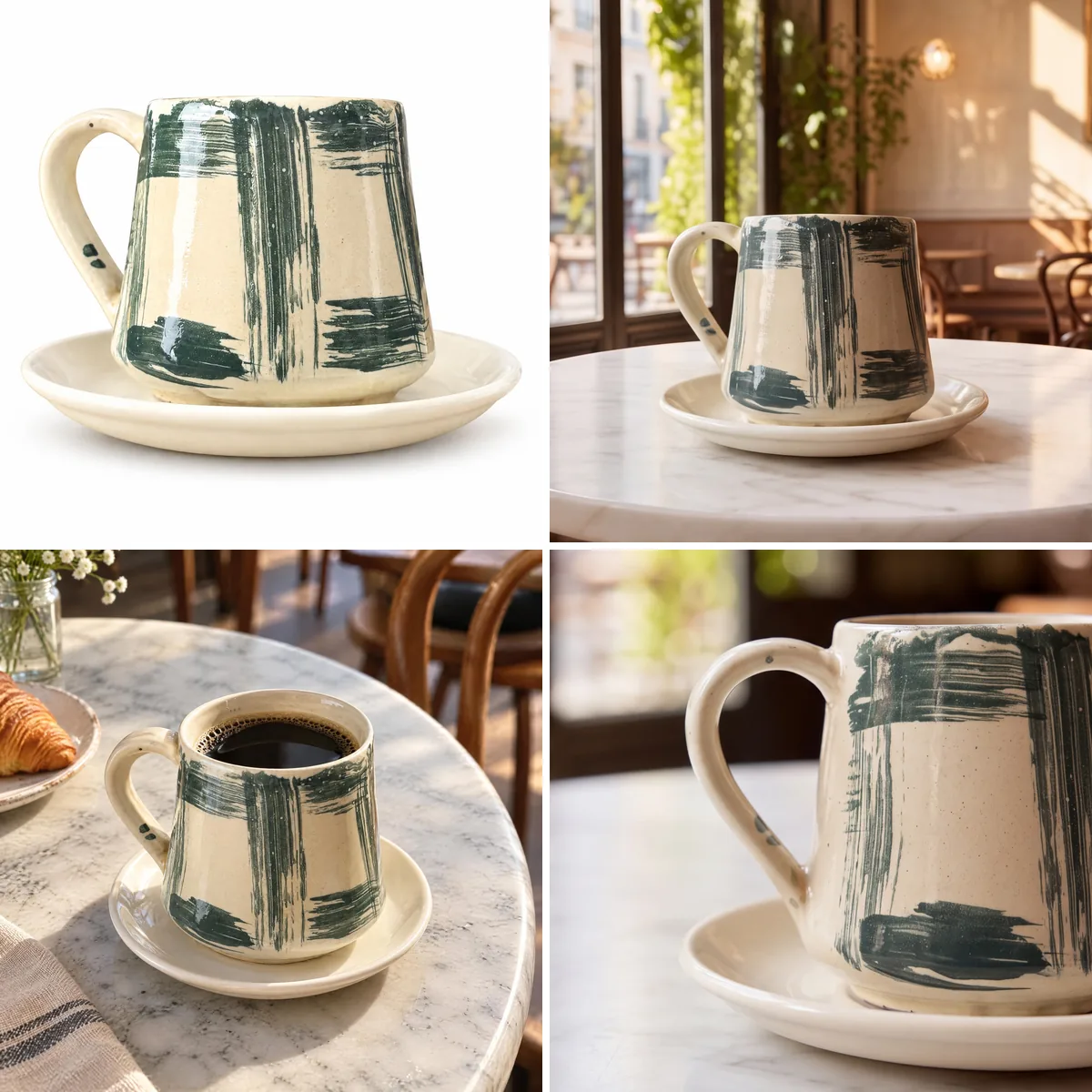
The table below gives each image its alt text.
| Image | Its job in the gallery | Alt text |
|---|---|---|
| Top left: white background | The main image, which also appears in collection grids, image search and shared links | Handmade cream ceramic mug with dark green brushstrokes and a speckled glaze, on a matching saucer |
| Top right: café table | Shows the mug in a setting | The brushstroke mug on its saucer on a marble café table by a sunny window |
| Bottom left: from a high angle | Shows the inside and how it looks in use | The mug from a high angle on a marble café table, filled with black coffee, with cream glaze inside the rim |
| Bottom right: close-up | Shows the handle and the glaze up close | Close-up of the mug's curved handle, with two small dark green dots, and the speckled glaze |
The main image carries the full description. The other three lead with what they add and still say "the mug", so each one makes sense when it's read alone. The same planning makes the photos easier to choose: decide what each image in the gallery is for, and the alt text nearly writes itself. How many product photos you need per SKU covers which views a gallery should have.
A few other gallery cases come up on most stores:
- Zoom and lightbox views show the same photo larger, so they take the same alt text.
- Collection pages usually make the product photo a link to the product page. Google notes that alt text "is useful as anchor text" when an image is a link, so the alt text there names the product.
- Product videos don't take alt text. They need captions, and anything they show that the photos don't belongs in the page text too.
How to write alt text for color variants and swatches
A variant photo describes its own variant. When a shopper picks a color and the gallery switches to that color's photos, each photo's alt text names that color: "Ocean (deep teal) linen midi dress, front view", not alt text copied from the first color. Alt text can only describe what the photo shows, so a variant with no photo of its own has nothing honest to say about its color. One photo, every color covers how to get a photo of each colorway without a reshoot.
A color swatch is a button, not a picture. WCAG's first success criterion says a control needs "a name that describes its purpose", and for a swatch that name is the color: "Ocean". Most themes print the color name as the button's label. When they do, the swatch image takes an empty alt (alt="") so the name isn't read twice. A swatch image with no label of its own takes the color name as its alt text, never "swatch" or the product title.
Check one more thing if your Shopify store shows only the selected color's photos. Some themes and page builders decide which photos belong to which color by reading the alt text. The4's themes ask for the same code on every photo of a color, such as "Color_White Cream", or "t4option0_1" on stores in several languages, and a screen reader reads that code aloud as the photo's description. GemPages only needs the alt text to contain the variant name, so "Ocean (deep teal) linen midi dress, back view" still works. If your theme needs codes, look for a setting or an app that groups photos by variant another way, so the alt text can describe the photo.
What to do with text inside product images
Put words in the page, not in the picture. WCAG 1.4.5 asks for real text instead of pictures of text, and the W3C's tutorial says that when an image of text can't be avoided, its alt text "must contain the same text presented in the image". Real text can be read aloud, zoomed, translated and searched.
- Size charts. Add the chart to the product description as a real table. If you keep the image too, its alt text says what it is and where the text version is, such as "Size chart for the linen dress, also in the description below". Etsy gives the same two options: describe the chart in detail, or put it in the listing description.
- Dimension diagrams and infographics. The alt text repeats every number and claim in the image, as in example 20 above. Amazon offers alt text only in A+ Content, so the claims on an Amazon listing infographic belong in the bullet points as well.
- Labels and packaging. A label in a product photo isn't an image of text in WCAG's sense, which excludes text that's "part of a picture that contains significant other visual content". You don't need to transcribe the label. Name the words a shopper would look for: brand, product name, size or shade.
- "Sale", "New" and "Free shipping" badges. Move them out of the photo and into the page. Google Merchant Center's product data rules don't allow promotional text or watermarks on product images, so a badge baked into the photo can cost you in Shopping as well.
Does alt text help product images rank in Google
Yes, as a description, not as a place for keywords. Google's image SEO guide says "the most important attribute when it comes to providing more metadata for an image is the alt text". Google uses it "along with computer vision algorithms and the contents of the page to understand the subject matter of the image". Its own example ranks alt="puppy" as better than nothing and alt="Dalmatian puppy playing fetch" as best. For a product, that's the difference between "dress" and "sage green linen midi dress with a tie waist".
The rest of Google's advice for product images is short:
- File names give "very light clues". Name files like
sage-linen-midi-dress-back.jpgrather thanIMG00023.JPG, but don't spend hours on it. - Nearby text counts: Google reads captions and the page around an image, so a product page with a clear title and description helps every image on it.
- Real image tags. Google doesn't index images set as CSS backgrounds, so product photos belong in standard
<img>tags, where alt text can go. Check any custom page sections that show product photos as backgrounds. - Etsy says accurate alt text means search engines outside Etsy "can read your listing images" and "might also positively impact your listings' SEO".
Google Shopping works differently. Shopping listings take their images from your Merchant Center product data, which has image links but no alt text field, so alt text works for your own pages in Search and Google Images rather than for your Shopping listings.
How long should alt text be for a product image
There is no official length. The W3C asks for "the most concise description possible of the image's purpose", and WebAIM says "only a few words are necessary, though rarely a short sentence or two may be appropriate". The numbers you see quoted come from platform fields: Shopify allows 512 characters and recommends 125 or fewer, and Etsy recommends up to 250. They're advice for those fields, not accessibility rules. The 30 examples above run from 51 to 122 characters, and only the one naming five lipstick shades goes past 95. On the 1,000 Shopify stores in our 2026 study, the median alt text that stores did set ran 53 characters.
If an image needs more than a sentence, the extra information belongs in visible text. That's the W3C's advice for complex images such as charts: a short alt text that names the image, and a full description on the page.
Where to add alt text on Shopify, Etsy, Amazon and WooCommerce
| Platform | Where to add it | Length | If you leave it blank |
|---|---|---|---|
| Shopify | Products > open the product > click an image > Add alt text. In bulk: the "Image alt text" column of the product CSV | Up to 512 characters; Shopify recommends 125 or fewer | Depends on the theme. Dawn hides the photo from screen readers in the gallery and uses the product title in its zoom view and on collection pages. The media editor may suggest AI-written alt text for you to accept or edit |
| Etsy | Shop Manager > Listings > open a listing > select the photo > Alt text | Etsy recommends up to 250 characters | Etsy may add AI-written alt text to US sellers' images. Alt text you wrote is never replaced |
| Amazon | Only in A+ Content, for brand-registered sellers: an alt-text field on each image | "A simple sentence describing the image", in Amazon's words | Required in A+ modules. Amazon's own example: "Blender on kitchen counter next to fruit, yogurt, orange juice, and a smoothie glass" |
| WooCommerce | Media > Library > select the image > Alt Text | No set limit | WooCommerce uses the product title for the main photo and "Product title - Image 2" and so on for the rest |
Sources: Shopify's alt text help, Shopify's product CSV guide, Etsy's alt text help, Amazon's A+ Content help as quoted by Amazon staff, WordPress's Media Library guide and WooCommerce's gallery code. The Dawn behavior was checked on Shopify's Dawn demo store in 2026. There, a bag with no alt text had an empty alt on every photo in its product page gallery, and "Puff", its product name, on all 14 photos in its zoom view.
One WordPress catch: an image placed inside a product description keeps the alt text it had when it was inserted. WordPress says the inserted image "becomes disconnected from the data in the media library", so fix those images in the description itself.
How to add alt text to hundreds of product images
Start from the product data you already have. Most of a good alt text is in your catalog: product type, color, material and the variant name. Only the last part, what each photo shows, needs a look at the image.
- Export your products and find the gaps. Shopify's product CSV has one row per image, with the image URL, its position in the gallery and an "Image alt text" column. Filter that column for blank cells and for text repeated across a product's photos. To check a single page, WebAIM's free WAVE checker flags images with no alt text.
- Draft from your data. Build each alt text in the spreadsheet from color, material and product type, then add the view by position if your galleries follow a set order, such as 1 for the front, 2 for the back, 3 on a model and 4 for a detail.
- Check every row against its photo. Fix the rows where the photo isn't what the pattern assumes, add scale where it matters and spell out any text in the image.
- Back up, import a few, then the rest. Keep the original export as a backup and import a few products first. Open their pages and listen to them with a screen reader, such as VoiceOver on a Mac or iPhone, then import the rest.
Start with the main image of your best sellers, then the products with the most variants.
AI can write a first draft. Shopify's media editor suggests AI-written alt text for images that have none, Etsy writes AI alt text for US listings left blank, and apps do it in bulk. AI describes the pixels, though, not your catalog. It doesn't know the material, your color names, the size or which detail a photo is there to show, and it guesses when it isn't sure. Read each suggestion before you accept it, and check four things: the color matches the variant, the material is right, the photo's purpose is stated, and nothing is invented.
How to write alt text for AI-generated product photos
Describe an AI-generated product photo the same way as a photo from a camera: what a shopper sees in it. Don't paste in the prompt, and don't add "AI-generated" to the alt text of an ordinary listing image. Disclosure and provenance metadata go where each sales channel asks for them, which our help answer on alt text and SEO metadata for AI-generated product photos covers channel by channel.
Alt text is only true if the photo shows the real product. If an AI image changes the stitching or the shape, its alt text misdescribes either the photo or the product, and a blind shopper is misled either way. Nightjar is built to keep your product true to the original: it automatically looks at every generated image and retries the ones that misrepresent the product, at no cost to you.
Do you need alt text to avoid an ADA lawsuit
This is a plain-English summary, not legal advice.
In the US, the Department of Justice says the ADA applies to the websites of businesses open to the public, and its web guidance names images without alt text as an example of a barrier. Lawsuits are frequent. UsableNet counted more than 5,000 digital accessibility lawsuits in 2025 and found that e-commerce accounted for nearly 70 percent of them. Seyfarth Shaw, counting federal courts only, found 3,117 website accessibility suits in 2025, up 27% from 2024. UsableNet projects more than 6,000 for 2026.
Missing alt text is one of the easiest problems to find. The WebAIM Million found it on 53.1% of the top million home pages in 2026, and complaints name it. In a 2026 New York case reported by Seyfarth, the complaint listed missing alt text among the barriers a blind shopper hit while trying to buy sunglasses. The court dismissed it as moot, but without prejudice, so the shopper could file again. The store had worked with an accessibility consultant since 2023 and showed, with evidence the shopper didn't rebut, that its website was accessible.
Three things are worth knowing before you act:
- An accessibility widget doesn't remove the risk. UsableNet reports that lawsuits keep naming sites that use widgets, and that "widgets do not materially reduce legal risk". In 2025 the FTC ordered accessiBe to pay $1 million over claims that its AI tool could make any website compliant with the accessibility guidelines.
- Alt text is one check among many. It's the first success criterion in WCAG, at the most basic level, but keyboard access, form labels, color contrast and working buttons count too. The DOJ adds that a "clean" report from an automated checker "does not necessarily mean everything is accessible".
- Selling to the EU brings its own rules. The European Accessibility Act covers e-commerce services from 28 June 2025. Service businesses with fewer than 10 employees and under €2 million in turnover are exempt.
If a demand letter arrives, talk to a lawyer before you pay anything or install anything. Whatever your lawyer advises, real alt text is worth writing for the shoppers who rely on it. On its own, it doesn't make a site accessible.
Product image alt text checklist
- Every product photo has alt text, and no two photos of a product share it.
- The main image names the product type, color and material.
- The other photos lead with what they add: a view, a detail, the product in use or its scale.
- Variant photos name their own color, and swatch buttons are labeled with the color name.
- Any words in an image are in its alt text or written out on the page.
- No "image of", no file names, no keyword lists, no marketing claims.
- One phrase or sentence per image, with the most important words first.
- AI suggestions are checked against the product before they're saved.
Frequently asked questions
Should every product image have alt text?
Yes. Every product photo carries information about the product. Only purely decorative images, such as a background texture, take an empty alt="". Leaving the attribute out entirely is worse: the W3C notes that "some screen readers will announce the file name of the image instead".
Should alt text include the brand name? On the main image, when the brand is visible on the product or is part of how shoppers know it, yes. Don't repeat it on every photo, and don't add your shop name to alt text: Etsy says it brings no extra SEO benefit, and Google warns against stuffing alt text with keywords.
Can I use the product title as the alt text? For the main image, the product title is a starting point, but add what the photo shows. For every other photo, no. A gallery where every image says "Linen Midi Dress" tells a screen reader user nothing about the photos. On the 1,000 Shopify stores in our 2026 study, 7% of the alt text that was set was just the product title.
Is alt text the same as the image title or caption? No. Alt text replaces the image for someone who can't see it. A caption is visible to everyone, and the HTML title attribute shows on hover. When a photo has a caption, the two shouldn't repeat each other word for word.
References
- Google Search Central: Image SEO best practices
- W3C Web Accessibility Initiative: Images tutorial, Groups of images, Images of text, Tips
- W3C: Understanding WCAG 2.2 SC 1.1.1 Non-text Content and SC 1.4.5 Images of Text
- WebAIM: Alternative Text and The WebAIM Million, 2026
- Shopify Help Center: Adding alt text to media, Using CSV files and Media editor
- Etsy Help: How to Add a Text Alternative to Your Listing Images
- WordPress: Edit Media
- Google Merchant Center: Product data specification
- Amazon Seller Forums: A+ Content and SEO, quoting Amazon's A+ Content help
- WooCommerce: wc-template-functions.php
- Theme and page-builder docs: The4, variant images grouped and GemPages, display product image by selected variant
- US Department of Justice: Guidance on Web Accessibility and the ADA
- UsableNet: ADA web lawsuit trends for 2026 and 2026 midyear numbers
- Seyfarth Shaw, ADA Title III blog: Federal website accessibility lawsuit filings in 2025
- Federal Trade Commission: Final order requiring accessiBe to pay $1 million
- Your Europe: Accessibility requirements for products and services