

Etsy recommends listing photos at least 2,000 pixels wide and 2,000 pixels tall, and it keeps photos up to 3,000 pixels on each side. A first photo of 2,000 pixels or more is also among the requirements Etsy lists for a chance at priority placement in search. Upload a landscape 4:3 first photo (3,000 × 2,250 pixels) or a square one (3,000 × 3,000), saved as a JPEG in sRGB and ideally under 1 MB. The first photo sets the shape of the gallery, so a listing looks most consistent when every photo has that shape.
Etsy publishes no thumbnail ratio. It cuts square, landscape and portrait thumbnails from the middle of your first photo, which sellers in 2026 report as 1:1, about 4:3, and 3:4 to 2:3. Keep the product inside the middle two thirds of a square photo, or the middle half of a landscape photo's width and 80% of its height, and every crop sellers have reported shows all of it.
What size should Etsy listing photos be in 2026?
Etsy listing photos should be at least 2,000 pixels on both sides, and Etsy keeps no more than 3,000 pixels on either side. Etsy's image requirements page recommends "a width and height of at least 2000 pixels or more", and says the first photo should be at least 635 pixels on each side "to avoid showing up lower in searches". Below 2,000 pixels the listing form shows "Listings look best with photos at least 2000 pixels wide", but Etsy's listing help says you can still publish.
For search, 2,000 pixels matters more than that warning suggests. Etsy's search visibility help lists a primary photo with "a width and height of 2000 pixels or more" among the requirements "for a chance to receive priority placement in relevant search results". 635 pixels is only the floor below which a listing shows lower.
| Spec | Etsy's number in 2026 | Where Etsy says it |
|---|---|---|
| Recommended size | At least 2,000 px wide and 2,000 px tall | Image requirements |
| First photo for a chance at priority search placement | 2,000 px or more wide and tall | Search visibility help |
| Smallest first photo before the listing shows lower in search | 635 × 635 px | Image requirements |
| Largest size Etsy keeps | 3,000 px on each side | Etsy Open API, full-size image field |
| File types | JPG, PNG, GIF, SVG or HEIC; no animated GIFs, no transparency | Image requirements |
| File size | No published maximum; files over 1 MB "may not finish uploading" on a slow connection | Image requirements |
| Color profile | Etsy converts photos to sRGB | Image requirements |
| Photos per listing | Up to 20 | How to create a listing |
| Videos per listing | Up to 2 | How to add listing videos |
| Thumbnail shapes | Square, portrait and landscape, with no ratios given | Image requirements |
A few numbers that still circulate in guides and AI answers are out of date or not Etsy's:
- 10 photos and one video. Etsy raised the limit to 20 photos in 2025 (Etsy's community newsletter announced it) and added a second video in 2026.
- 2,000 × 1,500 pixels as the ideal size. It is 4:3, but its short side is under Etsy's 2,000-pixel advice.
- A 1,000-pixel minimum. Etsy's pages now give 635 pixels for the first photo and recommend 2,000.
- 72 PPI. It came from Etsy's 2023 announcement and a 2024 search post. Etsy's current image help page doesn't mention PPI, and PPI doesn't change how a photo looks on screen.
- File-size limits of 10, 20 or 50 MB. They don't appear on any Etsy page we could find.
- Square photos get letterboxed with bars. Every seller report we found describes a crop, not bars.
Etsy really does stop at 3,000 pixels. In 2026 we checked the full-size files of 60 first photos from six Etsy shops: 24 were exactly 3,000 pixels on their long side and none was larger. That matches the Open API's description of the full-size image as "up to 3000 pixels in each dimension".
What aspect ratio should Etsy photos be?
Etsy's first photo should be landscape or square. Etsy's image requirements say: "The first photo in a listing should be horizontal (landscape) or square." That way, Etsy explains, the center of the photo appears in every cropped thumbnail. The same page leans to landscape: "Avoid square crops. Upload horizontal or landscape images." A horizontal photo, it says, lets you "use more of the available space within the thumbnail frame".
Square still works when the product sits in its safe zone, and it is what sellers recommend most: a square photo with room on every side was the most upvoted fix in the busiest seller threads about cropped thumbnails.
Etsy's help center doesn't name a landscape ratio. 4:3 is the usual choice: Etsy's Seller Handbook recommended "an aspect ratio of 4:3" in late 2025 (as quoted by eRank; we couldn't read the Handbook page directly), and most size guides use it. Either shape works when the product sits in the right part of the frame:
| Upload shape | Size to export | Keep the product inside | Best for |
|---|---|---|---|
| Landscape 4:3 | 3,000 × 2,250 px (2,667 × 2,000 is the smallest that meets Etsy's 2,000 on both sides) | The middle half of the width and 80% of the height | Tall or narrow items, and shops starting fresh |
| Square 1:1 | 2,000 × 2,000 to 3,000 × 3,000 px | The middle two thirds, both ways | Shops whose listings are already square, round or compact items, and wide items such as rugs, long necklaces laid flat or panoramic prints |
| Portrait | Not for the first photo | Later photos only; one shape across the listing looks most consistent |
Watch the short side. A 4:3 photo exported at 2,000 pixels wide is only 1,500 pixels tall, which is under Etsy's 2,000-pixel advice.
Camera photos are usually 3:2 (6,000 × 4,000 pixels, for example), and 8 of the 14 landscape first photos we checked were 3:2. In a 3:2 photo, a 2:3 portrait crop keeps only the middle 44% of the width, so crop camera photos to 4:3 first, or keep the product inside that middle 44%.
In the six shops we checked, 42 of the 60 first photos were square, 14 landscape and 4 portrait. 16 were under 2,000 pixels on the short side, four of them by a single pixel.
What size and ratio are Etsy thumbnails in 2026?
Etsy publishes no thumbnail size or ratio. It shows square, landscape and portrait crops of your first photo, which sellers in 2026 report as 1:1, about 4:3, and 3:4 to 2:3. Its help center calls the thumbnail "a cropped version of your primary listing photo", cut into "square, portrait, and landscape thumbnails", and asks sellers to position the photo "so your subject is clear in all 3 views used across Etsy".
Behind those views, Etsy's image server keeps fixed thumbnail files of each listing photo at 340 × 270, 300 × 300 and 270 × 340 pixels (about 5:4, 1:1 and 4:5). In 2026 we compared those three files with the full-size file for 60 first photos, and every one was cut from the exact center. Etsy's fixed thumbnail files don't follow the product, so unless you set the thumbnail yourself, assume the middle of the frame is what buyers see. Pages can show other sizes and shapes, so treat these files as evidence of how Etsy crops, not as sizes to design for.
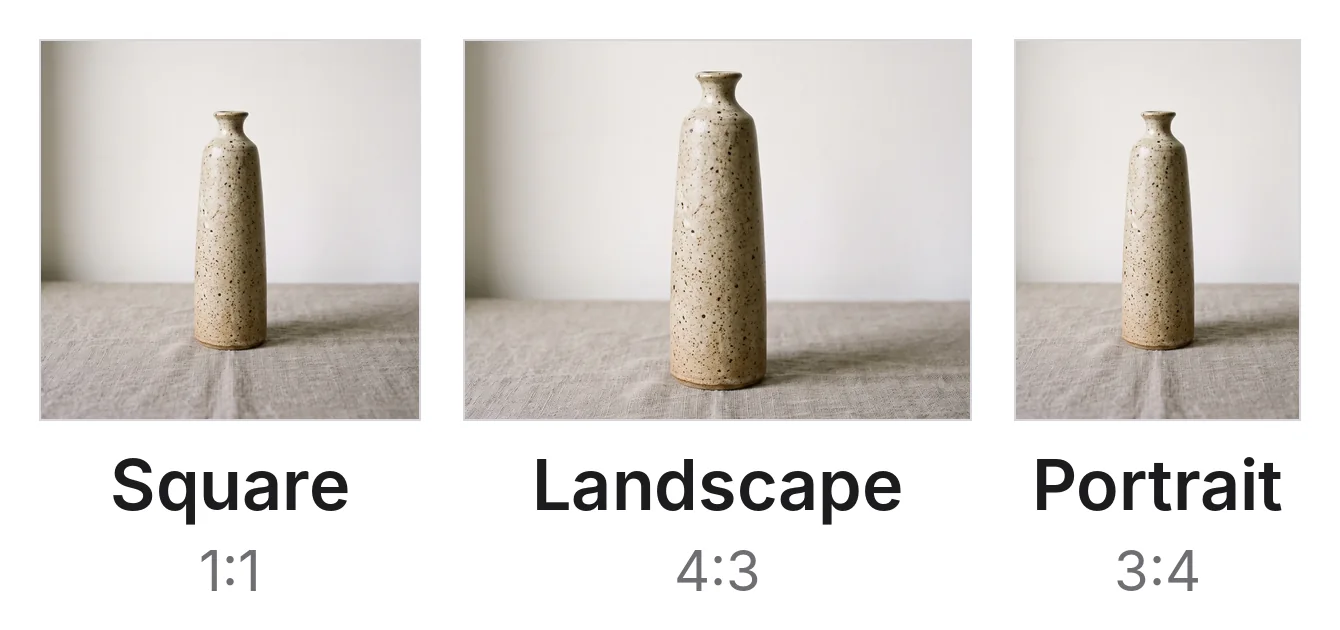
The same square upload cut into Etsy's three thumbnail shapes, shown here as 1:1, 4:3 and 3:4. Example photo made for this article.
What sellers report, by page:
| Where buyers see the thumbnail | Shape sellers report | When |
|---|---|---|
| Shop home | Square | Etsy made shop home square in 2023; sellers still report square in 2026 |
| Favorites | Square (one seller) | 2025 |
| Search on a computer | Square, then portrait (about 4:5) in a test from mid 2025, then landscape 4:3 (one seller, mid 2026) | 2025 to 2026 |
| Search in the Etsy app | A 5:4 crop of the center square (one seller's measurement, 2025); portrait, reported as 3:4 and as "2:3 or similar" (2026) | 2025 to 2026 |
| Etsy home page | Square, or portrait 3:4 for some buyers | 2025 to 2026 |
| Listing page | The first photo at its thumbnail crop, the other photos at their own shape (one seller's report) | 2026 |
These shapes change. Etsy hasn't announced any of them, sellers on the same device often see different layouts, and Etsy's own moderator wrote in 2026 that some thumbnail previews "don't appear the same way once live" (Etsy community). The safe reading is that Etsy tests layouts on different buyers, so your photo has to work in all three shapes at once.
How do I keep my product inside every Etsy crop?
Put the product in the middle of the photo with empty space on every side, sized to fit the narrowest crop. Etsy's image help asks for "enough of a border that they can be cropped to square, portrait, and landscape thumbnails without losing some of the product". The space you need depends on the shape you upload:
| Upload shape | What Etsy's crops cut off | Safe zone for the product |
|---|---|---|
| Square | Landscape 4:3 cuts 12.5% from the top and the bottom; portrait 3:4 cuts 12.5% from each side, and 2:3 about 17% | The middle two thirds both ways: 2,000 × 2,000 px of a 3,000 × 3,000 photo |
| Landscape 4:3 | Square cuts 12.5% from each side; portrait 3:4 cuts about 22% from each side, and 2:3 cuts 25%; the app's 5:4 crop cuts 10% from the top and the bottom | The middle half of the width and 80% of the height: 1,500 × 1,800 px of a 3,000 × 2,250 photo |
| Portrait 3:4 | Landscape 4:3 cuts about 22% from the top and the bottom | Avoid for the first photo |
The landscape safe zone leaves 10% at the top and the bottom because one seller measured the Etsy app's search view cutting a 5:4 frame from the center square of a 4:3 photo, which keeps 80% of its height. The square safe zone already clears that crop.
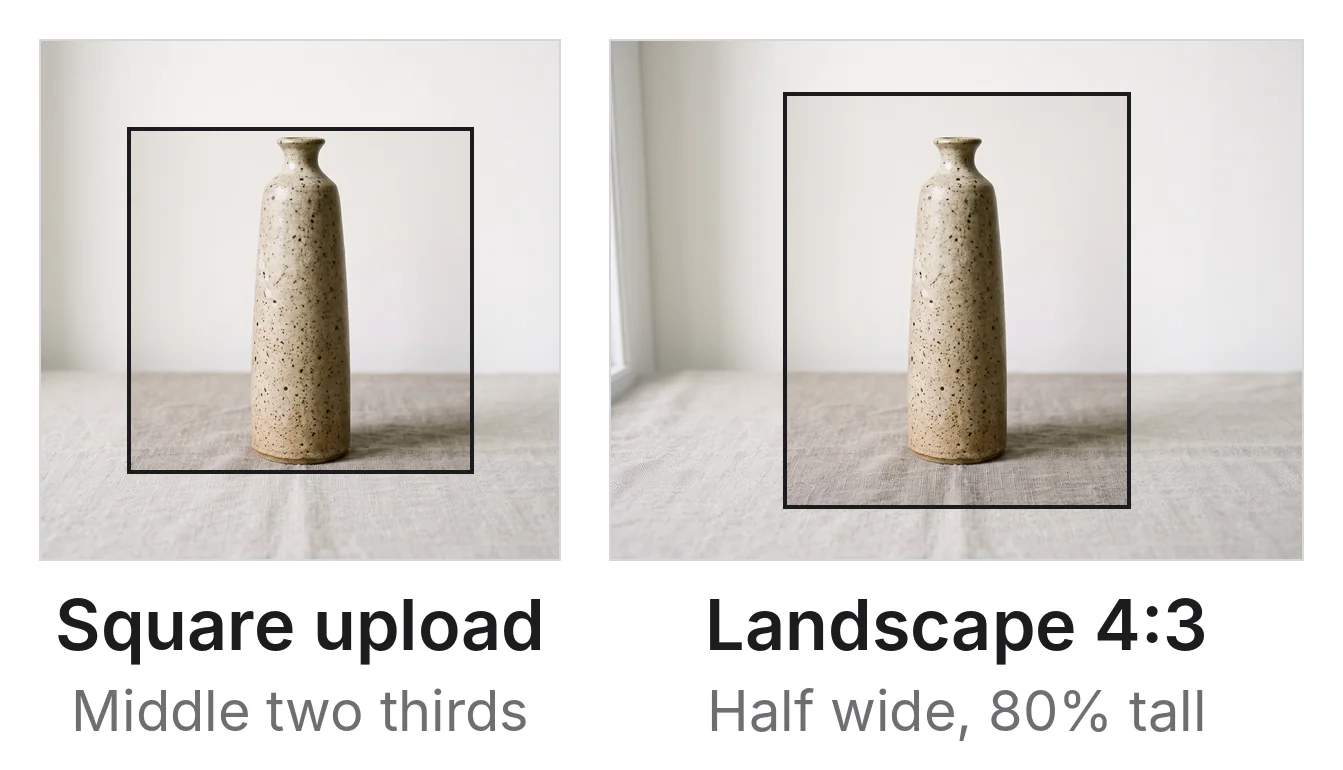
The safe zone for a square upload (left) and a landscape 4:3 upload (right). A product inside the box survives every crop sellers have reported. Example photo made for this article.
To check a photo before you upload it, place one of our safe-zone guides over it in an editor with layers, such as Canva or Photoshop. Use the square guide (3,000 × 3,000 PNG) or the landscape guide (3,000 × 2,250 PNG); each marks the safe zone and where Etsy's crops cut.
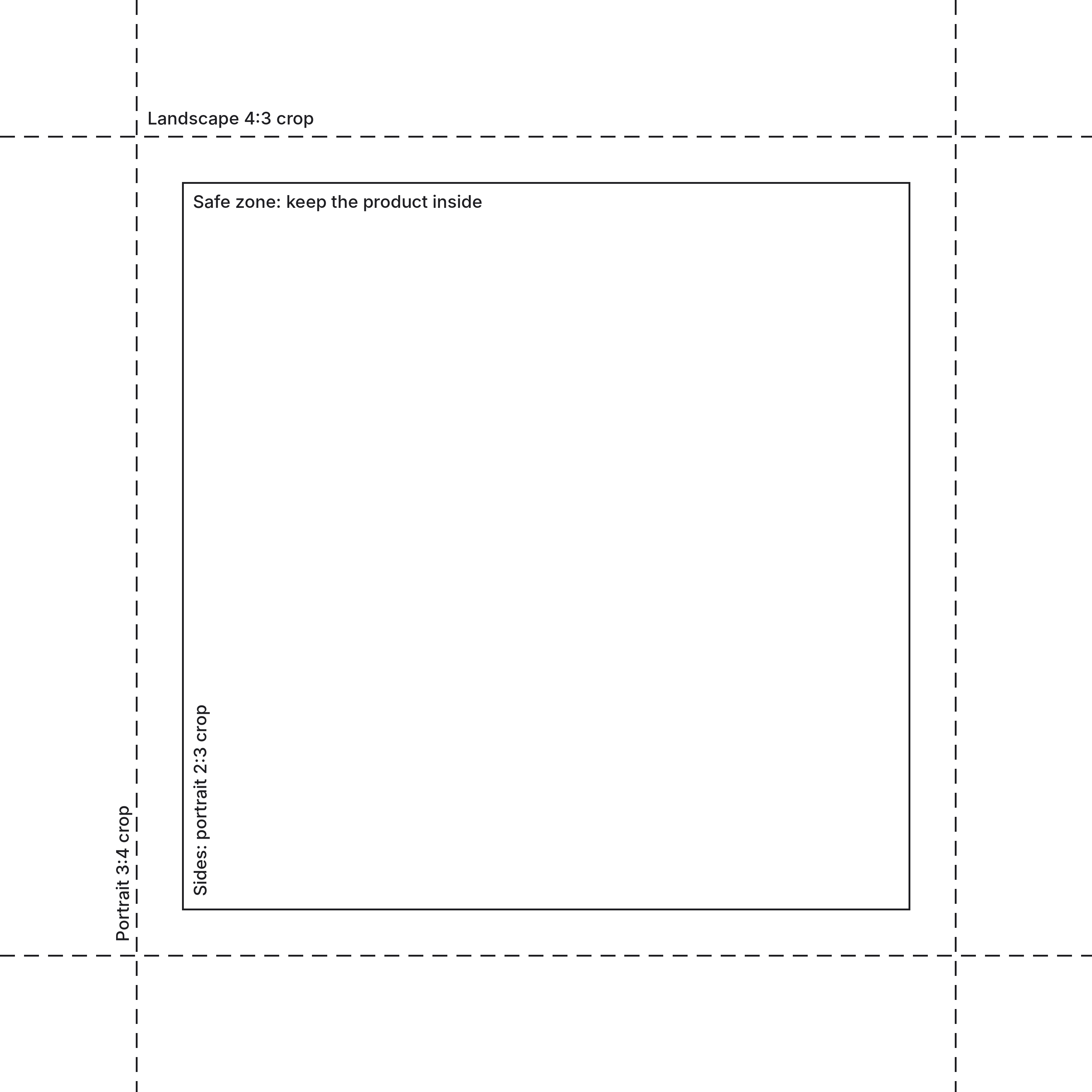
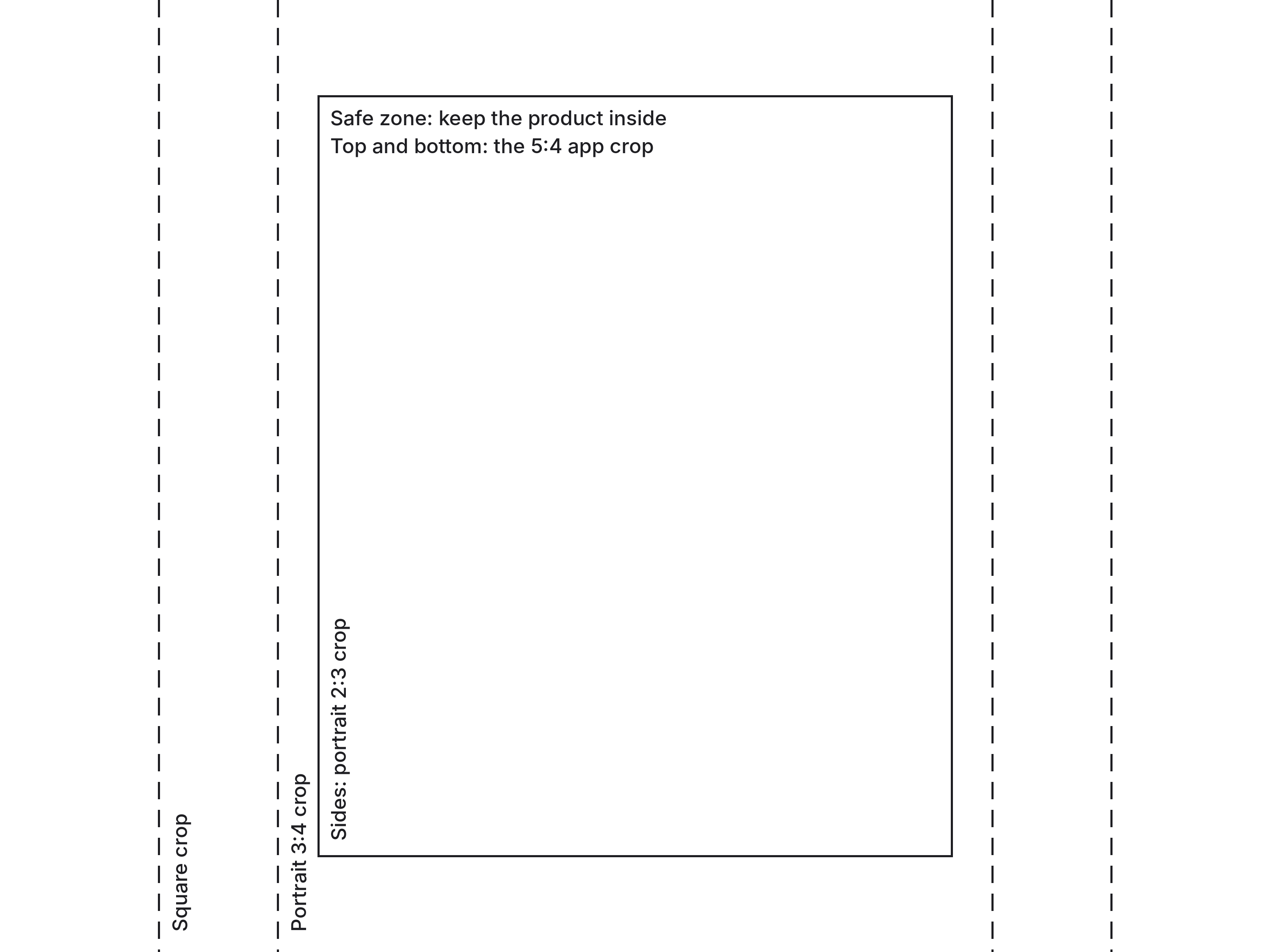
Leave a little more room than the minimum. Sellers report that some views zoom in beyond a plain crop, and matching one ratio exactly doesn't help: one seller remade their photos at exactly 2:3 and still found them zoomed and cropped in a 2:3 search view. A product with room on every side doesn't depend on which test a buyer is in.
A common mistake is filling the frame. In a square photo, a tall item loses its top and base in the landscape crop, and a wide item loses its sides in the portrait crop:
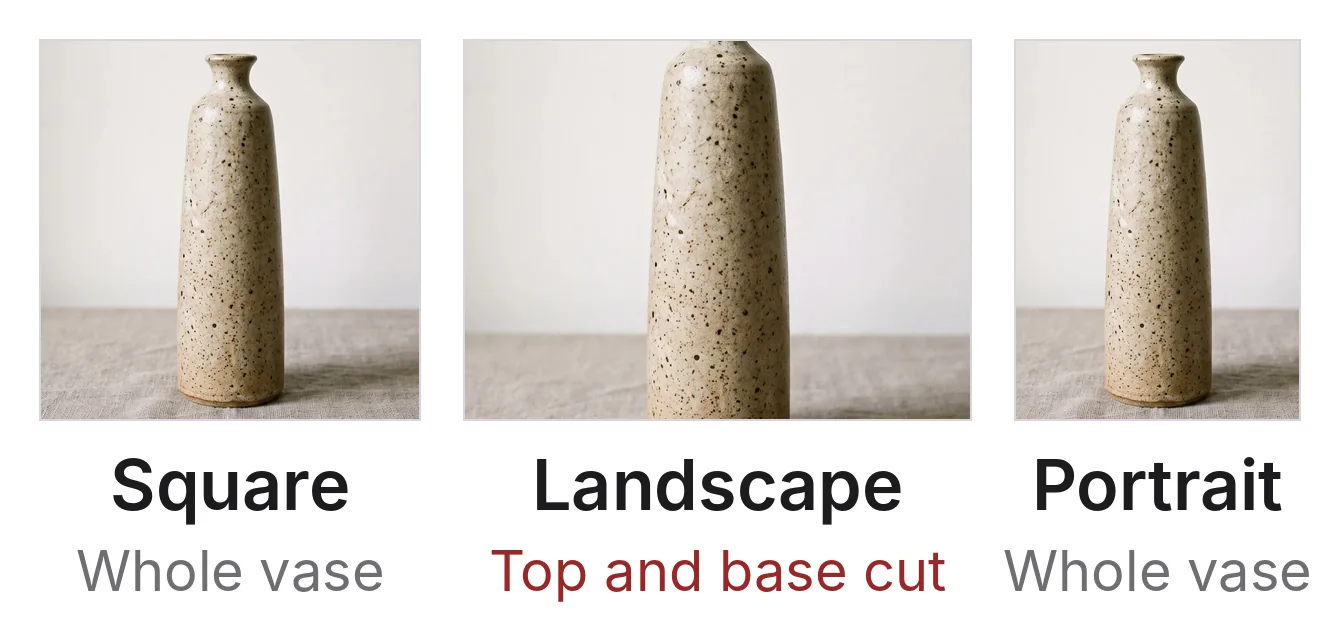
A square photo with the vase filling almost the full height. Etsy's landscape thumbnail cuts its neck and base.
How do I check my Etsy thumbnail before publishing?
Use the thumbnail preview in the listing editor, then check the live listing. In Etsy's listing editor, select a photo, choose Adjust Thumbnail, and slide to zoom in or out until the subject is clear in all three views (Etsy's photo editing help). Etsy added previews of every thumbnail shape to the listing form in 2026, and sellers report they show in a desktop browser but not in the app.
Three cautions apply:
- The preview can differ from the live page. Etsy's moderator confirmed in 2026 that some previews "don't appear the same way once live", and sellers report the thumbnail setting sometimes doesn't save. Open the live listing in search on a phone and on a computer after publishing.
- Etsy's crop tool can't be undone. Etsy says: "To undo the crop, upload the original image again." Crop in your own editor and keep the original file.
- Zooming in on the thumbnail makes it softer. A zoomed thumbnail enlarges part of the photo, so leave the zoom at its widest unless the product is too small.
A photo with room on every side doesn't need adjusting when Etsy tests a new layout. Re-cropping every listing for each test costs time and helps only the buyers in that test.
Why do Etsy thumbnails look blurry?
Etsy thumbnails usually look blurry because the photo is under 2,000 pixels, because the thumbnail is zoomed in, or because Etsy compresses every upload. Etsy's image help says photos "may appear less sharp after being uploaded due to compression of the image files", sized for phones. One seller reported that Etsy compresses PNGs more than JPEGs, and another that photos covered in small text stayed soft. The help answer on why an Etsy thumbnail looks blurry covers each cause and its fix.
What file format and file size should Etsy photos be?
Save Etsy photos as JPEG in sRGB, ideally under 1 MB. Etsy accepts JPG, PNG, GIF, SVG and HEIC, and says these "are the only image file types Etsy supports". WebP isn't on the list, so convert WebP files before uploading. Transparent PNGs don't work: "the transparent parts of the image will appear black on Etsy." Animated GIFs aren't supported either.
Etsy doesn't publish a maximum file size. It warns that "Images larger than 1MB in file size may not finish uploading, especially on a slower internet connection", and its listing help mentions time-outs on files over 300 KB on slow connections. If an upload stalls, lower the JPEG quality a step or export at 2,000 to 2,400 pixels instead of 3,000.
Convert the color profile to sRGB before uploading. Etsy converts photos to sRGB itself, and its help says to convert first if colors look wrong on the site. CMYK files are for print only.
What should go in Etsy's 20 photo slots?
Use as many of the 20 slots as you have different, useful photos for, starting with one clear photo of the item alone. Etsy says listings with too few images, or with a primary image that is "too dark", "low quality" or a collage, may appear lower in search (how to edit a listing), but it doesn't say how many is too few. Eight to twelve distinct views cover most products; the guide on how many product photos you need per SKU explains why.
| Slot | What to show | Why |
|---|---|---|
| Photo 1 | The item alone, centered, bright, with room on every side; one item, not a collage. For a personalized item, a finished personalized one, not a blank or a mockup with placeholder text | Etsy's search checks the first photo, every thumbnail is cut from it, and Etsy requires a finished item first for personalized listings |
| Video 1 | A 5 to 15 second turn of the item | Etsy shows the first video right after photo 1, and videos play when buyers hover over a listing in search |
| Photos 2 to 4 | Other angles: back, side, top or inside | Buyers can't turn the item over |
| Photos 5 and 6 | Close-ups of the material, finish, stitching, glaze or maker's mark | The detail buyers zoom for |
| Photo 7 | Scale: in a hand, on a person, or beside a familiar object | Buyers can't judge size from a photo |
| Photos 8 and 9 | The item in use or in a room | Shows how it looks in real life |
| Next | One photo per color or size, linked to that variation | Etsy lets you link photos to variations |
| Next | Packaging and everything that arrives | Answers "what do I get" |
| Next | A size chart, personalization examples or the making process | Text graphics and collages are fine after the first photo |
| Video 2 | Another view, or the item in use | Etsy shows the second video at the end of the gallery |
Etsy wants your own photos of the actual item, with limited exceptions such as mockups that show personalization options in later photos (Etsy's personalization help). The guide to AI product photos for Etsy covers which edits and images Etsy allows.
What size and length should Etsy listing videos be?
Etsy listing videos can be up to 100 MB and 15 seconds, at least 500 pixels and ideally 1,080 pixels, with up to two videos per listing. Etsy's two help pages disagree on the shortest length: How to add listing videos says 3 seconds and How to create a listing says 5, so make videos 5 to 15 seconds long to satisfy both.
| Spec | Etsy's number |
|---|---|
| Videos per listing | Up to 2 |
| Length | 3 to 15 seconds on the video help page, 5 to 15 on the listing help page |
| File size | Up to 100 MB |
| File types | MP4, MOV, FLV, AAC, AVI, 3GP, MPEG |
| Resolution | At least 500 px; 1,080 px is ideal |
| Shape | Etsy's video help says the ratio "should be 2:1 or 1:2" |
| Sound | Removed on upload |
How do I fix an Etsy photo that is too small or too tight?
Retake the photo if you can, because a new photo of the item fixes both problems. Shoot at your camera's full resolution (a 12-megapixel phone photo is 4,032 × 3,024 pixels) and step back rather than zooming, so the item has room on every side. The guide to taking professional product photos covers the setup.
When the item has sold, or you can't reshoot it, fix the photo you have:
- Too tight on a plain background. Enlarge the canvas in any editor and fill the new area with the background color. The item's pixels don't change, and on a white or plain backdrop the seam doesn't show. If you use an AI tool to extend a textured background such as wood or linen instead, zoom in and check that it only filled the new area and left the item exactly as it was.
- Too small. Stretching a small photo in an ordinary editor only spreads the same pixels further apart; Etsy's help notes that enlarging an image can cause "pixelation". An AI upscaler such as Nightjar's Upscale enlarges the photo you have to 2K (2,048 pixels on the long side) or 4K (4,096 pixels) without making a new image of the product. Pick 2K for a square photo, which gives 2,048 × 2,048 pixels. Pick 4K for a 4:3 photo, because 2K leaves its short side at 1,536 pixels; Etsy stores the 4K file at 3,000 × 2,250.
Upscale costs 1 Credit at 2K and 2 at 4K, and new Nightjar accounts start with 6 free Credits and no card (pricing). Etsy wants listing photos of the actual item, so check the upscaled photo against the item before you upload it.
Frequently asked questions
What is the Etsy photo size in inches? Etsy measures photos in pixels, not inches. Inches depend on the pixels-per-inch setting: at the 72 PPI that Etsy's 2023 announcement mentioned, 2,000 pixels is about 27.8 inches, but PPI changes nothing on a screen. If you sell printable art, the file buyers download is separate from your listing photos: an 8 × 10 inch print at 300 PPI needs 2,400 × 3,000 pixels.
What is the Etsy thumbnail size in pixels? Etsy publishes no thumbnail size, and there is no thumbnail to upload. Etsy cuts every thumbnail from your first photo, and its image server keeps fixed thumbnail files at 340 × 270, 300 × 300 and 270 × 340 pixels, each cut from the center. Upload the first photo at 2,000 to 3,000 pixels and keep the product in the safe zone. Many guides, including some updated in 2026, quote 570 × 456 pixels, a 5:4 shape that Etsy's help center never gives.
What is the Etsy photo size limit? Etsy keeps photos up to 3,000 pixels on each side and allows up to 20 photos per listing. It publishes no maximum file size, but files over 1 MB may not finish uploading on a slow connection.
Can I use portrait photos on Etsy? Not for the first photo: Etsy asks for a landscape or square one, and a portrait first photo loses its top and bottom in the landscape thumbnail. Later photos can be portrait, but Etsy says the first photo sets the gallery's shape, so one shape across the listing looks most consistent.
Does Etsy accept WebP images? No. Etsy's help lists JPG, PNG, GIF, SVG and HEIC as "the only image file types Etsy supports". Save WebP files as JPEG first.
Do I need to re-crop my old listings when Etsy changes its thumbnails? Not if the product already sits in the safe zone. Listings with room on every side hold up in every crop sellers have reported: square, 4:3, 5:4, and 3:4 to 2:3. Re-crop the ones where the product fills the frame, starting with your best sellers.
References
- Etsy Help: Requirements and Best Practices for Images in Your Etsy Shop: size, file types, file size, color, orientation, the border around the product and the three thumbnail views
- Etsy Help: How to Use the Etsy Search Visibility Page: the 2,000-pixel first photo among the requirements for priority placement
- Etsy Help: How to Create a Listing: 20 photos, 2 videos, the 2,000-pixel warning and upload time-outs
- Etsy Help: How to Edit Your Listing Photos: cropping and Adjust Thumbnail
- Etsy Help: How to Add Listing Videos: video size, length, formats and resolution
- Etsy Help: How to Edit a Listing: photo issues that lower search placement
- Etsy Help: How to Offer Personalized Listings: the finished-item rule for the first photo and mockups in later photos
- Etsy Help: Newly Crafted, Etsy Updates for Your Shop: thumbnail previews and the second video in 2026
- Etsy Open API reference and listings tutorial: full-size images up to 3,000 pixels, 20 images, 2 videos and their gallery positions
- Etsy community: We're making updates to size and ratio for listing images (2023): square shop home and the 72 PPI advice
- Etsy community: Community Newsletter, October 9, 2025: 20 photos per listing
- Etsy community: How to Elevate Your Listing Photos (2026): first-photo advice and the preview mismatch
- eRank: Photo Guidelines for Etsy Listings (2025): Etsy's Seller Handbook advice on a 4:3 ratio, as quoted by eRank
- Seller reports on r/EtsySellers: a measured 5:4 app crop (2025), square in favorites, thumbnail ratios by page, portrait thumbnails in 2026, aspect ratio changes, 4:3 on desktop, blurry thumbnails and the multi-ratio preview
- Nightjar pricing: Upscale Credits and free Credits