
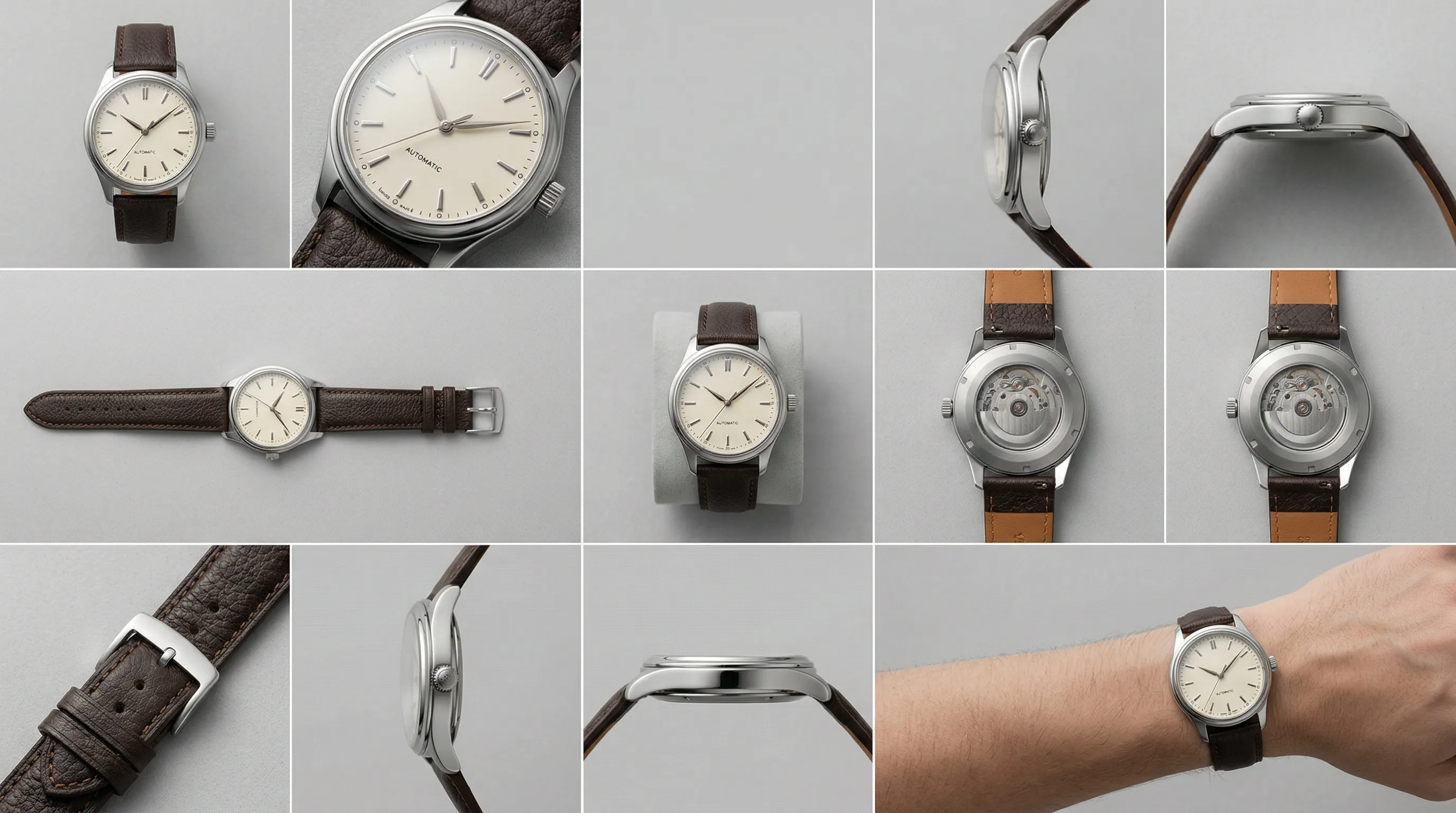
Quick Answer
Every eBay listing needs at least one photo that is 500 pixels or more on its longest side. The photo must accurately represent the item, and eBay prohibits placeholders, borders, added text or marketing material, watermarks, and stock photos for used, damaged, or defective goods. For better presentation, eBay recommends images around 1600 by 1600 pixels, several clear views, and an uncluttered neutral background.
What are eBay's current product photo requirements?
eBay's enforceable picture rules are narrower than many seller checklists suggest. The eBay Picture policy requires at least one photo, sets a 500-pixel minimum on the longest side, and requires the image to represent the item accurately. The remaining technical limits come from eBay's current photo uploader guidance and developer documentation.
| eBay photo rule | Current requirement | Status |
|---|---|---|
| Photos per listing | At least 1 | Required |
| Minimum dimensions | At least 500 pixels on the longest side | Required |
| Accuracy | The photo must accurately represent the item | Required |
| Prohibited additions | No borders, added text, artwork, marketing material, or watermarks | Not allowed |
| Stock photography | Not allowed for used, damaged, or defective items | Not allowed |
| File size | No more than 12 MB per image in eBay's photo uploader | Upload limit |
| Accepted formats | JPEG, PNG, GIF, TIFF, BMP, WebP, HEIC, and AVIF | Upload formats |
| General photo allowance | Up to 24 photos for most categories at no cost | Platform limit |
The 24-photo allowance has exceptions. eBay's image-management documentation limits multiple-variation listings to 12 pictures per variation, while the number available for motor-vehicle listings depends on the selected vehicle package. Sellers using a bulk tool or an integration should also check that tool's limits rather than assuming the standard listing form and every upload method expose the same allowance.
The policy list matters more than a generic “professional image” score. A crisp 1600-pixel photo can still violate policy if it hides damage, depicts the wrong variant, adds a promotional badge, or uses a stock image for a used item.
Which eBay photo specifications are recommendations rather than rules?
eBay recommends images around 1600 by 1600 pixels, but its hard minimum remains 500 pixels on the longest side. The current photo guidance also says that 1:1 and 16:9 images generally look best; it does not require a square aspect ratio.
| eBay recommendation | What it means in practice |
|---|---|
| About 1600 × 1600 pixels | Gives eBay a larger, cleaner source than the 500-pixel minimum. Do not enlarge a blurred original merely to reach the number. |
| 1:1 or 16:9 aspect ratio | These shapes generally display well, but neither is mandatory. Compose the item with enough clear space that it remains legible in search and listing views. |
| White or neutral background | Keep the setting uncluttered. eBay notes that a darker background may suit shiny or reflective products better than white. |
| Whole item shown face-on in the main photo | Make the first image a clear account of what is for sale. A single-item main photo should not show other variants; a bundle photo should show everything included. |
| Several angles and close-ups | Show features, labels, texture, and any scratches, wear, or damage a buyer needs to judge. |
| Only a few AI-generated background scenes | eBay advises keeping generated scenes from distracting from the item. |
Older guides often present 800 pixels as an official zoom threshold or claim that eBay always crops search images to a square. Those statements do not appear in eBay's current general photo guidance. The current, supportable advice is simpler: meet the 500-pixel policy minimum, aim for eBay's recommended 1600 by 1600 size when it suits the composition, and inspect the live listing on desktop and mobile.
How do product photos affect eBay Best Match rankings?
Photos contribute to eBay Best Match as part of overall listing quality, but eBay does not publish a special image score or say that click-through rate and conversion rate are the two dominant factors. The official Best Match guide lists search-term relevance, item popularity, price, listing quality, listing completeness, service terms, and seller history among its factors.
That guide describes listing quality as including “description, photos, and so on.” It also recommends high-quality photographs from different angles, including clear views of flaws, without borders or added text. Photos therefore matter, but they work beside accurate titles, item specifics, price, shipping, returns, and seller performance.
The first photo deserves the most attention because it appears beside the listing title in search. eBay's Seller Center puts the advice plainly: “Your first photo appears in search results. Make it your best shot, with your item centered and fully visible.” A better main photo can make the offer easier to understand, but no current eBay source supports a guaranteed ranking lift, a fixed conversion percentage, or a promise to “win the Buy Box.”
Does eBay allow AI-generated or AI-edited product photos?
eBay does not prohibit AI-generated or AI-edited listing photos as a category. Its User Agreement expressly places responsibility on the seller for listing content created with generative AI, and eBay's listing tools offer white, studio, surface, outside, and AI-generated background options.
The governing test is whether the finished image is truthful. An AI edit must not alter the item's color, shape, materials, included accessories, branding, or condition in a way that misleads the buyer. For used, damaged, defective, collectible, or otherwise unique goods, actual photos of the exact item should carry the listing because eBay bars stock photos for those conditions and tells sellers to show wear and flaws.
As of September 3, 2026, eBay's public Picture policy, User Agreement, and Images, videos and text policy do not instruct sellers to label every AI-created listing photo. In its AI background announcement, eBay separately said sellers should be transparent about AI “where appropriate,” so the absence of a blanket photo-label rule is not an exemption from applicable law, local marketplace rules, or category-specific disclosures. For the focused policy answer, see Does eBay allow AI-generated product photos in listings?.
AI also does not grant rights to someone else's source photograph. eBay's content policy says sellers should create their own images or use authorized eBay catalog content, and that third-party content generally requires explicit written permission from the rights holder.
Treat eBay's 24-photo allowance as a limit, not a target
Sellers should treat 24 photos as an allowance, not a target. Build the gallery around unanswered buyer questions, then stop when another image adds no useful evidence about identity, condition, scale, function, or what is included.
| Gallery position | Useful subject | What the image should establish |
|---|---|---|
| 1 | Main photo | The whole item, centered and fully visible, with no ambiguity about the offer |
| 2–3 | Other sides or angles | Shape, construction, ports, closures, or profile |
| 4–5 | Detail views | Texture, labels, serial markings, hardware, or workmanship |
| 6 | Condition evidence | Scratches, dents, stains, repairs, or wear on the actual item |
| 7 | Scale | A ruler or familiar object when dimensions are hard to judge |
| 8 | Package contents | The exact bundle, accessories, packaging, or parts included |
| 9–12 | Use or context | A few helpful in-use views for new goods, without obscuring the product |
| 13–24 | Product-specific evidence | Additional variants, details, or use cases only when each photo adds information |
This is an editorial shot list, not an eBay rule. A simple new item may need fewer views; a used watch, camera, collectible, or bundle may need more actual photographs because condition and included parts drive the decision. For a variation listing, associate the right images with each variation and remember the separate 12-picture-per-variation limit.
For alternative angles, start from several real views so each visible side, seam, port, and label has a source photo. The AI camera-angle guide explains which views belong in an ecommerce gallery and how to create them from those sources.
How can AI product photography fit an eBay listing workflow?
AI product photography has two different jobs on eBay. For one-off or pre-owned goods, real photographs should carry the condition evidence while AI edits stay conservative. For repeat new inventory, several reliable Product Photos can anchor consistent main and supporting images without rebuilding the setup for every listing.
In Nightjar, a Product groups those Product Photos with a factual description and physical dimensions so the product identity can be reused. The Product Photography Workflow can then create a clean main-image candidate with a flat white or neutral background, 1:1 aspect ratio, 2K resolution, and JPEG, PNG, or WebP output. For product-only shots, Framing controls the camera angle and crop, while Shadow controls the contact shadow on a flat-color background.
For supporting images, a reusable Photography Style can hold the photographic feel, and a Background can hold a repeated Backdrop or Location. A Recipe saves that Product Photography setup without saving the Product itself, making the same listing direction easier to apply across a catalog. Nightjar's four-image Photoshoot option can produce a connected secondary set. On eBay, keep generated scenes to a few secondary positions and reserve actual photos for flaws, wear, and included parts.
Nightjar's built-in visual review can catch obvious failures, such as a missing or substituted product, a misspelled brand or product name, a replaced main logo, or a catastrophic defect, then retry them at no extra Credit cost.
For a catalog, consistency becomes a practical control rather than decoration. If 40 listings each use eight photos, the seller is checking 320 images against the same background, framing, output, and accuracy rules. Reusing a Product Photography Recipe reduces setup drift; a final item-by-item review catches the product-specific exceptions. See the guide to consistent AI product photography for the wider catalog workflow.
The final pre-upload check for eBay listing photos
Every eBay photo should pass a policy check, a product-accuracy check, and a small-screen check before publication. Use this final review:
- Confirm that at least one photo is 500 pixels or more on its longest side, and prefer a clean source around 1600 by 1600 when that shape suits the item.
- Keep each uploaded file at 12 MB or less and use one of eBay's currently accepted formats.
- Make the first photo show the whole offer clearly. For a single item, do not mix other variants into the main photo; for a bundle, show all included items.
- Remove added borders, text, promotional badges, artwork, and watermarks.
- Compare edited or generated images with the real product for color, materials, shape, labels, logos, accessories, and quantity.
- Show flaws and wear on the actual item. Do not use stock or synthetic images as condition evidence for used, damaged, or defective goods.
- Check that you own or have permission to use every source image.
- Preview the live listing on both desktop and mobile, especially the main photo at search-result size.
Frequently Asked Questions
What is the minimum image size for an eBay listing? eBay's Picture policy requires at least one photo that is 500 pixels or more on its longest side. Its separate quality guidance recommends images around 1600 by 1600 pixels.
How many photos can an eBay listing have? Most categories allow up to 24 photos at no cost. Multiple-variation listings allow up to 12 photos per variation, and eBay Motors limits depend on the vehicle package.
Does eBay require a white background? No. eBay recommends an uncluttered white or neutral background, while noting that darker backgrounds may work better for shiny or reflective items. Its app also offers colored and AI-generated background options.
Can sellers use AI-generated photos on eBay? Yes, provided the photos accurately represent the item, respect third-party rights, and follow all other eBay policies. Used, damaged, or defective items still need actual condition evidence, and stock photos are prohibited for them.
Does eBay require an AI disclosure on every listing photo? As of September 3, 2026, eBay's public seller rules do not state a blanket requirement to label every AI-generated photo. Sellers remain responsible for applicable law and should be transparent where the role of AI would matter to the buyer.
Do eBay photos affect Best Match? Yes, as one part of listing quality. eBay also considers relevance, popularity, price, listing completeness, service terms, and seller history, and it does not publish a fixed photo weight or guaranteed ranking gain.
Can sellers use manufacturer or stock photos? eBay allows authorized catalog content in some contexts, but it bars stock photos for used, damaged, or defective items. Images copied from a manufacturer site or another source generally require explicit written permission from the rights holder.
References
- eBay Picture policy - Required photo, minimum dimensions, and prohibited image elements
- eBay: Adding pictures to your listings - Upload limits, formats, photo recommendations, and background tools
- eBay Seller Center: Take great photos - Main-photo, angle, condition, and AI-background guidance
- eBay: Optimizing your listings for Best Match - Official search-ranking factors and listing recommendations
- eBay Developers Program: Managing images - General, variation, and motor-vehicle image allowances
- eBay User Agreement - Seller responsibility for generative-AI listing content
- eBay Images, videos and text policy - Accuracy, ownership, and third-party-content requirements
- eBay background enhancement announcement - AI background use and transparency guidance
- Nightjar - AI product photography system