
Quick Answer
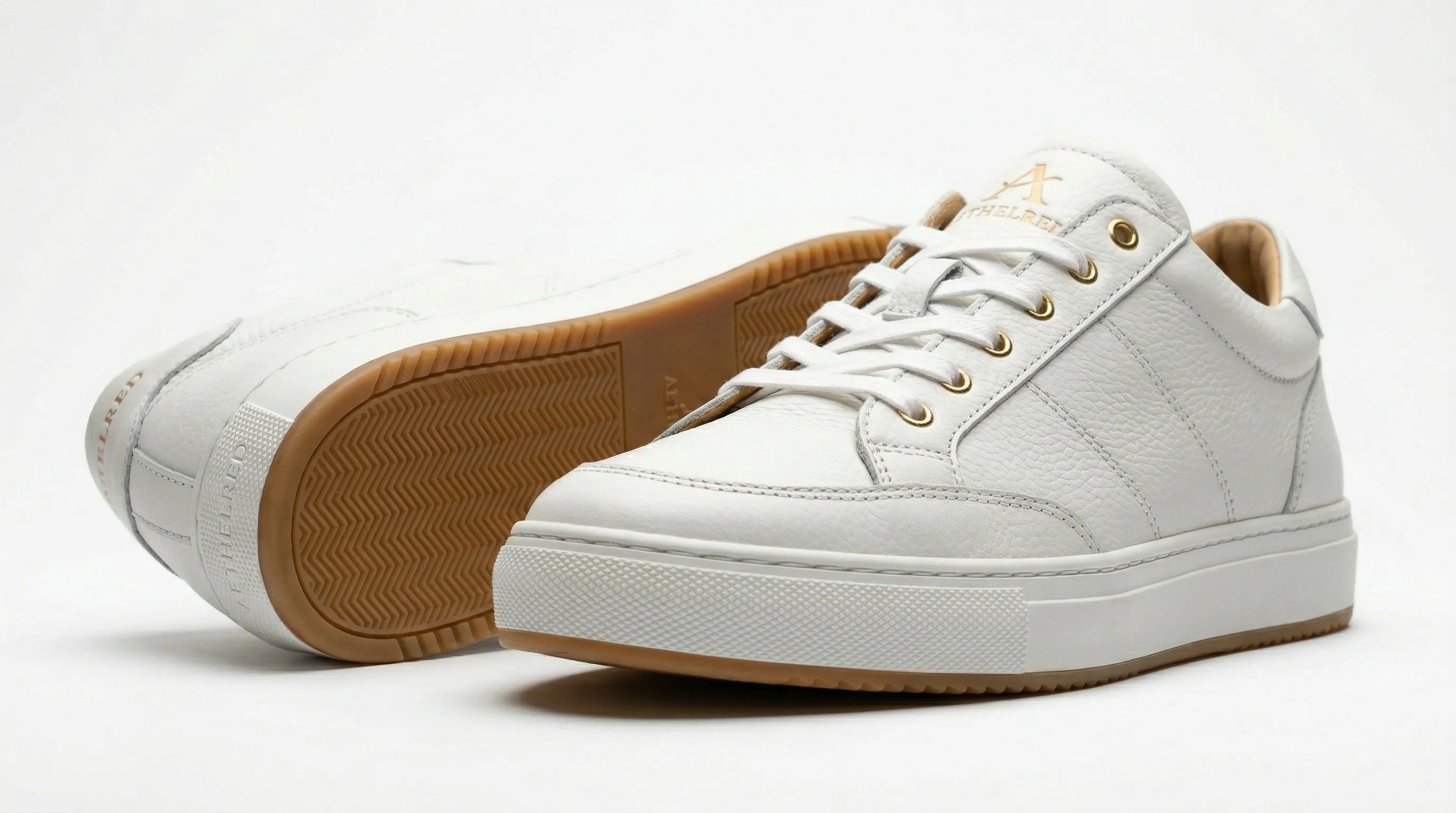
Good shoe product photography starts with a consistent evidence set: a clear three-quarter or side view, front and rear views, the sole, construction details, and an on-foot or contextual image when scale matters. Prepare each pair carefully, adapt the light to the material, and keep camera height, crop, white balance, and aspect ratio fixed across the catalog. For a large footwear catalog, the practical AI shortcut is to photograph that evidence set once per shoe or colorway, then reuse approved production direction for listing and campaign images.
What shoe photography shot list should an ecommerce page include?
A useful shoe photography shot list shows identity, construction, condition, and scale without chasing an arbitrary image count. Seven or eight image slots are a practical planning range for many footwear pages, but the right set depends on the shoe and the sales channel. A technical hiking boot needs tread and fastening details that a simple sandal may not.
| View | What the buyer can inspect | Practical setup |
|---|---|---|
| Three-quarter | Toe box, side profile, lacing, and part of the sole in one frame | Place the camera slightly above shoe height and about 45 degrees off the side |
| Side profile | Silhouette, arch, heel height, and sole profile | Keep the sensor parallel to the shoe and the camera near shoe height |
| Front | Toe shape, width, tongue, and lace pattern | Center the toe and keep verticals straight |
| Rear | Heel counter, pull tab, back seam, and rear branding | Match the camera height used for the front view |
| Overhead | Opening, insole, lace layout, and overall width | Keep the camera square to the surface |
| Sole | Tread, wear surface, branding, and material | Photograph the actual underside directly when those details matter |
| Detail | Stitching, texture, eyelets, fasteners, labels, and logos | Use a close or macro view of one specific feature per frame |
| On-foot or lifestyle | Worn scale, styling, and use context | Keep the shoe unobstructed and use a setting appropriate to the product |
The three-quarter view is often the strongest lead image because it shows several defining features at once. It is not a substitute for direct evidence of the heel, sole, interior, or small construction details. When a buyer's decision depends on a surface, photograph that surface.
For used or resale footwear, real condition photography is essential. eBay prohibits photos that do not accurately represent the item and explains that buyers use photos to “see the item's exact condition.” Its current guidance also asks sellers to show blemishes, damage, and wear in close-up rather than hiding them in a polished overview (eBay picture policy).
How should you prepare and style shoes before photographing them?
Shoe styling should restore the product's intended shape without hiding its construction or condition. Clean the pair, match the lacing, remove loose fibers, and use supports that do not show through the upper. Preparation is faster and more truthful than repairing a collapsed toe box or dirty outsole later.
- Preserve the shape. Use tissue, a shoe tree, or a fitted foam insert to support the toe box. Support tall boot shafts with a clean tube or insert so both boots stand at the same height.
- Standardize the laces. Match the lacing pattern, tension, bow size, and lace length across colorways. If fishing line or thin wire is used to position a lace, remove it cleanly in post and check its shadow.
- Control fingerprints and dust. Wear clean gloves for patent leather, polished leather, and glossy synthetic uppers. Keep a microfiber cloth, lint roller, and suitable sole cleaner on set.
- Pair the shoes deliberately. Decide whether the lead image shows one shoe or a pair, then keep spacing and overlap consistent. A second shoe should reveal useful structure rather than block the first.
- Document condition before retouching. For resale products, do not remove scuffs, sole wear, creasing, or defects that the buyer needs to see.
Invisible supports help only when they remain invisible. Before exporting, inspect translucent mesh, open sandals, lace gaps, reflective surfaces, and the floor beneath a floating shoe for visible tissue, tape, line, or implausible shadows.
How should you light leather, suede, mesh, and translucent soles?
Shoe lighting should reveal the material's real surface response, not flatten every material into the same generic studio look. Large diffused sources make glossy uppers easier to control, while more directional light helps visible grain, nap, and weave read clearly.
| Material | Lighting approach | What to check |
|---|---|---|
| Patent leather or glossy synthetics | Use large diffusion panels close to the shoe so reflections form broad gradients | Softbox edges, camera reflections, fingerprints, and clipped bright areas |
| Smooth or full-grain leather | Place a broad source off-axis so fine grain and curvature create gentle tonal changes | Hot spots that make leather look like plastic and shadows that hide stitching |
| Suede or nubuck | Brush the nap consistently, then use soft but directional side light | Patchy nap, greasy-looking bright spots, and color shifts between panels |
| Canvas or woven textile | Use even soft light for the full view and angled light for a texture detail | Wrinkles, lint, moiré, and false color from mixed light sources |
| Mesh or knit | Use clean internal support and test front light against mild backlight | Stuffing visible through the weave and lost edge detail |
| Translucent or clear soles | Light through or behind a neutral translucent surface when possible | Color contamination from the table, clipped bright areas, and hidden tread |
Gloss is defined by reflections, so the goal with patent leather is not to remove every reflection. Shape the reflections until they describe the curve cleanly. A circular polarizer may reduce unwanted glare on some surfaces, but rotating it too far can erase the specular cues that make the finish look glossy.
Material changes require a new reference. A smooth-leather photograph should not be edited and presented as suede, knit, or translucent plastic because the surface response is part of what the product is.
What camera setup keeps shoe photos consistent across a catalog?
A repeatable shoe-photography setup fixes perspective and color before it optimizes any one frame. Use a tripod, mark the shoe and camera positions, lock white balance and exposure, and record the focal length, camera height, background distance, and lighting placement for the next pair.
| Setting | Reliable starting point | Reason |
|---|---|---|
| Lens | A normal or short-telephoto focal length, with a macro lens for small details | Keeps working distance comfortable and reduces wide-angle distortion |
| Aperture | Choose enough depth of field to keep the required shoe surfaces sharp | The correct value changes with sensor size, distance, and angle |
| ISO | Use the camera's low native ISO when the tripod and lights allow it | Reduces noise and preserves surface detail |
| White balance | Set and lock a measured or manual value | Prevents the same colorway shifting between frames |
| File format | RAW for capture, then an appropriate delivery format | Leaves room for controlled color and exposure correction |
| Support | Tripod, position marks, and a remote or timer | Makes crop and perspective repeatable between Products |
Shopify's current product-photography guidance also starts at ISO 100 and recommends manual or aperture-priority control for depth of field (Shopify product photography guidance). Treat those values as a starting point, then test at the final display size. A tiny aperture can introduce diffraction, while a shallow aperture can leave the heel or toe visibly soft.
Color consistency needs a controlled viewing chain. Remove mixed daylight and artificial light, include a neutral reference during setup, calibrate the display used for approval, and compare the export with the physical colorway. A locked white balance makes a series consistent, but it does not prove that the displayed color matches the manufactured shoe.
How do Amazon, eBay, and Shopify change a shoe photography plan?
Marketplace rules should be checked before capture because the main image, resolution, background, and content rules can change the shot list. Produce a clean master set, then make channel-specific crops and backgrounds from approved files instead of forcing one export to serve every destination.
| Channel | Current planning constraint | Official source |
|---|---|---|
| Amazon | Seller University guidance calls for a pure-white main image, the actual product, no added text or watermark, at least 85% frame fill, and a shoe main image showing one shoe facing left at about 45 degrees. It recommends at least 1,600 pixels on the longest side. | Amazon Seller University listing guidance |
| eBay | At least one photo is required; images must be at least 500 pixels on the longest side, and sellers can add up to 24. Used, damaged, or defective items cannot use stock photos. | eBay picture policy and eBay photo guidance |
| Shopify | Product images can be up to 5,000 × 5,000 pixels or 25 megapixels and under 20 MB; Shopify says 2,048 × 2,048 pixels usually displays best for square product images. Consistent aspect ratios keep collection images evenly sized. | Shopify product media types |
These specifications do not decide whether a particular AI-generated image is acceptable for a listing. Platform policy, product category, country, and the image's truthfulness still matter. Check the destination's current rules and review the separate answer on whether Amazon allows AI-generated product images before publishing.
How can AI extend a footwear shot list without inventing product details?
AI is most useful in footwear catalog production when it extends documented product evidence into new, controlled shots. Give it a real view of every surface the finished image must represent accurately.
In Nightjar, save each visually distinct shoe or colorway as a Product, a reusable subject made from Product Photos and factual details. Add the clearest identity image as the Main photo, then include real side, heel, sole, label, material, and hardware views when those surfaces may appear. Multiple Product Photos give the Generation more evidence than one hero image, while a factual description and physical dimensions add context without replacing the photographs. For footwear, those Product Photos establish what is true about the shoe; the production controls determine how that shoe is photographed.
For product-only images, Framing is Nightjar's fixed control for camera angle, staging, and crop. Eye-level, Three-quarter, High angle, Low angle, Overhead, and Macro cover many footwear views. When a reusable AI person called a Fashion Model appears, a Pose controls the body arrangement and Camera Distance controls the crop; a close Camera Distance for shoes frames the feet and may intentionally leave the face outside the image. A footwear team can therefore select an overhead packshot or a feet-focused on-model crop without rebuilding those decisions in prose for every colorway.
Choose independent Single shots when the listing requires a prescribed view. Photoshoot is a cohesive four-image output choice inside the Product Photography Workflow. It keeps the product, setting, photographic look, Fashion Model choice, and written direction connected while varying angle, crop, pose, and detail, so it suits a related lifestyle or campaign set. The AI camera-angle guide explains why source coverage matters for every new view.
Nightjar's built-in visual review compares outputs with the request and references and can retry obvious failures at no extra Credit cost. That extra pass can catch a missing or substituted product, a misspelled brand or product name, a replaced main logo, or a catastrophic image defect.
How do you keep AI shoe photography consistent across products and colorways?
Consistent AI shoe photography comes from separating the shoe's identity from the reusable direction used to photograph it. Each colorway should have its own Product and verified Product Photos, while the angle, scene, light, person, crop, and delivery settings can be repeated across the range.
Nightjar calls the reusable photographic look a Photography Style. It carries camera feel, lighting, mood, and color direction. A flat color provides a clean listing background, while a reusable Background can provide a recurring Backdrop or Location. Product-only shots use Framing and, on a flat-color listing image, an optional Shadow control. On-foot shots use a Fashion Model, Pose, and Camera Distance.
A Recipe is Nightjar's saved Create-form setup for those decisions. It can store the Photography Style, background choice, Framing or Pose, Camera Distance, Fashion Model, written Custom Directions, image count, aspect ratio, resolution, and format. It deliberately excludes the Product, so an approved Recipe can carry the same production choices to the next shoe while each Product supplies its own identity and evidence.
The production arithmetic shows why that separation matters. A launch with 40 shoe designs, four colorways, and seven deliverables per colorway needs 40 × 4 × 7 = 1,120 finished images. The 160 colorway Products establish product truth; the repeatable angle, lighting, background, crop, and export decisions belong in Recipes. The team builds that production brief once and applies it across the range instead of manually rebuilding those choices for every deliverable.
Nightjar's Recolor Edit Shortcut creates color derivatives from a hex value. Compare each result with the manufactured colorway or approved swatch, and follow the fashion colorway review workflow before using it in a sale listing.
Photograph the evidence and proof shots first
Use photography to establish the shoe, then use AI to create listing, colorway, and campaign variations from that evidence. Before generating, photograph any sole, insole, label, or construction detail that no source image shows yet, and any new color, print, leather, or fabric. Keep real photographs for the actual condition of used, sample, or one-of-one pairs, for exact fit, orthopedic, protective, or performance claims, and wherever a marketplace requires original product photography.
What are the most common shoe photography mistakes?
The most damaging shoe photography mistakes hide product information or let the catalog drift from frame to frame. Most are prevented by a documented shot list and a single approved reference set before the full catalog is produced.
- Using one attractive view as the whole listing. A lead image cannot prove the sole, heel, interior, fasteners, and small details.
- Letting the shoe collapse. Unsupported toe boxes and boot shafts distort the intended silhouette.
- Changing crop or camera height between Products. Small perspective shifts become obvious in a collection grid.
- Using one light setup for every material. Gloss, grain, nap, knit, and translucent rubber need different reflection and texture control.
- Leaving auto white balance on. The same physical colorway can shift across a session.
- Retouching away condition. Resale photos should show the actual wear and defects a buyer will receive.
- Generating unseen surfaces from one source. Add real views of the sole, heel, and any detail the image will show as Product Photos first.
- Skipping the colorway comparison. Compare each generated colorway with the physical product or an approved swatch before listing it.
- Using Photoshoot for a fixed compliance list. Its four images are deliberately varied; prescribed views need separate Single shots.
- Scaling before approving one complete set. Finish and inspect one Product across listing, detail, and on-foot views before applying the direction to the rest of the catalog.
For a deeper final-pass checklist, see how to make AI product photos more professional and the guide to consistent AI product photography.
References
- Amazon Seller University: product listing image guidance - Amazon listing-image rules and shoe main-image direction
- eBay: picture policy - minimum image rules, accuracy requirements, and restrictions for used items
- eBay: adding pictures to listings - current image count, resolution, and photo guidance
- Shopify: product media types - product image size, file, and aspect-ratio guidance
- Shopify: taking product photographs - camera setup and product-photography guidance
- Nightjar - AI product photography system
Frequently Asked Questions
What is the best angle for shoe product photography?
A three-quarter view is often the most useful lead angle because it shows the toe box, side profile, lacing, and part of the sole in one frame. Pair it with direct side, front, rear, sole, and detail views wherever those surfaces affect the buying decision.
How many shoe photos should an ecommerce listing include?
Use enough photos to prove silhouette, construction, sole, condition, and worn scale; seven or eight slots are a practical plan, not a universal rule. The guide to how many product photos a SKU needs explains how product complexity and channel intent should set the count.
Can AI create another shoe angle from one photo?
AI can create a new shoe angle from one photo. In Nightjar, Framing sets the camera angle, such as Three-quarter, Overhead, or Low angle, while the Product supplies the shoe's identity. When the new angle shows a sole, heel, label, or side the original photo never captured, add a real view of that surface to the Product first. The AI camera-angle workflow covers source coverage and review.
How do you create close-up shoe details with AI?
Add a sharp real detail photo, then use Macro Framing for a product-only Single shot or a close Camera Distance for an on-foot image. The AI close-up product-photo guide covers source resolution, focus, and review.
Can AI make every shoe colorway from one photographed color?
AI can create a color derivative for every colorway from one photographed color. Nightjar's Recolor Edit Shortcut takes a hex value for each new color while the source photo helps preserve lighting, texture, and structure. Compare each result with the manufactured colorway or an approved swatch, keep each approved colorway as a separate Product, and follow the fashion colorway approval workflow.
How do you keep the same person across on-foot shoe images?
Use one reusable Fashion Model, an approved Pose, Camera Distance, Photography Style, and Location across Product Photography Generations. The guide to reusing one AI Fashion Model across a collection covers the complete consistency and review process.
Should shoe listing images use Nightjar Photoshoot or Single shots?
Use Single shots for prescribed front, side, rear, overhead, sole, or detail views because each Generation can hold one fixed direction. Use Photoshoot when you want four related lifestyle or campaign images that vary angle, crop, pose, and detail while retaining one connected creative direction.