
Quick Answer
AI eyewear photography is useful for listing images, lifestyle scenes, on-model visuals, and colorway concepts, but transparent lenses, reflective finishes, fine frame details, and prescription effects still require close human review. The safest workflow anchors each visually distinct frame as a reusable Product, controls product-only shots with Framing and Shadow or model shots with Pose and Camera Distance, and reuses the photographic direction through a Recipe without treating the Recipe as the product record.
Why is eyewear difficult for AI product photography?
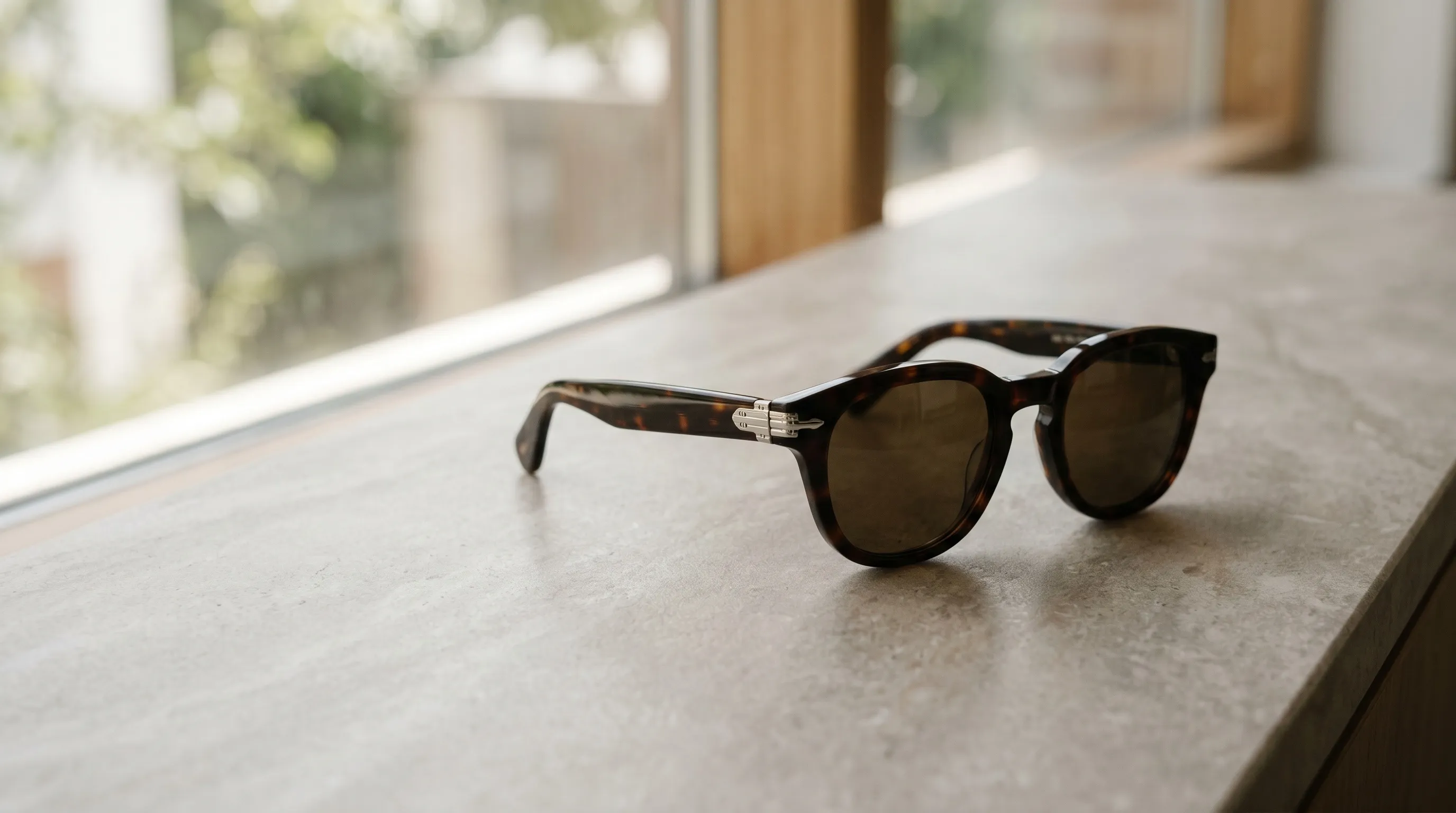
Eyewear is difficult for AI product photography because one item can combine transparency, refraction, specular reflections, tiny hardware, patterned materials, logos, and a precise relationship with the wearer's face. A tortoise acetate front, a titanium temple, and a gradient lens each respond differently to light. If one part drifts, the whole frame can look implausible or become a different product.
Traditional eyewear photography solves many of these problems by shaping reflections rather than trying to remove all of them. In a Pixelz lighting guide, photographer Krysten Leighty recommends that you "place foam board next to the sunglasses on the side opposite from the light source" to create softer, more even light. The same principle matters in generated imagery: reflections should explain the form of the product, not obscure it or contradict the scene.
AI changes the production method, not the review standard. A generated eyewear image should be checked against the real frame for lens shape, bridge construction, hinge placement, temple profile, material pattern, logos, and color. Prescription optics and measured fit should never be inferred from an attractive rendering.
Which parts of an eyewear image should be controlled separately?
An eyewear image becomes easier to direct when the product, photographic look, camera arrangement, model identity, scene, and output format are treated as separate decisions. Combining all of them in one long prompt makes it harder to identify which variable caused a poor result.
| Decision | What must stay controlled | Nightjar control |
|---|---|---|
| Product identity | Frame shape, bridge, temples, hinges, material, markings | Product with multiple Product Photos and factual details |
| Photographic look | Lighting, lens feel, mood, color treatment | Photography Style |
| Product-only arrangement | Camera angle, staging, crop, contact shadow | Framing and, on a flat color, Shadow |
| On-model arrangement | Body orientation and crop around the worn zone | Pose and Camera Distance |
| Model continuity | The person wearing the frame | Fashion Model |
| Scene | Automatic setting, flat color, or a reusable environment | Background choice, including a Backdrop or Location |
| Repeat production | The direction and delivery settings used again | Recipe |
Nightjar's Product Photography Workflow follows that separation. A Product holds the Product Photos and factual details that define one visually distinct frame, while a Recipe saves how it should be photographed, including selected ingredients, Custom Directions, and output settings. Products remember what is being photographed. Recipes remember how. A Recipe does not save the Product or generated outputs.
For a catalog, treat different colorways as separate Products when they are visually distinct. Give each Product a clear Main photo plus other views that reveal details the Main photo hides. Nightjar can also compare generated outputs with the references and request, then retry obvious eligible failures at no extra Credit cost. That review layer is useful protection, but it is not a guarantee of exact color, text, logo, material, or geometry.
The Help Desk explains how those reusable choices help maintain a consistent aesthetic across AI images.
How should AI handle clear, tinted, mirrored, and prescription lenses?
AI should treat lens behavior as a material-and-lighting problem, with the real lens appearance checked after every Generation. Clear, gradient, and mirrored lenses can all be depicted convincingly, but a plausible result is not automatically an accurate representation of the product.
| Lens type | Review closely for | Practical direction |
|---|---|---|
| Clear | Double edges, cloudy glass, missing eyes, false tint | Keep reflections restrained but present; compare the lens outline and transparency with Product Photos |
| Gradient tint | Banding, reversed gradient, uneven density | State the tint direction in Custom Directions and check both lenses for the same transition |
| Mirrored | Impossible reflections, mismatched left and right lenses, scene contradictions | Use one coherent setting and reject reflections that could not belong to it |
| Polarized | A generic dark tint presented as a technical polarization effect | Treat polarization as a product claim that imagery alone cannot verify |
| Prescription | Invented magnification, distortion, or optical performance | Use the image to present the frame, not to prove a prescription or visual correction |
A Photography Style can preserve the broad photographic language of the catalog, such as soft studio light, hard editorial reflections, or a warm outdoor treatment. In Nightjar, a custom Photography Style is created from exactly three reference Assets. It guides camera feel, lighting, mood, color, and atmosphere; it does not certify optical behavior or replace product review.
Mirrored and prescription lenses deserve a stricter approval pass. A mirror should reflect a believable environment that agrees with the Background, and prescription distortion should not be invented for dramatic effect. When exact reflected content or optical performance is commercially important, use a controlled real photograph or specialist retouching for that slot.
How can AI preserve acetate, titanium, metal, and tortoise frames?
AI preserves frame materials more reliably when the references expose the surface, edge profile, and construction details that distinguish the real product. A front-facing photo alone may hide temple thickness, hinge hardware, or the layered edge of acetate, leaving the system to guess.
| Frame material | Visual cues to preserve | Common failure to reject | Useful Product Photo |
|---|---|---|---|
| Acetate | Edge thickness, translucency, polish, bevel | Flat plastic appearance or softened silhouette | Three-quarter view with visible rim depth |
| Titanium | Thin profile, restrained sheen, fine hardware | Generic chrome finish or thickened temples | Side view with hinge and temple visible |
| Polished metal | Controlled specular lines and clean geometry | Blown highlights, warped rims, uneven bridge | Front and three-quarter views under soft light |
| Tortoise or patterned acetate | Placement and scale of the pattern | A newly invented pattern on each view | Close detail plus full frame view |
| Mixed materials | The boundary between front, hinge, and temple | Materials blending into one surface | Side and three-quarter views from the same Product |
Multiple Product Photos give the Generation more evidence than one loose reference. Add a factual Product Description for details such as material, color, construction, and distinguishing hardware, and include physical dimensions when they help establish scale. Those facts supplement the photos; they should not contradict what the photos show.
Patterned acetate needs special care. Recoloring a tortoise pattern is not equivalent to manufacturing a real colorway, because the pattern itself may be unique. Use the real variant as the Product reference whenever shoppers are expected to receive that exact pattern and color combination. The same caution applies to logos, lens etching, and fine engraved text. See the guide to preventing AI from changing a product's shape for a broader product-fidelity checklist.
How can AI create consistent on-model eyewear images without predicting fit?
AI can create a consistent visual presentation of eyewear on a reusable Fashion Model, but it should not be described as a fit-prediction or sizing system. Bridge fit, temple length, pantoscopic tilt, and prescription suitability depend on real measurements and professional fitting, not on the appearance of a generated image.
In Nightjar, a Fashion Model is a reusable AI person used to wear or appear with a product. Reusing the same Fashion Model helps the catalog feel like one session. A reusable Pose controls body arrangement, while Camera Distance controls whether the crop is close, medium, or full body within the distances that Pose supports. For eyewear, a close Camera Distance can frame the face because the product's worn zone is the face.
Use the same Fashion Model and Pose when the purpose is comparison across frames. Change them deliberately when the purpose is campaign variety. A Location controls the environment behind an on-model shot; it is separate from Pose and Camera Distance. This separation lets a team change the person, body arrangement, crop, or setting without rebuilding the full photographic brief.
A repeatable on-model setup has four parts:
- Select the Product whose photos define the exact frame.
- Choose one Fashion Model for the comparison series.
- Choose a Pose and supported Camera Distance for consistent body arrangement and crop.
- Apply the same Photography Style, Background choice, and output settings through a Recipe.
For more detail, compare the best AI Fashion Model tools, see how to reuse the same AI Fashion Model across a collection, and learn how to change a Fashion Model's Pose while preserving the product.
How should eyewear brands create frame colorways and lens-tint variants with AI?
Eyewear brands should create variants one controlled change at a time and compare every output with the physical variant or approved product specification. An explicit color direction can guide generation, but a hex value is an instruction, not proof that the rendered frame or lens matches production color.
Use the Edit Images Workflow when a real base photo needs a targeted change. Nightjar's Recolor Edit Shortcut prepares a common recoloring task, and the /color command adds explicit color direction. Keep the source Asset on the editing board, name the component being changed, and leave the frame structure, hardware, markings, and untouched materials unchanged in the instruction.
Do not use one recolored output as the only evidence for every subsequent colorway. Each visually distinct sellable colorway should become its own Product with Product Photos of the real variant when those photos exist. A Recipe can preserve the Product Photography direction used after the variant is established, but it does not save an Edit Images sequence or a list of Products.
A useful approval order is:
- Compare the frame silhouette and hardware with the source.
- Check that only the intended component changed.
- Check both lenses for matching tint direction and density.
- Compare material texture and pattern with the approved variant.
- Review color on a calibrated workflow before making an exact color claim.
The broader guide to AI product color variants explains where recoloring can replace a reshoot and where a real sample still matters. A separate comparison covers the best AI tools for product color variants, and the Help Desk explains why AI changes product color and how to keep it accurate.
What image set should an eyewear product page include?
An eyewear product page should show enough views to explain the frame's shape, construction, material, and appearance on a person. There is no universal six-image requirement, so the gallery should follow the questions a shopper needs answered and the capabilities of the storefront theme.
| Suggested gallery slot | What it answers | Suitable Nightjar path |
|---|---|---|
| Front | What is the lens and bridge shape? | Product Photography Single shot with Eye-level Framing |
| Three-quarter | How deep are the rims and how do the hinges connect? | Product Photography Single shot with Three-quarter Framing |
| Side or temple | What do the temples, hinges, and side markings look like? | Product Photography with Product Photos that expose those details plus Custom Directions |
| Material detail | What is the finish, pattern, or engraving? | Macro Framing, then Upscale only if a higher-resolution Asset is needed |
| On-model | How does the frame look on a face? | Product Photography with a Fashion Model, Pose, and Camera Distance |
| Lifestyle | How does the frame belong in the brand's world? | Product Photography with a Photography Style and Background |
Use independent Single shots when each slot needs a specified angle or crop. Use Photoshoot when the goal is a cohesive four-image set with varied angle, framing, distance, pose, and detail. Photoshoot is an output choice inside Product Photography, not a separate Workflow, and its camera decisions vary across the set rather than obeying one fixed Framing, Shadow, Pose, or Camera Distance.
A small catalog calculation shows why reusable direction matters. Forty Products with five approved gallery slots require 200 final Assets. The visual brief may be one system, but each output still needs comparison with its Product Photos. Products reduce repeated subject setup, Recipes reduce repeated production setup, and review remains an image-by-image responsibility.
What Shopify image settings work for eyewear product pages?
Shopify currently allows product images up to 5,000 by 5,000 pixels or 25 megapixels, with a file size below 20 MB. Shopify says square product images at 2,048 by 2,048 pixels usually display best, and it recommends a consistent aspect ratio for main images shown together on collection pages.
For a square eyewear catalog, a 1:1 Product Photography output at 2K is a practical starting point because it matches Shopify's square-image guidance. Nightjar can output JPEG, PNG, or WebP. Choose the format for the image content and storefront workflow, then test the result in the actual theme rather than assuming one format is always best.
Use Upscale only when the existing Asset needs a larger target. Nightjar's Upscale Workflow brings an Asset to a 2K or 4K long edge while prioritizing preservation of product content. It does not need to run when the Asset already meets the selected target. The Help Desk has more detail on choosing 2K or 4K for product images and selecting aspect ratios for ecommerce platforms.
When should an eyewear brand use AI, specialist retouching, or a studio shoot?
The right production method depends on whether the image is primarily a repeatable catalog asset, a precision correction, or a high-stakes representation of optical performance. AI is strongest when reusable direction and controlled variation matter; a studio or specialist retoucher remains appropriate when the image must document exact physical or optical behavior.
| Method | Best fit | Main advantage | Main review concern |
|---|---|---|---|
| AI product photography system | Repeat listing, lifestyle, on-model, and campaign production across a catalog | Reusable Products, visual direction, model identity, output settings, and team workflow | Product, lens, material, text, and logo fidelity still need approval |
| Multi-image AI editor | Targeted recolor, placement, reframe, or format change | Direct use of several source Assets and explicit edit instructions | The edit can spill into components that were meant to remain unchanged |
| Specialist retouching | Glare cleanup, dust removal, controlled composites, exact local corrections | Human control over a specific existing photograph | Cost and turnaround rise with the number and difficulty of corrections |
| Traditional studio | Regulated imagery, exact optical behavior, physical fit evidence, celebrity talent, or complex hero work | Direct control of the real product, light, camera, and talent | Studio logistics make frequent catalog refreshes harder to repeat |
For repeat production, Nightjar keeps the subject and direction reusable in one Team system. Product Photography handles product-only and on-model imagery, Edit Images handles targeted changes, and Upscale handles resolution. A shared Product, Photography Style, Background, Pose, Fashion Model, and Recipe make it easier for later work to follow the same visual rules, while built-in visual review adds another check for obvious failures.
Frequently Asked Questions
Can AI render realistic lens reflections and tints for sunglasses?
AI can render plausible clear, gradient, and mirrored lens treatments, but plausible is not the same as product-accurate. Compare lens shape, tint, transparency, left-right consistency, and reflected environment with the real product before publishing.
Can AI generate prescription-lens effects accurately?
Do not use generated imagery as evidence of prescription power or optical performance. If prescription distortion must be shown exactly, photograph or retouch the real lens under controlled conditions.
Can AI create on-model eyewear images without hiring a human model?
AI can create on-model product imagery with a reusable Fashion Model, Pose, and Camera Distance. The image presents the frame visually; it does not predict bridge fit, comfort, sizing, or prescription suitability.
How can an eyewear catalog keep the same person across many Products?
Reuse one Fashion Model for the comparison series, then keep the Pose, Camera Distance, Photography Style, and Background direction consistent through a Recipe. Review each output for both frame fidelity and facial continuity.
Should each eyewear colorway be a separate Product in Nightjar?
Yes, when the colorway is a visually distinct sellable item. Its own Product Photos should define the real frame and lens appearance; a Recipe can reuse how the catalog photographs it but never saves the Product itself.
Can a Recipe save an entire eyewear gallery?
A Recipe saves a reusable Product Photography setup, including ingredients, Custom Directions, and output settings. It does not save Products, generated outputs, or a multi-step Edit Images sequence, so specified gallery slots still need deliberate Generations and review.
Is Photoshoot the best choice for every eyewear PDP gallery?
Photoshoot is useful for four varied but connected images from one direction. Use independent Single shots instead when the gallery requires exact front, side, detail, or on-model slots with specified controls.
What resolution should eyewear images use on Shopify?
Shopify says 2,048 by 2,048 pixels usually displays best for square product images. A 1:1 2K output is therefore a practical starting point, with 4K reserved for Assets that genuinely need more detail and remain below Shopify's upload limits.
References
- Shopify Help Center, Product media types - Current product-image dimensions, file-size limits, formats, and square-image guidance
- Pixelz, Photographing highly reflective products - Sunglasses lighting and reflection-control technique
- Nightjar - AI product photography system