
Why Most Light Box Guides Won't Tell You the Full Story
Here is something you will notice if you search for light box reviews: almost every article is trying to sell you one. Affiliate links pepper the recommendations. The tutorials assume a light box is always the right choice. Nobody mentions what happens when you outgrow it.
This matters because product photos have two jobs: show what the buyer will receive and present it clearly enough to judge. A light box may help with the second, but the right setup depends on the material, required views, and how often you repeat the work. Is a small tabletop box actually the answer?
Sometimes yes. Sometimes no.
Light boxes have legitimate uses for beginners, small catalogs, and certain product types. They also have real limitations that sellers discover only after investing time and money. This guide covers both sides honestly. You will learn when a light box makes sense, when it becomes a bottleneck, and what alternatives exist when you need to scale beyond what physical equipment can handle.
For context, I will also cover modern AI tools like Nightjar for sellers who need consistency across large catalogs or want lifestyle images that light boxes simply cannot produce.
What Is a Light Box for Product Photography?
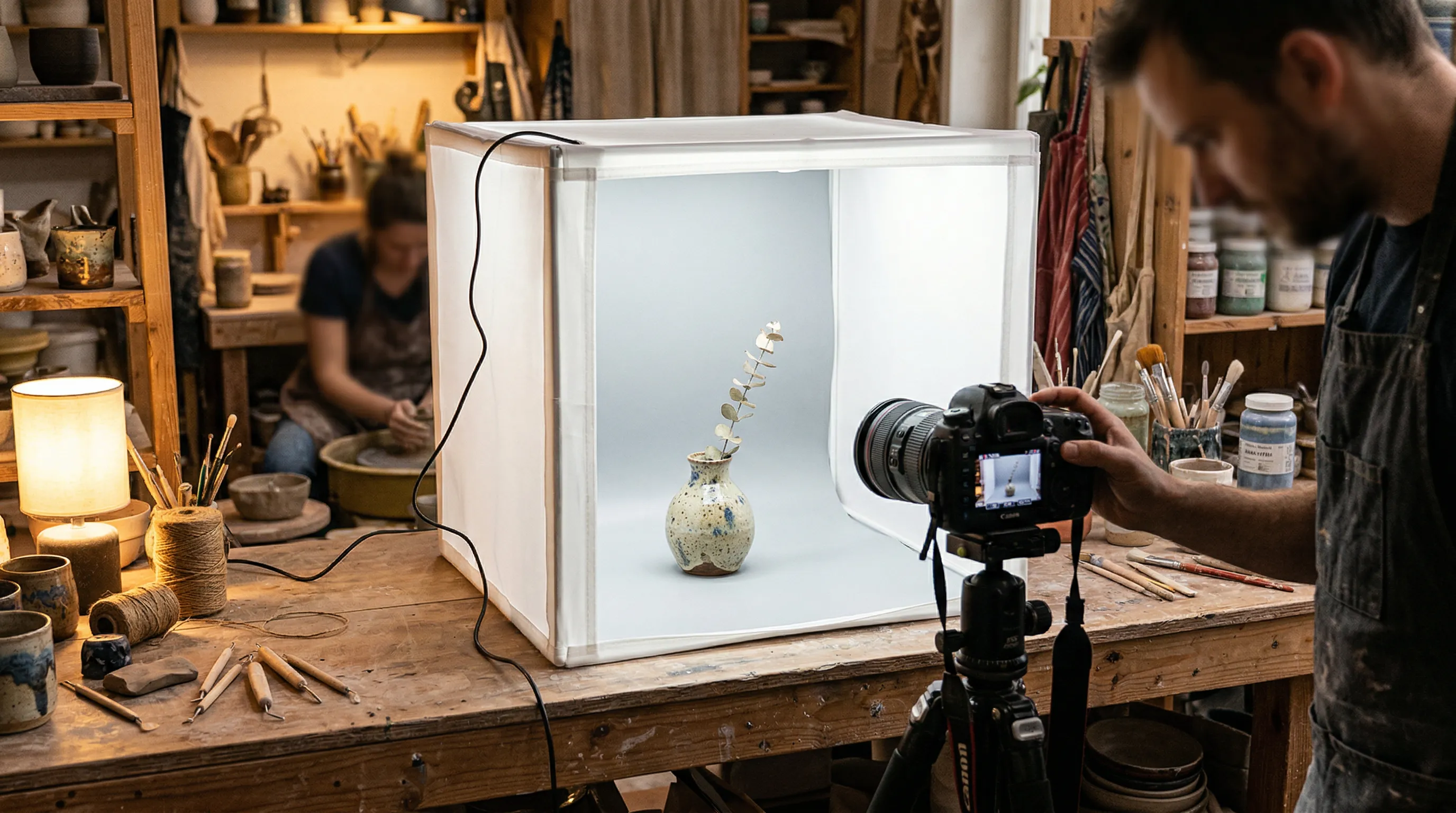
A light box, sometimes called a photo light box, light tent, or portable photo studio, creates a controlled space around a product. A fabric tent uses translucent sides to diffuse external lights; other enclosures contain their own lights and reflective or diffusing surfaces. A tabletop sweep kit provides a related setup without a full cube around the subject.
The physics are simple. Hard light creates harsh shadows. Soft light wraps around objects more gently. The translucent walls scatter incoming light, so instead of a single directional source creating strong shadows on one side, light arrives from multiple angles simultaneously. The result is even illumination with minimal shadows.
Most light boxes include a curved white backdrop, sometimes called a cyclorama, that eliminates the hard line where the floor meets the back wall. This creates the seamless white background you see on Amazon, eBay, and Shopify listings.
How Light Boxes Create Diffused Lighting
The typical setup places LED panels or strip lights outside the box, angled toward the translucent walls. As light passes through the material, it scatters. Think of it like the difference between direct sunlight and overcast sky. Direct sun is harsh. Clouds act as a giant diffuser, spreading light more evenly.
Some photographers add small reflectors inside the box to bounce light back onto the front of products, filling any remaining shadows. The combination of surrounding diffused light plus strategic reflection can produce clean images suitable for marketplace listings.
Who Uses Light Boxes?
Light boxes appeal to a specific audience. Ecommerce sellers on Amazon, Etsy, and eBay use them for catalog images. Small business owners photograph their own products rather than outsourcing. Hobbyists and craft sellers test whether professional photography is worth further investment.
The common thread: smaller products that fit inside the box. Jewelry, watches, cosmetics, small electronics, and similar items are the sweet spot. Choose the enclosure around the product and the required camera angles; compact tabletop units are not the only size available.
Why Light Boxes Work (When They Work)
Before discussing limitations, light boxes deserve fair treatment. For the right situation, they solve real problems.
A beginner with no photography experience can achieve consistent, repeatable results without understanding complex lighting setups. There is no need to learn about key lights, fill lights, rim lights, or light ratios. Set up the box, turn on the LEDs, shoot. The learning curve is gentle.
The cost can be accessible if you already own a suitable phone or camera. A basic enclosure, lighting and support may fit a modest equipment budget; buying a camera as well is a different total. The complete examples below show why the box price alone is not the setup cost.
A light box can also help with reflective objects by replacing a cluttered room with large, controlled surfaces. That is useful for jewelry, watches and polished metal. It does not remove the need to shape reflections: glass may need dark edge cards, and gems or brushed metal may lose important texture under overly uniform light.
Best Use Cases for Light Boxes
Light boxes make sense when:
- Your products share a size and lighting treatment that the box can accommodate
- You are testing whether product photography is worth professional investment
- You shoot highly reflective products that need controlled reflections
- You enjoy the hands-on process and have time to invest
- Your products physically fit within size constraints
A seller with 20 SKUs refreshing images quarterly may need only a simple box. A 500-SKU operation needs to evaluate handling time, repeatable positioning and possibly capture automation; the catalog count does not disqualify enclosed lighting.
What to Look for in a Light Box
If you decide a light box fits your situation, quality matters. Cheap units with poor LEDs will cost you time in post-processing.
| Feature | Why It Matters | What to Look For |
|---|---|---|
| CRI Rating | A useful screen for light-source color rendering | Look for a documented high-CRI source; still check actual product colors |
| Size | Determines what products fit | Match to your largest product + 4-6" clearance |
| LED Brightness | Exposure flexibility | Dimming and enough light for your box size, aperture and shutter speed |
| Color Temperature | Repeatable white balance | Matched sources with a stated temperature; avoid mixed room light |
| Shooting Windows | Angle flexibility | Access for the front and overhead views your shot list needs |
CRI, or Color Rendering Index, compares a light's rendering of test colors with a reference illuminant at the same color temperature. A documented CRI of 90 or above is a useful buying filter, but CRI is not a guarantee of camera color accuracy. White balance, exposure, the product's pigments and the light's spectrum also matter. Do not assume paying a little more eliminates editing.
The box should make your setup easier to repeat, not hide which light is doing what. Before buying, check whether the lights can be dimmed or repositioned and whether the backdrop is replaceable.
Best Light Boxes by Price Point (2026)
Here are current manufacturer examples, checked in September 2026. They illustrate different setups rather than a hands-on ranking; prices exclude any shipping, tax or accessories not in the listed package.
Budget: Start with the Required Kit, Not the Lowest Box Price
At the low end, compare the exact model's internal dimensions, included lights, backdrop, power supply and shooting access. A tent without lights is not equivalent to an illuminated kit. If the listing does not identify the light specifications or the actual product dimensions, do not infer them from another model by the same brand.
A DIY enclosure is also a reasonable low-cost way to learn whether the required views and reflections work in an enclosed space; instructions are below.
Compact Foldable: Foldio3
The Foldio3 base unit is listed at $139, with an open size of about 24 x 23 x 25.8 inches and manufacturer-stated CRI 95+ lighting. Halo Bars are an additional lighting option, not automatically part of the base price.
For overhead work, note the actual setup: Orangemonkie's support instructions say to flip the Foldio3 so its back becomes the bottom. The top-window arrangement belongs to the Foldio2 Plus; do not buy the Foldio3 expecting that opening.
Rigid Tabletop Sweep: MyStudio MS20
The MyStudio MS20 is listed at $279. Its 20 x 20 x 12-inch rigid sweep, overhead lighting and bounce cards are a different arrangement from a fabric cube. The rigid backdrop is useful when wrinkles and repeated setup are the problem; check that the available depth fits your product and framing.
Automated Studio: Ortery
Ortery's enclosed product-photography systems serve a different job: repeatable capture with software control. Larger systems such as the PhotoSimile 430 can accommodate much larger subjects than a tabletop tent. Request a quote and confirm camera compatibility, subject size and workflow requirements. Evaluate the complete capture workflow, not just the enclosure price.
Size Guide
| Light Box Size | Best For |
|---|---|
| Small (8-16") | Jewelry, watches, cosmetics, small electronics |
| Medium (20-32") | Shoes, handbags, toys, small appliances |
| Large (35"+) | Home decor, larger electronics, flat-lay clothing |
When selecting size, add 4-6 inches of clearance beyond your largest product in each dimension. Products touching the walls or backdrop create shadows and reflections that defeat the purpose of diffused lighting.
The Limitations Nobody Mentions in Light Box Reviews
This section separates an honest guide from an affiliate-driven roundup. Light boxes have real constraints that sellers discover after investing time and money.
Flat, Boring Lighting
The same property that makes light boxes easy for beginners, even diffusion from all directions, creates a visual problem. Products look flat. Shadows are what give objects dimensionality. When you eliminate nearly all shadows, products can appear two-dimensional in photos.
Professionals may use open lighting for greater placement freedom, or enclosed and automated systems for repeatable catalog work. Ortery's product range is one counterexample to the claim that professionals do not use light boxes. The relevant question is whether the enclosure lets you create the lighting this product needs.
For marketplace listings where clean white backgrounds are the primary requirement, this may be acceptable. For brand-building images where products should look premium and desirable, flat lighting works against you.
Size Constraints
A compact box has a real working-size limit: allow room for the product, background, flags and the camera's view. The advertised external width does not tell you how much usable background will remain in the finished frame.
Large enclosed studios do exist, including systems for apparel on people or mannequins. They need space and a different budget. For furniture or other oversized subjects, an open studio with large diffusion panels may be more practical than a portable tent.
No Lifestyle or Contextual Images
A tabletop box is best suited to controlled backgrounds and small sets. You can add colored sweeps or props, but it cannot reproduce every context at full scale.
Secondary images may need context: a coffee maker on a kitchen counter, running shoes on a trail, or jewelry worn by a person. A small enclosed set cannot supply those actual environments. A turntable can add real rotational views, but a 360-degree spin is different from a lifestyle scene.
For contexts beyond the box, use a separate physical setup or generate a reviewed scene from trustworthy product photos. Keep the clean source shot when it best communicates the item's actual details.
The Scalability Problem
The handling work is what grows with a catalog: position the product, capture the required angles, review, and move to the next item. Similar products and a fixed setup can be batched; different sizes and materials need more adjustment.
For an illustrative planning rate of 20–35 minutes per product—including all required views and basic editing—100 products would take about 33–58 hours. A thousand would take about 333–583 hours. These are arithmetic scenarios, not measured light-box benchmarks. Time a representative mix from your catalog before using either number as a production commitment.
A turntable, tethered capture, positioning guides or an automated studio may reduce repeated handling. The remaining question is whether you need actual photographs of those views or new creative treatments based on an existing source.
Inconsistency Across Sessions
A standardized setup reduces drift, but only if it includes the variables that affect the picture. A box alone does not record them for you.
Control ambient light, use consistent exposure and white balance, mark product and camera positions, and save a reference frame. If a light or backdrop is replaced, compare the next batch with the reference before proceeding.
Customers notice inconsistency, even if they cannot articulate why. Some product images look professional. Others look slightly off. The catalog lacks visual cohesion.
The Pure White Background Challenge
Marketplace requirements often specify pure white backgrounds. Amazon's main image requires RGB 255,255,255. Getting there is harder than it appears.
A white sweep may photograph as off-white because it is not lit or exposed identically to the product. A background that looks white at normal viewing size may still contain tinted pixels. Inspect the delivered file against Amazon's current requirements instead of assuming the material's color guarantees compliance.
Achieving true pure white requires either precise lighting ratios that overexpose the background while properly exposing the product, or post-processing to push the background values to pure white. Many sellers unknowingly submit off-white images.
Lighting flexibility varies by box. Fixed strips may give less room to shape a reflection than separate lights and diffusion panels. Look at the exact enclosure's controls rather than treating every light box as the same setup.
The Real Cost of Light Box Photography (Time Included)
Equipment cost is the visible expense. Time is the hidden one. Most light box content focuses on the former and ignores the latter.
Equipment Costs (The Visible Part)
Build the equipment budget from what the kit already includes. Add missing lights, a suitable backdrop and a stable phone or camera support; do not charge for the same lighting twice. The verified examples above range from a $139 foldable unit to a $279 rigid tabletop kit, before optional items. An already-owned camera is an explicit assumption, not a free new purchase.
For the worked calculation below, assume $150 of total equipment allocated to the catalog. Replace that assumption with your actual spend.
Time Costs (The Hidden Part)
For illustration, allocate 20–35 minutes per product for the whole set of required photos, covering setup, repositioning, capture, review and basic editing. This is a planning assumption, not a measured average. If your editing time is per image, multiply it by the image count before adding it; do not silently treat it as per product.
At an assumed $25/hour opportunity cost, that is about $8.33–$14.58 per product in labor.
True Cost by Catalog Size
| Catalog Size | Equipment Total | Labor at $25/hour | Total Cost | Per Product |
|---|---|---|---|---|
| 25 products | $150 | $208–$365 | $358–$515 | $14.33–$20.58 |
| 100 products | $150 | $833–$1,458 | $983–$1,608 | $9.83–$16.08 |
| 500 products | $150 | $4,167–$7,292 | $4,317–$7,442 | $8.63–$14.88 |
Totals are rounded; per-product figures use unrounded calculations. Editing is already inside the labor assumption, not an extra charge. Equipment cost per product falls as the catalog grows, while assumed labor stays constant.
For 100 products with five photos each, this model is still about 33–58 hours, because the rate was per complete product set. If you instead measure 20–35 minutes per image, it becomes 167–292 hours. That distinction matters more than the price of the enclosure.
Compare equivalent deliverables before choosing an alternative: generated scenes still need source photos, selection and accuracy checks, while a photographer's quote may already include retouching.
When to Skip the Light Box: Modern Alternatives
Not everyone needs to skip light boxes. But for certain situations, better options exist.
Professional Photography Services
Professional photography is worth pricing when the product or campaign needs specialist lighting, actual fit, or a high-stakes hero image. Get a quote for your shot list rather than applying a universal per-image rate; material complexity and what is included can change the cost substantially.
The trade-off is control and expertise against cost, sample handling and coordination. A repeatable studio arrangement can serve ongoing catalogs well; it is not inherently impractical beyond a particular SKU count.
AI Product Photography Tools
AI product photography takes a different route: use clear source photos to generate a new presentation. It can create contextual scenes and request different framing, but an unseen angle is not evidence of the product's real back, underside or construction.
This approach makes sense when you already have good product references and recurring creative work is the bottleneck. More than 10,000 brands use Nightjar. The relevant fit is the workflow—not whether the catalog has crossed 50 products.
| Need | Nightjar | Light Box | Professional Studio |
|---|---|---|---|
| Cost basis | Plan spend; for Single shots, 1 Credit per completed 1K/2K image, 2 per 4K; preparation and review | Equipment and measured labor | Quote for the brief |
| Lifestyle context | Generated scenes from product references | Limited to sets that fit | Physical locations and sets |
| Additional views | Supply critical views; generated unseen details need checking | Reposition the real product | Photograph the required views |
| Repeated direction | Saved Styles and Recipes | Marked setup, reference frames, fixed camera/light settings | Documented lighting and art direction |
| Pure white | Request white, inspect output, edit if needed | Light or edit the background, inspect output | Include the requirement in delivery checks |
| Physical capture | Source photos still needed | Direct capture | Direct capture |
How Nightjar Addresses Light Box Limitations
For sellers whose recurring need is new scenes rather than more source capture, Nightjar addresses several light-box constraints.
Lighting direction: A Photography Style carries the intended camera feel, light and mood into generated images. Choose a treatment with the shadow and highlight structure your product needs.
Size constraints: A generated scene does not need a physical enclosure around the item. The source still needs to show its proportions and details clearly; a poor photo does not become reliable merely because the subject fits on screen.
Lifestyle scenes: Backgrounds and scene generation let a clean product source support kitchen, room or outdoor treatments without building those sets for each variation.
Repeated production: Save an approved setup so the next product does not start with a blank brief. Source preparation, selecting useful outputs and product checks remain real work.
Shared direction: A Photography Style carries lighting and mood; Framing guides product-only camera direction and crop. A Recipe saves those choices with the Background and output settings. This reusable setup keeps the catalog's intended direction available across sessions without promising identical rendering.
Background preparation: Choose a solid white Background color in Create, then check the delivered background and product edges against the channel's requirements. Use precise editing if the generated result is only near-white.
The useful hybrid is straightforward: keep the light box for clear, repeatable physical source photos, then reuse an approved Recipe for suitable generated scene variants. Select the Product and critical Additional Photos for each run; a Recipe does not save those inputs or control later Edit operations.
How to Build a DIY Light Box (Budget Option)
For sellers testing whether product photography is worth any investment, a DIY light box costs almost nothing.
Materials Needed
- Large cardboard box
- White tissue paper or diffusion material
- White poster board (backdrop)
- Clear tape
- 2–3 cool-running LED lights, with safe clearance from the box and diffusion material
If you already have the lights and materials, the extra outlay may be small. Otherwise price those items before assuming DIY is cheaper than a complete kit.
Basic Steps
Cut windows in the sides and top of the box, leaving a frame of cardboard around each opening. Tape diffusion material (tissue paper works) over the windows. Insert white poster board curved from the back wall to the floor, creating a seamless backdrop. Position cool-running LED lights outside each window, angled inward and away from contact with paper or cardboard. Do not use hot bulbs against flammable diffusion, and do not leave the setup unattended. Place your product inside and shoot through the front opening.
The result is functional, if imperfect. DIY boxes produce images good enough to test whether your products photograph well, whether customers respond to better imagery, and whether photography fits your workflow.
DIY Limitations
DIY constructions are fragile. Cardboard warps, tape fails, tissue paper tears. The build degrades over time and requires periodic rebuilding.
Repeatability depends on the construction and setup. Secure the diffusion, mark camera and product positions, and keep a reference frame. Replace torn or discolored material before it changes the next batch's light.
A DIY light box is useful for learning and may remain adequate for occasional work. Upgrade when durability, setup time, lighting control or required views become an actual constraint—not because a fixed number of months has elapsed.
Light Box vs. Alternatives: Which Is Right for You?
The right choice depends on your specific situation. Here is a decision framework.
| Your Situation | Option to Consider | Why |
|---|---|---|
| Small products, beginner, tight budget | DIY or a basic light box | An accessible way to learn controlled capture |
| Similar products and recurring listing views | A repeatable light-box or tabletop setup | Real views can be batched with marked positions |
| High-volume physical capture | Automated enclosure or studio workflow | Evaluate handling and capture throughput against a quote |
| Good source photos, many scene variations | AI tools such as Nightjar | Reuse creative direction without physically staging each scene |
| Lifestyle images needing real people or demonstrable use | Professional or DIY location photography | Records actual fit, interaction and surroundings |
| Highly reflective products | Controlled lighting, sometimes a box, plus careful review | Reflections need shaping, not just diffusion |
| High-stakes hero or specialist detail | Professional photography | Match expertise to the actual material and brief |
Light boxes are legitimate production tools, not a phase every serious seller must outgrow. Keep one while it serves the required photographs efficiently. Add an open set, a specialist photographer, or generated scene production when the image brief calls for it.
Frequently Asked Questions About Light Box Photography
Is a light box worth it for product photography?
Yes when it gives your products suitable, repeatable lighting with manageable handling time. Catalog count alone does not decide. Compare the required views and measured labor with a tabletop setup, studio quote or source-photo-plus-AI workflow.
What size light box do I need for product photography?
Start with enough clearance around the largest product for framing, backdrop and light shaping; 4–6 inches is a useful initial allowance, not a guarantee. Check the usable interior and camera angles. Small boxes suit jewelry and cosmetics, medium ones shoes or bags, and larger enclosures larger goods.
Do professional photographers use light boxes?
Some do, including automated enclosed studios for catalog capture. Others prefer independent lights and modifiers for more freedom. The difference is the control required by the subject and shot list, not whether the equipment is “professional.”
How do I get a pure white background with a light box?
Light the backdrop evenly without clipping the product's highlights. Inspect the delivered pixels and use selective background editing where needed; raising exposure everywhere can erase product detail. AI output also needs the same final check.
Can I make my own DIY light box for product photography?
Yes. Use a cardboard frame, suitable white diffusion and a curved poster-board backdrop, with cool-running LEDs safely separated from flammable materials. Cost depends on what you already own. Keep the setup if it remains stable and produces the required views.
What is CRI and why does it matter for light boxes?
CRI compares color rendering against a reference illuminant at the same color temperature. A documented high-CRI light is useful, but it does not certify the photograph's color. Use consistent light and white balance, then compare the photo with the product.
How long does it take to photograph products with a light box?
Measure a representative set, including setup, all required views, editing and review. This guide's 20–35 minutes per product is an illustrative budget, not a benchmark. If you use AI for new camera angles, provide a reference for important unseen details rather than treating generated geometry as a substitute for capture.
References
- Amazon Seller Central - Product image requirements
- Shopify Help Center - Product media specifications
- GrabOn - Product photography statistics
- Shopify Blog - Lifestyle photography guide
- Iconasys - Light box analysis
- Pro Photo Studio - Lightbox vs professional lighting comparison
- Imagen AI - Light box photography tips
- Hippist AI - AI vs traditional photography costs
- Waveform Lighting - CRI technical explanation