
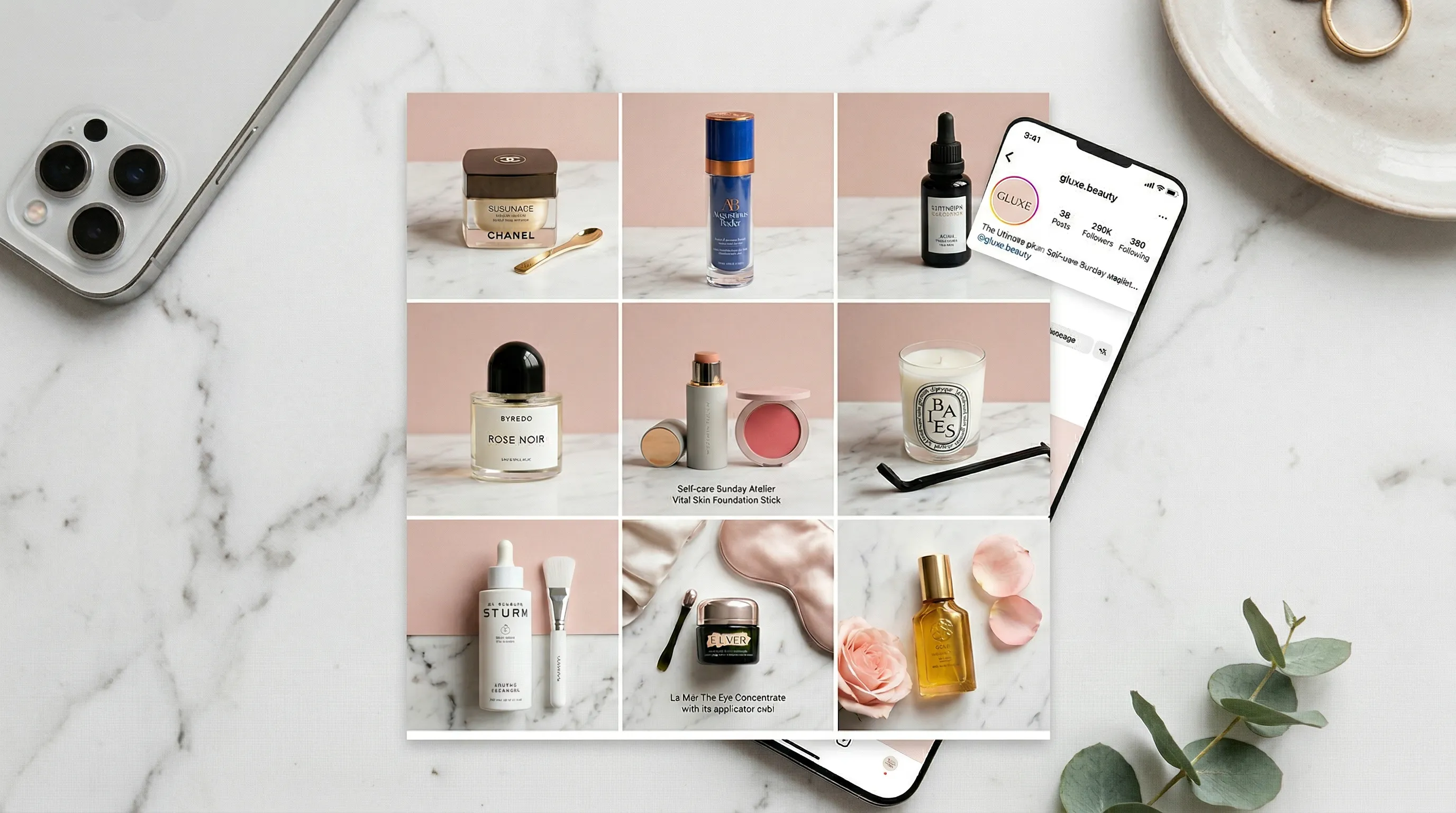
Quick Answer
Create consistent AI backgrounds for Instagram by separating five decisions: the product evidence, the scene, the photographic look, the arrangement, and the output ratio. Reuse the same approved scene and look across products, but review each result for product accuracy, lighting, scale, crop, and platform presentation. In Nightjar, saved Backgrounds, Photography Styles, and Recipes make that production direction reusable instead of rebuilding it for every post.
Consistency is a system, not a prompt
Consistent Instagram product photos repeat a visual system, not just a background prompt. Ask for “a warm marble counter” twice and the generator can still change the table angle, light direction, product scale, crop, and shadows because those decisions were never fixed; across a grid, the result reads like a collage rather than a catalog. The practical rule is to define each layer separately, then reuse the approved combination.
Use this five-layer check:
| Layer | Decision to keep stable | What to review |
|---|---|---|
| Product | Approved views, shape, color, material, labels, dimensions | The generated item still represents what is sold |
| Scene | Flat color, repeatable surface, or repeatable environment | Perspective, props, horizon, and product contact feel related |
| Photographic look | Lighting, camera feel, mood, texture, and palette | New images belong beside earlier posts |
| Arrangement | Product-only camera angle and crop, or model pose and camera distance | The subject occupies the frame in a predictable way |
| Delivery | Feed, carousel, Story, or Reels ratio | Important details survive the final crop and interface overlays |
An AI-generated scene is still generative. Reusing the same settings can keep the direction coherent, but it does not preserve every background pixel. If one approved scene must remain identical, use a manual template or composite and place each product into that fixed file.
Which Instagram image sizes should product photos use?
Instagram feed photos can retain their original shape from 1.91:1 landscape through 3:4 portrait, with uploads displayed at up to 1080 pixels wide. At that width, the tallest supported feed photo is 1080 × 1440 pixels. Instagram says a supported upload can “keep that photo at its original resolution,” while an unsupported ratio may be cropped to fit. Instagram documents the current photo-resolution range in its Help Center.
The best ratio depends on the placement and the planned frame, not on one universal Instagram rule:
| Placement or use | Useful ratio | Practical reason |
|---|---|---|
| Tall feed photo | 3:4 | Uses the tallest supported portrait shape for a standard feed photo |
| Portrait feed or carousel | 4:5 | Gives the product a tall frame and remains a useful cross-platform size |
| Square catalog grid | 1:1 | Keeps a simple, uniform crop for square-first layouts |
| Stories | 9:16 | Fits a full-screen vertical canvas |
| Reels creative | 9:16 | Meta recommends vertical 9:16 creative with key elements inside the safe zone for Reels ads |
Keep the product, logo, and essential copy away from the extreme edges. Feed previews, profile views, Story controls, and Reels controls do not all expose the same area. Generate at the intended ratio when possible; expanding a finished square image later can invent scene details or make the product look too small.
Four AI background choices, four different jobs
Choose an Instagram product-photo background according to what the post must communicate. A flat color gives a clean product-first image, a repeatable surface establishes a recognizable set, and a broader environment supplies context. A specific source photograph requires a placement or compositing workflow rather than a loosely described scene.
| Background approach | Best use | Main risk |
|---|---|---|
| Flat color | Product-first feed posts, collection grids, simple carousels | Small color or edge errors can look obvious on a clean field |
| Repeatable surface | Beauty, food, accessories, packaging, and tabletop series | Surface angle and contact shadows can drift |
| Repeatable environment | Lifestyle posts, seasonal campaigns, and on-model imagery | Props, perspective, and environmental details may vary |
| AI-selected setting | Early concept exploration or a one-off post | The next product may receive a different visual world |
| Fixed manual composite | Approved campaigns that require unchanged scene pixels | Requires masking, placement, and retouching work |
In Nightjar, a reusable image-backed scene is called a Background. A Backdrop is the exact surface behind or beneath the subject, while a Location is the wider environment in which the shot takes place. For a generated lifestyle scene from a clean source image, the white-background-to-lifestyle workflow explains when to choose a Location and when to use Product Placement with a specific scene.
How can I create a repeatable Instagram background workflow in Nightjar?
Nightjar creates a repeatable Instagram background workflow by giving the product, scene, photographic look, arrangement, and delivery their own controls. This makes the approved direction visible to a Team and reusable across later products.
For brands building a recognizable Instagram series, a repeatable visual system matters more than any single impressive background. In Nightjar, the Product carries the approved subject evidence while the saved Background, Photography Style, and Recipe carry the Instagram series direction. Another Team member can therefore apply the same brief to the next product without reverse-engineering the previous post.
- Build the product evidence. Create a Product, Nightjar’s reusable record for one visually distinct sellable item. Add clear Product Photos from useful angles, plus a factual description and physical dimensions when they help establish material, construction, or scale.
- Choose the scene. Open Product Photography, Nightjar’s Create Workflow for listing, lifestyle, and on-model product imagery. Choose a flat color, a saved Backdrop, a saved Location, or leave the setting open for Nightjar to choose from the request.
- Set the photographic look. Select a Photography Style, reusable direction for camera feel, lighting, mood, color, texture, and atmosphere. A Team can choose a curated option or create a custom Photography Style from three brand reference Assets.
- Control the arrangement. For a product-only shot, choose Framing for camera angle, staging, and crop; a flat-color product shot can also use Shadow for the contact treatment. When a Fashion Model appears, use a reusable Pose plus Camera Distance instead.
- Choose the destination ratio. Select 3:4, 4:5, or 1:1 for a feed image, or 9:16 for a Story, Reels cover, or vertical source asset. Also set resolution and JPEG, PNG, or WebP output.
- Save the direction. Save a Recipe, Nightjar’s reusable Create-form setup. A Recipe stores the scene choice, Photography Style, arrangement, Custom Directions, and output settings, but not the Product, so the same production direction can be applied to the next item.
- Review the series together. Compare several outputs at grid size and full size. Regenerate an outlier instead of allowing one mismatched image to become the new visual rule.
Nightjar’s built-in visual review can retry obvious eligible product substitutions, omissions, broken readable text or brand marks, and severe image failures without another user Credit. That provides another review layer, but a person still needs to approve fine product details, claims, crop, scale, and brand fit.
One visual direction, several Instagram canvases
One AI background setup can serve several Instagram placements when the reusable direction stays fixed and the framing is adapted for each canvas. Do not stretch or crop one finished image blindly. Re-run or reframe the approved concept so the product keeps an intentional size and the generated edges still make visual sense.
Start with a reusable scene and Photography Style, then save separate Recipes for recurring delivery formats. A feed Recipe might use 4:5 with room for a short caption overlay. A Story Recipe can use 9:16 with clear space near the top and bottom for interface controls. For a carousel, keep the ratio and core lighting consistent while varying detail, angle, or context from slide to slide.
Nightjar’s Photoshoot option inside Product Photography creates four related images with varied angles, crops, poses, and details while keeping the subjects, background choice, Photography Style, Fashion Model choice, and Custom Directions connected. It is useful for one cohesive carousel or a small campaign set. For further ideas, see the guide to creative AI product shots for social media.
How should I review an AI product background before posting it on Instagram?
Review an AI product background as both a photograph and a product claim. A polished scene is unusable if the item’s shape, quantity, color, material, label, included parts, or apparent size no longer matches what a buyer receives.
Check these areas before publishing:
- Product identity: Compare shape, proportions, color, materials, text, logos, closures, and included pieces with the approved Product Photos.
- Grounding: Inspect contact points, shadow direction, reflections, transparency, and whether the product appears to float or intersect with the surface.
- Scene logic: Check perspective, horizon, prop scale, occlusion, light direction, and environmental color cast.
- Crop and safe areas: Preview the actual Instagram placement and confirm that interface elements or alternate previews do not cover key details.
- Series consistency: View the image beside recent posts. A background can be attractive on its own and still break the feed’s visual language.
- Truth and rights: Remove invented product claims, unauthorized artwork, misleading results, or a real person’s likeness when you lack permission to use it.
Meta’s AI-labeling approach continues to change. Meta says it can apply AI information labels when it detects industry-standard signals in generated or significantly edited media, including third-party AI in ads. Check the current publishing and advertising rules for the exact placement before posting; Meta explains its current AI transparency approach for ads.
Common AI background consistency failures
The most common mistake is trying to carry the full art direction in one prompt. That makes every new image dependent on a fresh interpretation. Separate reusable decisions from one-off directions, then change only the variable that the next post actually needs.
| Mistake | Better practice |
|---|---|
| Rewriting the scene prompt for every product | Reuse one approved Background or fixed composite |
| Letting lighting change with each scene | Reuse one Photography Style and review light direction |
| Treating crop as part of the aesthetic | Control product-only Framing or model Pose and Camera Distance separately |
| Using one finished crop everywhere | Prepare the image for each placement’s ratio and safe area |
| Judging only one image at full size | Review the full series as a feed or carousel |
| Assuming repeated settings guarantee accuracy | Compare every output with the real product |
| Adding prices or exact offer copy during generation | Add critical typography in a design tool after the image is approved |
The goal is controlled variation. Keep the product evidence and visual rules stable; vary the props, angle, crop, or seasonal detail deliberately. For a deeper catalog workflow, use the same-background consistency guide and the guide to consistent AI product photos.
Frequently Asked Questions
What is the best AI background approach for Instagram product photos? The best approach depends on the series. Use a flat color for clean product-first posts, a reusable Backdrop for one recognizable surface, a reusable Location for lifestyle context, or a fixed manual composite when every scene pixel must remain unchanged.
Can AI keep the same background across different products? AI can keep a shared background direction across products, but generative details may still move. Reuse the same Background, Photography Style, arrangement controls, and output settings, then review the images together for scene and lighting drift.
What size should an Instagram product photo be? For a tall feed image, 3:4 at 1080 × 1440 pixels is within Instagram’s documented range. A 4:5 or 1:1 image also works well when that crop suits the product; use 9:16 for full-screen vertical placements such as Stories and Reels creative.
Can I turn a white-background product photo into an Instagram lifestyle image? Yes. Use the clean photo as product evidence, then generate a Location around it or place the product into a specific scene. Add other product views or dimensions when scale, labels, transparency, or hidden sides matter.
How do I keep lighting consistent across a series of AI product photos? Reuse a photographic direction instead of repeating a loose lighting prompt. In Nightjar, a Photography Style stores the camera feel, lighting, mood, color, and texture; the consistent-lighting guide covers the review details.
Should I use the same crop for every Instagram product post? Use a consistent crop system, not necessarily one identical crop. Product size, placement, and negative space should feel related, while feed, carousel, Story, and Reels canvases may need different ratios.
Do I need to label AI-generated product photos on Instagram? Meta’s labels and disclosure requirements vary by media type, placement, detected technical signals, and region. Review Meta’s current guidance before publishing, and disclose the use of AI whenever a platform, law, agreement, or the risk of misleading a viewer requires it.
References
- Instagram Help Center: Image resolution of photos shared on Instagram
- Meta for Business: Reels creative and 9:16 safe-zone guidance
- Meta: Generative AI transparency for advertising products
- Nightjar - AI product photography with reusable visual direction